Solved How to hide a queue from the user interface ?

Status
Not open for further replies.

rinchu

Silver Partner
Basic Certified
Joined
Nov 2, 2019
Messages
16
Reaction score
1
Hello,
How can we hide a queue or queue member's presence status from the user interface. Our intention is simple : the members belongs to a specific queues should not see others status in the same queue.
3CX version : 16.0.1078
Product: Enterprise Annual
 
Hello @rinchu,

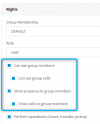
You can edit the rights of each extension to stop showing presence information to group members and to stop seeing group members. What this will do is stop showing the status of extensions in the Switchboard, however you will still see who is logged in.

1613646352609.png
 
Dear @VasilisV_3CX,

Thanks !!!
But my case there is no Group. I m maintaining Queues Only.
 
Hi @rinchu,

The extension rights affect what you can see in the queue. Such that if the group rights are set to not allow anyone to show presence or see group members, then they will only be visible in the switchboard, under the queue which the extensions are all members.

Can you define which status you'd like your users not to be able to see?
 
Hi @VasilisV_3CX.

There was a need of hidden Queue for a group of users to answer the calls which should be in place for some queue failure destination..
I've managed by creating a separate ring group for the agents belongs to the queue we have planned to hide and the user presence .We made the needed changes -under group rights : enable : "Publish group information to all extensions" and under user rights: deselect "Can see group members" and "Show presence to group members"
 
  • Like
Reactions: VasilisV_3CX
Glad to hear that you managed to get it set up @rinchu.
 
Status
Not open for further replies.

Forum statistics

Threads
111,974
Messages
590,081
Members
164,899
Latest member
mazet