How to make only one phone ring at one time?

Status
Not open for further replies.

Kane Wong

Free User
Joined
Oct 13, 2018
Messages
233
Reaction score
9
Hi;
I have a desktop phone and using mobile app on my cellular phone, is it possible to make mobile phone ring when there is an incoming call but not ring on desktop phone or vice versa?
 
You probably are better off creating a separate extension for your mobile phone app and use call forwarding rules on each extension to control call flow. I'm pretty sure it rings anything registered on an extension all at once, but you don't have a limit on number of extensions so it's not too much of a problem.
 
  • Like
Reactions: Kane Wong
Hi @Kane Wong

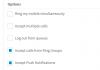
You can stop your mobile app from ringing under different statuses by enabling/disabling Accept push

1587626197694.png
 
Hi @Kane Wong

You can stop your mobile app from ringing under different statuses by enabling/disabling Accept push

View attachment 15753

My understanding is that the user can sign on to the webclient and disable/enable the Accept Push Notifications themselves, once this function is disable, they would not receive ring on mobile app. But they need switch ON when they work from home, please correct me from wrong.
 
Yes that is correct, if you turn off push the mobile will not ring.

Regards
 
  • Like
Reactions: Kane Wong
The 'Accept Push Notifications' is per status (available , away, etc), so end user just needs to make the required changes to the status via the web client

You can change the status of the extension, via 3CX app which makes it easy to change when required.
 
Last edited:
The 'Accept Push Notifications' is per status (available , away, etc), so end user just needs to make the required changes to the status via the web client

You can change the status of the extension, via 3CX app which makes it easy to change when required.

In my case, if the status on 3CX app change to either Away or DND, would my desk phone ring?
 
By default, no. Keep in mind that if you change your status on your mobile app, webclient or desk phone, it is your extension status you are changing so all devices are effected by the status change. Is it just the one user that needs this ability to change what rings or a company wide thing?
 
By default, no. Keep in mind that if you change your status on your mobile app, webclient or desk phone, it is your extension status you are changing so all devices are effected by the status change. Is it just the one user that needs this ability to change what rings or a company wide thing?

Thank you for your response. Yes, this is just one user request.
 
You can edit an unused Status for example " available2" rename it like " No push" in this status then untick "accept push notification" on app just click on green square top right and select the "no push status" just created your app won't ring but will always able to call.
 
That will solve the issue of getting the app to ring or not, but the desk phone is going to ring for each call.

I still think a second extension for the mobile app is the way forward. so for example, your extension is 1000, create a new one, 1001, and on extension 1000 set the forwarding rules on one of the statuses to forward the call to extension 1001. So when you want calls to your desk phone ONLY, you set ext 1000 to available, if you want calls to your mobile app ONLY set 1000 to "Away" or whatever status you set the forwarding rules on. It sounds complicated but if you program their hotkeys on the desk phone you can do this with a single button press to turn it on/off.

Ext 1001 could even forward callers back to 1000 Voicemail to keep it all on a single ext
 
I noticed DND status allows forwarding calls to your own extension (yourself), and has the Accept Push checkbox. Being curious I tried it...the app doesn't ring but does show the missed call. Caller gets "call transfer failed."

If calling the cell directly is an option then of course one can forward to My Mobile, but I think the goal was use the extension/app.

I guess one question for the OP is whether the desk phone ringing at an empty desk is a problem? If not then available statuses with push on/off would allow the app to ring or not.
 
That will solve the issue of getting the app to ring or not, but the desk phone is going to ring for each call.
I understood perhaps wrongly OP wanted to stop phone ring on one or another and for sure it's easier to do on app otherwise DND on deskphone will stop everything and none will ring.
 
Turn down (or off) the ringer volume, on the desk phone and rely more on visual notification, if the ringing set is a bother to others. A bit, out of the box...If the set uses an AC power adapter, it could be operated by a switch that also turns on a desk lamp. When the person comes in, the turn it on, when they leave, both go off.
 
You can edit an unused Status for example " available2" rename it like " No push" in this status then untick "accept push notification" on app just click on green square top right and select the "no push status" just created your app won't ring but will always able to call.

Hi;

How can I do it? If it is available in Standard edition?
 
In MC , go to settings, general settings , scroll down to"Rename Available 2 and Out of Office 2 status " section ; rename one unused status.
When done go in extension edit new renamed status and untick "accept push notification". done
Now in app click on green square and select right status.
 
Status
Not open for further replies.

Latest Posts

Forum statistics

Threads
111,945
Messages
589,866
Members
164,835
Latest member
Firefox Technologies