You could create an IVR, one for each different voicemail you want to play. When the agent hears the contact's voicemail box "beep" they could transfer the call to the correct IVR extension. But depending on the number of different voicemails you need, that might become challenging to easily remember which extension goes with which extension.
However, there may be a better way. I encourage you to take a look at our
3CX Auto Voicemail tool. It was created for your exact need.
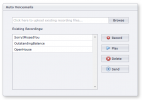
You access our tool via a simple web interface. On the web page is a list of pre-recorded voicemails. When you hear the beep, you select the desired voicemail and it immediately drops the agent's call, and has 3CX leave the voicemail for you. This approach, as you have already concluded, can save a lot of time and the tedious experience of leaving the same voicemail 100 times.
You can either record and share system-wide recorded voicemails, or the agent can record the voicemails themselves in their own voice, or use both. Because these are pre-recorded, you have the opportunity to get the message exactly right. I don't know about you, but recording prompts for IVRs or recording voicemails is a multi-attempt effort. I never get it just right the first time, or perhaps even the 5th time. So this solution ensures you have a consistent, carefully crafted, voicemail, with the perfect "tone" every time.
But even better, how about use OpenAI to generate the voicemail for you using text-to-speech? True, it is not in the agent's actual voice, but it does hugely simplify the recording of the voicemail by eliminating the multi-attempt problem with trying to record the prompt just the way you want it.
Before you discount the usefulness of text-to-speech, let me give you an example of what is possible with OpenAI. Without reservation, I can confidently say the days of robotic-sounding text-to-speech are completely gone forever. I personally cannot recognize the difference between an AI generated voicemail and a human. Take a listen to the attached file.


