How to setup Yay.com

Status
Not open for further replies.

JackMozza

New User
Joined
Jul 22, 2021
Messages
1
Reaction score
0
Hi,
Could anyone give me some instructions for setting up Yay.com with 3CX as Yay support basically they said find out your self.

Any help would be appreciated.

Thanks :)
 
Hi @JackMozza

They seem very helpful :) Well since the are not a supported 3CX Voip provider we do not know the details on how the set them up in 3CX either. So my first suggestion is to use a 3CX supported provider which has been tested and all configuration is known.
If that is not an option then perhaps another forum users has Yay already running and can offer some assistance.
 
  • Like
Reactions: Evolute IT
Hi Jack,

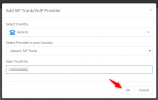
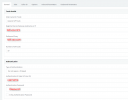
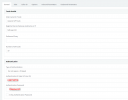
Just use the Generic template, and Enter username/password which is provided by yay.com and use server, proxy as talk.yay.com. then click "OK". it will be green UP.

1626945727901.png

1626946077799.png


Thanks,
RA.
 

Attachments

  • 1626946016969.png
    1626946016969.png
    42.1 KB · Views: 31
I guess not so much yay?

What is it that yay offers you that 3CX doesnt that you require?

All you need is a SIP Trunk - looks like yay is it's own phone system.
 
  • Like
Reactions: Evolute IT
I guess not so much yay?

What is it that yay offers you that 3CX doesnt that you require?

All you need is a SIP Trunk - looks like yay is it's own phone system.
Looks like they offer a SIP trunking feature at the bottom. Their pricing looks pretty expensive as well.
 
  • Like
Reactions: [email protected]
Status
Not open for further replies.

Forum statistics

Threads
111,992
Messages
590,171
Members
164,929
Latest member
Cloudstar