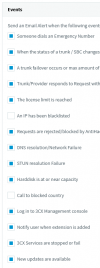
ZenMasta Customer Joined Mar 10, 2010 Messages 254 Reaction score 10 Dec 28, 2021 #1 Under Settings>Email Settings>Notifications I have unchecked An IP has been blacklisted, but I'm still getting emails for this notification. Also, I get emails about automatic backups, but don't even see that as an option to uncheck here.
Under Settings>Email Settings>Notifications I have unchecked An IP has been blacklisted, but I'm still getting emails for this notification. Also, I get emails about automatic backups, but don't even see that as an option to uncheck here.
VasilisV_3CX Customer Joined Jan 12, 2021 Messages 4,360 Reaction score 951 Jan 3, 2022 #2 Hi @ZenMasta, If you uncheck the option below it "Requests are rejected/blocked by AntiHack", do the mails continue to come in? Reactions: ZenMasta
Hi @ZenMasta, If you uncheck the option below it "Requests are rejected/blocked by AntiHack", do the mails continue to come in?
ZenMasta Customer Joined Mar 10, 2010 Messages 254 Reaction score 10 Jan 4, 2022 #3 Yes that helps. But now I'm still getting the emails about getting backups. I
daveatgower2 Customer Joined Apr 30, 2019 Messages 10 Reaction score 0 Jan 4, 2022 #4 I would love to know how to turn off the backup emails...
SteveITS 3CX MVP Silver Partner Advanced Certified Joined Jun 20, 2018 Messages 4,424 Reaction score 2,153 Jan 4, 2022 #5 There is a "Notify when Scheduled backups are created successfully" checkbox at the bottom of the list of notification choices. Reactions: VasilisV_3CX
There is a "Notify when Scheduled backups are created successfully" checkbox at the bottom of the list of notification choices.
VasilisV_3CX Customer Joined Jan 12, 2021 Messages 4,360 Reaction score 951 Jan 5, 2022 #6 Yes, as @SteveITS mentioned, there is an option available for turning off backups as well at the very bottom. Since the original post was answered and resolved, I'll mark this thread solved. Feel free to open a new thread if you'd like.
Yes, as @SteveITS mentioned, there is an option available for turning off backups as well at the very bottom. Since the original post was answered and resolved, I'll mark this thread solved. Feel free to open a new thread if you'd like.