How to upgrade from StartUP to StartUP Pro?

Status
Not open for further replies.

Christian Hubinger

Forum User
Joined
Jun 15, 2022
Messages
12
Reaction score
2
Hi,

Well the subject says it all ;)
I could not find anything in the UI to upgrade my subscription. We need more than one ring group, which should be possible with paid StartUp Pro plan as far as I understand.

kind regards,
Christian
 
Hi @Christian Hubinger,

The cloud-native systems (StartUp) has just louched a couple of weeks ago and it's currently on the Alpha version. There is no option to upgrade it to a Pro edition at the moment.

What I can suggest at the moment is to create a standard edition from your customer portal by doing the following:

1) Login to your customer portal and navigate to the Systems page.
2) Click on the Add System -> 3CX Hosted -> Over 10 Users - 3CX Dedicated
3) Follow the steps to complete the new deployment

This will generate a new dedicated instance and you will be able to create more than one Ring Group.

Hope that helps you out!
 
Last edited:
Hi @Christian Hubinger,

As the cloud-native systems (StartUp) has just louched a couple of weeks ago and it's currently on the Alpha version and there is no option to upgrade it to a Pro edition at the moment.

What I can suggest at the moment is to create a standard edition from your customer portal by doing the following:

1) Login to your customer portal and navigate to the Systems page.
2) Click on the Add System -> 3CX Hosted -> Over 10 Users - 3CX Dedicated
3) Follow the steps to complete the new deployment

This will generate a new dedicated instance and you will be able to create more than one Ring Group.

Hope that helps you out!

Thanks for your help :)
Just to get this correct, for more than one ring group i'll need the 3CX Dedicated for 235,-/pa - or could I also sign up Start Up Pro 150,- /pa?
Can I somehow export/import the configuration from my current StartUP setup?
How is my SIP Trunk handled - can i simply set it up in the new instance once I migrated my configuration or do I need anything else done before?

thx,
Chris
 
  • Like
Reactions: AndreasY_3CX
Just to get this correct, for more than one ring group i'll need the 3CX Dedicated for 235,-/pa - or could I also sign up Start Up Pro 150,- /pa?

This really depends on your company's needs. What features do you want to use etc.

Can I somehow export/import the configuration from my current StartUP setup?

Unfortunately, this is not possible.

How is my SIP Trunk handled - can i simply set it up in the new instance once I migrated my configuration or do I need anything else done before?

You will need to delete the StartUp system from your customer portal and proceed with the new deployment of the dedicated machine (steps mentioned in my previous answer). Now from our side, there should be no issue. However, you need to contact your SIP provider as well to validate that there won't be any issues from their side.
 
  • Like
Reactions: Christian Hubinger
This really depends on your company's needs. What features do you want to use etc.
Basically it is just the Ring Groups - we use 3CX as 24/7 Hotline shared with some partners where we want to set up a ring group for each.
Can the dedicated Instance do webhooks for example? To intigrate with a REST API we provide? Hard to find an eay to understand feature list what is included in which version.

Thx
 
Can the dedicated Instance do webhooks for example? To intigrate with a REST API we provide? Hard to find an eay to understand feature list what is included in which version.

Unfortunately, this is not available at the moment.

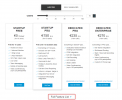
To see the full features of each edition, click on the 'Full Feature List' on the pricing page. (https://www.3cx.com/ordering/pricing/)

1655742572296.png
 
Status
Not open for further replies.

Members Online Now

Forum statistics

Threads
111,831
Messages
589,277
Members
164,660
Latest member
RJenkinsROCK