• We do not provide troubleshooting help for unsupported phones. Please try with a supported phone.
  • V20 Update 10 Alpha Learn more

Solved HT802 busy signal when making internal and external calls

Status
Not open for further replies.

qbitnetworking

Bronze Partner
Joined
Nov 28, 2020
Messages
138
Reaction score
30
  • 3CX Version 16.0.1078
  • Server OS Raspberry Pi
  • Is the 3CX Server Hosted and where? AWS
  • IP Phone Make/Model/Firmware HT802
  • Provisioning Method: Local / VPN / STUN / SBC SBC
  • Trunk Provider or Gateway Make/Model Bandwidth
  • Has the Firewall Checker passed: YES
  • Are custom Phone Templates being used: NO
I setup the HT802 according to the official guide and I used the optional Fax method. I then hooked up a test phone and tried to make a call to an extension and to an outside number but I receive a busy signal every time. Not sure what else to add but thanks for the help!
 
Hi @qbitnetworking

Check on the Web UI or the HT802, and see whether the accounts were populated in the settings, and whether the extensions register.

You also need to add extensions to the HT802 via the FXS settings page in your 3CX management console first, I realize it might be silly to ask, but it happens more often than you think ;)
 
That's what it was! I didn't even notice that tab.

For anyone wondering, after you finish provisioning the device go to:

FXS/DECT --> choose the device in question --> extensions tab --> I added my fax extension to #1 and another extension to allow our security system to dial out to #2 --> rebooted the device and it started working.

Thanks John!
 
  • Like
Reactions: YiannisH_3CX
Actually @JohnS_3CX, while I have you, is the above method the best practice for adding an extension for a security system to be able to call out? or is there a better way for the security system extension to not be seen as a regular extension that users can call and instead setup similarly to how my fax extension is?
 
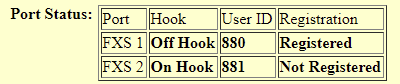
Actually now after doing a couple reboots and testing out what I mentioned above, line 1 is working but line 2 gives me silence and then eventually a busy signal. Going to try and provision again by uploading the config file.
 
1612907694240.png

Looks like FXS 2 doesn't want to register. Not sure what to do next.
 
When looking over the settings in the ATA, and comparing both lines, does the second line appear to be configured the same (server), with the expected differences? (and the local SIP ports being unique)

Have you checked the 3CX Activity Log, to see if the second line is even attempting to register?
 
  • Like
Reactions: qbitnetworking
Hi @qbitnetworking

Ignore my previous post, I've removed it.

There is a template update for the HT802 specifically, please check your updates section and you will see it appear under Voip Gateways.

Once this is updated, you can then download a fresh config file from your FXS section which you can now upload on your device. The 2nd extension should now register.

Make sure you factory reset the device first
 
@JohnS_3CX Yup that was it! Thank you doing that so quickly!
 
  • Like
Reactions: JohnS_3CX
One other weird thing is that it's always listed as a new phone in the phones section but I have no problem ignoring that as long as it's working. Thanks again!

1612967472288.png
 
Glad to hear! Will mark this one as solved then

Yes no problem, you can make that go away by selecting it from the left, then clicking the Reject button
 
Status
Not open for further replies.

Members Online Now

No members online now.

Forum statistics

Threads
111,831
Messages
589,277
Members
164,660
Latest member
RJenkinsROCK