Hubspot 3cx Integration

Status
Not open for further replies.

bibbybabs

Customer
Joined
Oct 16, 2022
Messages
27
Reaction score
2
Hi guys,
So I've completed the integration with hubspot according to the tutorial and contact info is displayed in the windows softphone with incoming calls, but I have few follow-up questions.

1) While the contact info is displayed, I can't get "Automatically open contact URL when CRM integration is enabled" setting to work. It's support to launch the hubspot page for the contact on the desktop's browser right? Any idea why it wouldn't work? I've set the default browser and run the softphone as admin mode to no avail.

2) How would I get the normal desk phones (yealink T54w) to display the contact info on it's screen? Do I basically have to enable Console > Settings > CRM > Add CRM contacts to 3CX Company Phonebook. then wait for the following incoming call for the contact in question to display their info on the deskphones?

3) If that above settings is enabled, will it prevent other contacts from being looking up from the CRM as it's now defaulting to the 3cx phonebook?

Thanks for any help, appreciate it!
 
1) While the contact info is displayed, I can't get "Automatically open contact URL when CRM integration is enabled" setting to work. It's support to launch the hubspot page for the contact on the desktop's browser right? Any idea why it wouldn't work? I've set the default browser and run the softphone as admin mode to no avail.
Are you using the Desktop App or the Web Client? Did you check for a popup blocker?

2) How would I get the normal desk phones (yealink T54w) to display the contact info on it's screen? Do I basically have to enable Console > Settings > CRM > Add CRM contacts to 3CX Company Phonebook. then wait for the following incoming call for the contact in question to display their info on the deskphones?
That's correct, regular desk phones will show the contact name from the phonebook, so you will need to enable the synchronization, and wait for a second call (the first call will not sync fast enough to show the contact, except if the call goes through a queue and you have time to do the lookup before the phone rings).

3) If that above settings is enabled, will it prevent other contacts from being looking up from the CRM as it's now defaulting to the 3cx phonebook?
When the contact in the phonebook was synchronized from the CRM, then a new call will trigger a new lookup against the CRM, to update contact details in case you made changes on the CRM side.
 
  • Like
Reactions: Evolute IT
Are you using the Desktop App or the Web Client? Did you check for a popup blocker?
Thanks for reply and addressing each point. I'm using the desktop app on windows 10. Like I said, I ran it in admin mode to see if it would help but it still doesn't open hub spot contact page. I have to manually select that little icon in order to open the page.

Also on the call log tab of the desktop app, is it possible to click a missed call and have it directly open the contact's hub spot page? As it stands, every time you click a missed call it starts dialing which isn't always desirable. In order to find the missed calls hubspot page, you'd either have to go to app's contact tab, search for them, then select the little CRM icon on their profile or go straight to hubspot and type in the info to bring up the page. Thanks again for any tips
 
Thanks for reply and addressing each point. I'm using the desktop app on windows 10. Like I said, I ran it in admin mode to see if it would help but it still doesn't open hub spot contact page. I have to manually select that little icon in order to open the page.
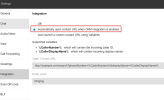
Do you have this option selected in Settings > Integration?
1668002175207.png

If this option is not there, you're probably in multi company mode, which is not a supported scenario for CRM integration.

Also on the call log tab of the desktop app, is it possible to click a missed call and have it directly open the contact's hub spot page? As it stands, every time you click a missed call it starts dialing which isn't always desirable. In order to find the missed calls hubspot page, you'd either have to go to app's contact tab, search for them, then select the little CRM icon on their profile or go straight to hubspot and type in the info to bring up the page. Thanks again for any tips
No, you can't. The contact card icon is only visible when the call is active. Or, if you have contact synchronization enabled, you can find the contact in the phonebook, as you said.
 
  • Like
Reactions: Evolute IT
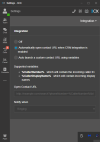
Thanks again for the reply. Yes, I had the option enabled previously as well. You can see as such with the attached image. I tried it with both the desktop app and webapp, but neither worked as expected and I tried on two machines as well. To be clear, the expected behavior with that setting is that once an incoming call matches a hubspot contact, it will automatically open a new browser tab with the hubspot contact page, right? Not sure why it's not working, any tip appreciated.

As for the call log, is there any way to request that feature be implemented? It's useful to know some contextual clues from contact CRM page/3cx contact profile before dialing them so having that as the default behavior would be nice. Thanks again for the help
 

Attachments

  • crmintegration.png
    crmintegration.png
    31.8 KB · Views: 32
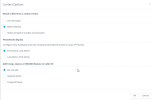
Also as follow up to previous question, is it possible to append the company name to the caller id? Such that it's First Name, Last Name, Company. The desktop app actually does display it with that exact formatting which is nice, but the deskphones following the formatting under Advanced> Contact>Options>Phonebook Display I think (see attached image), right? Hopefully I can format it in the way desktop app displays it. Thanks
 

Attachments

  • chrome_6ROZHua81e.png
    chrome_6ROZHua81e.png
    21.5 KB · Views: 27
Thanks again for the reply. Yes, I had the option enabled previously as well. You can see as such with the attached image. I tried it with both the desktop app and webapp, but neither worked as expected and I tried on two machines as well. To be clear, the expected behavior with that setting is that once an incoming call matches a hubspot contact, it will automatically open a new browser tab with the hubspot contact page, right? Not sure why it's not working, any tip appreciated.
The popup will happen when you answer the call, not when it rings. Are you answering the call?

Also, please note that the Web Client and Desktop App have isolated settings for this, i.e. setting this for the Web Client will not change the behavior of the Desktop App. You need to ensure that the setting is in place for the client you're using.

As for the call log, is there any way to request that feature be implemented? It's useful to know some contextual clues from contact CRM page/3cx contact profile before dialing them so having that as the default behavior would be nice. Thanks again for the help
You can post this in the Ideas section.

Also as follow up to previous question, is it possible to append the company name to the caller id? Such that it's First Name, Last Name, Company. The desktop app actually does display it with that exact formatting which is nice, but the deskphones following the formatting under Advanced> Contact>Options>Phonebook Display I think (see attached image), right? Hopefully I can format it in the way desktop app displays it. Thanks
The Web Client / Desktop App will show the company name when available. As for desk phones, they will take the information from the phonebook, so the only way would be adding the company name as part of the contact name (first name or last name). To do this you would need to edit the standard template we provide...
 
  • Like
Reactions: Evolute IT
Thanks again for following up. You're correct, I just needed to answer. I originally thought it was going to happen on first dial of incoming call.

As for company name showing up on desk phone's callerid, is there no other way then editing it into phonebook contact name? Altering this in CRM would cause issues for other services that require contact name as is. When you say edit template, I imagine you're referring to phone provisioning template that normally can be edited locally like so correct?:

https://www.3cx.com/docs/custom-ip-phone-templates/

Sadly, there is no option for this on hosted instances, so I guess making another feature request is the only way then? The information is right there in the phonebook already in the respective field would just need to get it displayed is all, but I doubt 3cx would implement it for a lowly user such as myself. Thanks again
 
I'm not referring to phone templates. I'm referring to the CRM template. You can edit it, and instead of storing the company name retrieved from the CRM into the Company name field in the phonebook, you can store it as part of the last name in the 3CX phonebook for example. This way your phones would get the value as you need.

In order to do such change, you need to:
1) Go to 3CX > Settings > CRM > HubSpot > Show Template
2) Copy the XML and store it in a local text file.
3) Edit the template as you need. Please check these guides for more details on what to do:
https://www.3cx.com/docs/crm-integration/
https://www.3cx.com/docs/server-side-crm-template-xml-description/
4) Among your changes to the template, ensure that you change the "Name" attribute in the second line, to something like "HubSpot_Custom", so you don't override the one provided by 3CX.
5) Once you're done with your changes, upload the template using the Add button in the same page of the management console.

Please note that when you do this, you will lose any template update provided by 3CX.
 
  • Like
Reactions: Evolute IT
I'm not referring to phone templates. I'm referring to the CRM template. You can edit it, and instead of storing the company name retrieved from the CRM into the Company name field in the phonebook, you can store it as part of the last name in the 3CX phonebook for example. This way your phones would get the value as you need.

In order to do such change, you need to:
1) Go to 3CX > Settings > CRM > HubSpot > Show Template
2) Copy the XML and store it in a local text file.
3) Edit the template as you need. Please check these guides for more details on what to do:
https://www.3cx.com/docs/crm-integration/
https://www.3cx.com/docs/server-side-crm-template-xml-description/
4) Among your changes to the template, ensure that you change the "Name" attribute in the second line, to something like "HubSpot_Custom", so you don't override the one provided by 3CX.
5) Once you're done with your changes, upload the template using the Add button in the same page of the management console.

Please note that when you do this, you will lose any template update provided by 3CX.
Hello again,

Thanks for the instructions. Here is the original Hubspot Template for reference: https://dpaste.org/BjiBS
Initially, I tried to concatenate some of the values (per your second link) such that "[LastName]" would become "[LastName]+[CompanyName]" but I couldn't get the expression engine to pick it up or maybe I wasn't editing the correct lines.

So, I went one step further and changed every instance of "LastName" to just "CompanyName" or the path values from "Path="results.properties.lastname"" to "Path="results.properties.company"". This change basically forced incoming contacts to be created with company name listed as last name in the 3cx phone book. I imagined this would make it such that the desk phones (Yealink T54w) would now display "Firstname + Company" as callerid, but still it just show "Firstname + Lastname" as usual on the desk phones (deleted the test contact after every change to confirm). I thought maybe I had to reprovision the phones (which I did) but all these changes are server side so it didin't really do anything.

Here is my latest custom template attempt with all the changes listed above in order to force the changes to no avail: https://dpaste.org/n6RkL

I know this is maybe outside the scope of usual help, but would appreciate any tips you have on why it's still not showing company in callerid and how to remedy it. Thanks for any tips!
 
Last edited:
Please note that the information retrieved from the CRM will be shown on the second call from this number. The first call will trigger the lookup and adding the details to the 3CX phonebook. If you see the company name there, then the changes to the template are correct. The retrieved information is not available for the first call, because when the phone rings, then CRM lookup result is not available yet. As a consequence, the name from the phonebook will be shown for the second call.
 
Please note that the information retrieved from the CRM will be shown on the second call from this number. The first call will trigger the lookup and adding the details to the 3CX phonebook. If you see the company name there, then the changes to the template are correct. The retrieved information is not available for the first call, because when the phone rings, then CRM lookup result is not available yet. As a consequence, the name from the phonebook will be shown for the second call.
Hmm, I think even after two successive calls it still showed "First Name + Last Name" callerid despite being saved in 3cx phonebook differently but I will double check again tomorrow. I made so many changes , it's hard to keep track hah. Maybe I need to clear some cache or power cycle the phones to prevent it from reusing old CRM data?

Any idea the proper concatenate syntax to get both "[LastName]" and [CompanyName]" to appear in single callerid field instead my outright replacement method? Or should I be concatenating the paths instead ( i.e. "Path="results.properties.lastname"" )? "[LastName]+[CompanyName]" didn't quite work I think.

There are line numbers in my paste here if you think a particular line from the original should be altered and it jumps out at you: https://dpaste.org/BjiBS

Let me know what you think, thanks again!
 
Last edited:
First, in the Variables section, you need to get separate values, one for the first name, one for the last name and one for the company name.

Next, in the Output, you can specify for example for the LastName:
[LastName] [CompanyName]

In the output you reference variables. You don't need any separator, just add a space between the variables. The variables will be replaced with the actual values.
 
  • Like
Reactions: Evolute IT
First, in the Variables section, you need to get separate values, one for the first name, one for the last name and one for the company name.

Next, in the Output, you can specify for example for the LastName:
[LastName] [CompanyName]

In the output you reference variables. You don't need any separator, just add a space between the variables. The variables will be replaced with the actual values.
Got it thanks, I'll give it a go when I get back in. Not to belabor this point, but do you think it's possible my phones themselves are reusing old CRM data and not repulling from the 3cx phone book when old established CRM contacts get repulled?

My testing method was,

1)Delete test contact each test round only from 3cx phonebook
2)Place call to see ID

And each time even on the first call after deletion, it still showed CRM first name + Last name as opposed to the raw number (like you would expect for new contact). Maybe I should have waited longer between changes? Sorry for noobish question, thanks again.
 
Can you check in the phone itself if the contact is in its internal phonebook? Maybe you need to cleanup the phone as well.
 
Can you check in the phone itself if the contact is in its internal phonebook? Maybe you need to cleanup the phone as well.
Oh man, good point. I was just looking it up and there is a setting for "remote phone directory" in these Yealinks and it's refresh interval is quite high. Perhaps a reboot would resolve this internal phonebook issue or maybe I need to factory reset them? Will give it a go and see what happens. Thanks for pointing it out
 
  • Like
Reactions: edossantos
Whelp, that was it! Just a reboot and it pulled the updated phonebook. So now that I'm using a custom CRM template, I have to manually update each time and adjust desired changes? Is there anywhere to get email notifications of when the default template is updated or is it only found on that CRM page?

Also, would you happen to know how to create dynamic placeholders from the 3cx phonebook fields to modify the quick response templates mentioned here? The current selection is limited to %CustomerName% which inserts the whole name (included unsightly company name) but just the first name is a more natural way to address someone. I tried %CustomerFirstName% and a few other variations to no avail. Sorry if this is outside of your scope, thanks in any event!
 
Whelp, that was it! Just a reboot and it pulled the updated phonebook. So now that I'm using a custom CRM template, I have to manually update each time and adjust desired changes? Is there anywhere to get email notifications of when the default template is updated or is it only found on that CRM page?
You will see the updates in the CRM page. I can tell you that Update 6 comes with an updated template for HubSpot, to use a newer version of the Engagements API, but you can continue using the old one without problems, the functionality is the same.

Also, would you happen to know how to create dynamic placeholders from the 3cx phonebook fields to modify the quick response templates mentioned here? The current selection is limited to %CustomerName% which inserts the whole name (included unsightly company name) but just the first name is a more natural way to address someone. I tried %CustomerFirstName% and a few other variations to no avail. Sorry if this is outside of your scope, thanks in any event!
The variables you have are the ones defined in the documentation, unfortunately there is no way to edit this.
 
  • Like
Reactions: Evolute IT
You will see the updates in the CRM page. I can tell you that Update 6 comes with an updated template for HubSpot, to use a newer version of the Engagements API, but you can continue using the old one without problems, the functionality is the same.


The variables you have are the ones defined in the documentation, unfortunately there is no way to edit this.
Oh I see, so only limited to 3cx documentation? I tried to post it in ideas forum section about this, but doesn't look like I have permission sadly. Just want %CustomerFirstName% variable (which is already in the phonebook), maybe you can put in a good word for me? ;)

In addition to that, I saw a post you made some time ago mentioning how we could auto launch contact url upon incoming sms, was that ever made available? I can't seem to find it on Update 6, just the one integration for calls. Thanks again, appreciate you!
 
Yes, contact lookup for LiveChat, SMS and Whatsapp is already in place. When you receive an SMS, the sender's number is searched in the CRM, and if found, you will see the contact details in the 3CX Web Client / Desktop App.
 
  • Like
Reactions: Evolute IT
Status
Not open for further replies.

Forum statistics

Threads
112,148
Messages
590,962
Members
165,168
Latest member
Stephan Eusebe