Hubspot 3cx Integration

Status
Not open for further replies.

bibbybabs

Customer
Joined
Oct 16, 2022
Messages
27
Reaction score
2
Hi guys,
So I've completed the integration with hubspot according to the tutorial and contact info is displayed in the windows softphone with incoming calls, but I have few follow-up questions.

1) While the contact info is displayed, I can't get "Automatically open contact URL when CRM integration is enabled" setting to work. It's support to launch the hubspot page for the contact on the desktop's browser right? Any idea why it wouldn't work? I've set the default browser and run the softphone as admin mode to no avail.

2) How would I get the normal desk phones (yealink T54w) to display the contact info on it's screen? Do I basically have to enable Console > Settings > CRM > Add CRM contacts to 3CX Company Phonebook. then wait for the following incoming call for the contact in question to display their info on the deskphones?

3) If that above settings is enabled, will it prevent other contacts from being looking up from the CRM as it's now defaulting to the 3cx phonebook?

Thanks for any help, appreciate it!
 
Yes, contact lookup for LiveChat, SMS and Whatsapp is already in place. When you receive an SMS, the sender's number is searched in the CRM, and if found, you will see the contact details in the 3CX Web Client / Desktop App.
Ah, true it does do that. I was thinking it would auto launch the CRM contact url similar to calls.

As far as CRM integrations go, can you advise me which of the ones you prefer to work with most and develop for? As in, the most readily supported and least likely to be dropped by 3cx? I still am testing out different solutions and haven't settled on Hubspot as I need some invoicing/accounting/inventory abilities still that I don't think it possesses. Seems lot of people on 3cx use Salesforce (costly for small team of 10) and Zoho, are those the most popular? Thanks again for any advice in this regard.
 
Ah, true it does do that. I was thinking it would auto launch the CRM contact url similar to calls.
No, you need to click on the card icon to launch the contact record in a new browser tab.

As far as CRM integrations go, can you advise me which of the ones you prefer to work with most and develop for? As in, the most readily supported and least likely to be dropped by 3cx? I still am testing out different solutions and haven't settled on Hubspot as I need some invoicing/accounting/inventory abilities still that I don't think it possesses. Seems lot of people on 3cx use Salesforce (costly for small team of 10) and Zoho, are those the most popular? Thanks again for any advice in this regard.
I can't provide advise on this, your selection should be based on what's best for your company. The CRMs that we support are listed here:
https://www.3cx.com/docs/crm-integration-guides/

There are no plans on dropping support for any of them, so you should be OK choosing among those options.
 
  • Like
Reactions: Evolute IT
No, you need to click on the card icon to launch the contact record in a new browser tab.


I can't provide advise on this, your selection should be based on what's best for your company. The CRMs that we support are listed here:
https://www.3cx.com/docs/crm-integration-guides/

There are no plans on dropping support for any of them, so you should be OK choosing among those options.
Great, I see the card icon so that streamlines it a bit.

I've also been testing out the chat journaling to CRM and apparently it only writes to CRM after an SMS convo is "dealt with", is there a CRM setting to enable all incoming messages to journal as they arrive? We rarely use the "dealt with" option unless it's a one off ineraction as most SMS chat logs are useful to the reps that use them so it's nice to have it visible. But since it's not archived/"deal with" the CRM has no record of that interaction at all which is unfortunate. Perhaps I can resolve this on CRM side somehow with a setting? Thanks again
 
I've also been testing out the chat journaling to CRM and apparently it only writes to CRM after an SMS convo is "dealt with", is there a CRM setting to enable all incoming messages to journal as they arrive? We rarely use the "dealt with" option unless it's a one off ineraction as most SMS chat logs are useful to the reps that use them so it's nice to have it visible. But since it's not archived/"deal with" the CRM has no record of that interaction at all which is unfortunate. Perhaps I can resolve this on CRM side somehow with a setting? Thanks again
That's how it works, you need to click "Dealt with" in order to log the chat session. There is no other way around this.
 
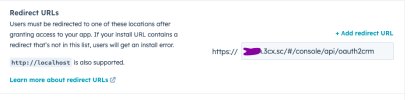
Hello have 3cx hubspot URI integration error

Need help please

The url from my console but cant create link between the 2
 

Attachments

  • Capture d’écran 2023-03-19 à 10.31.51 PM.png
    Capture d’écran 2023-03-19 à 10.31.51 PM.png
    47.3 KB · Views: 3
That's how it works, you need to click "Dealt with" in order to log the chat session. There is no other way around this.
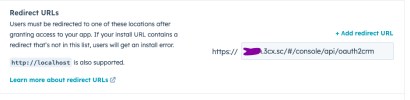
Hello have 3cx hubspot URI integration error
Need help please
The url from my console but cant create link between the 2
 

Attachments

  • Capture d’écran 2023-03-19 à 10.31.51 PM.png
    Capture d’écran 2023-03-19 à 10.31.51 PM.png
    47.3 KB · Views: 3
Status
Not open for further replies.

Forum statistics

Threads
112,148
Messages
590,962
Members
165,168
Latest member
Stephan Eusebe