Solved HubSpot authorization issue

Status
Not open for further replies.

DJCSYSTEMS

Silver Partner
Joined
Sep 11, 2023
Messages
13
Reaction score
0
Hi There,

Have set 3CX to link to HubSpot and entered the Client ID and Secret provided by the Developer, then passed the Authorization link back to the developer to complete but they are reporting the following error: "Authorization failed because there is a mismatch between scoped in the install URL and the app's configured scopes. Please contact the app developer."

I have attached images of the setup in 3CX and the error, the URL provided to the Developer is https://******^.3cx.com.au/api/oauth2crm

What am I missing ?

Regards

Dave
 
Please remove any integration information from your screenshots.
Furthermore, can you please share a screenshot from the added scopes in the Hubspot as per Step 4 in the integration guideline?
 
Please remove any integration information from your screenshots.
Furthermore, can you please share a screenshot from the added scopes in the Hubspot as per Step 4 in the integration guideline?
Thanks (how do I edit the Post?), I will get a screen shot as requested.

Regards
 
Can you remove the screenshots?
 
Hello @DJCSYSTEMS,

As mentioned by @TheodorosG_3CX, the scopes defined when the app was created in HubSpot are the problem. A very common issue is defining the scope "crm.schemas.contacts" instead of "crm.objects.contacts". Ensure that you're setting the correct scopes in your app.
 
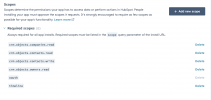
Please see attached the Scopes.
 

Attachments

  • Screenshot 2024-06-14 at 9.02.47 AM.png
    Screenshot 2024-06-14 at 9.02.47 AM.png
    180.7 KB · Views: 18
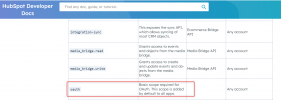
Looks good, the only weird thing is that new "oauth" scope which can't be deleted. Maybe that's what's causing the issue. This might be a new scope added by HubSpot.
1718320275638.png

And maybe the template must specify this in order to authorize. Can you try adding it to the template? This might be needed in line 10:
1718320410651.png
 
Looks good, the only weird thing is that new "oauth" scope which can't be deleted. Maybe that's what's causing the issue. This might be a new scope added by HubSpot.
View attachment 41965

And maybe the template must specify this in order to authorize. Can you try adding it to the template? This might be needed in line 10:
View attachment 41966
Thanks I have tried adding and still get the same error !
 
Thanks I have tried adding and still get the same error !
Still getting the same error related to the scopes? In that case, can you confirm that you are pointing to the right app? Maybe your HubSpot account has more than 1 app registered and you are referring to a wrongly configured one.
 
I would suggest to delete and start again. Ensure that there is one app registered to your account.
 
Issue was resolved by HubSpot developer creating a new Dev account and a new app, no issue with 3CX
 
Glad to know this is resolved ;)
 
Status
Not open for further replies.

Forum statistics

Threads
112,147
Messages
590,960
Members
165,167
Latest member
Finatra.us