Hubspot CRM Integration - Scope Issue - Nov 21 update

Status
Not open for further replies.

kiwi1234

Gold Partner
Intermediate Cert.
Joined
Jul 2, 2009
Messages
14
Reaction score
5
HI everyone

We are doing a 3cx install for a client that has hubspot (we have done lots of these in the past) and normally its a breeze to install.

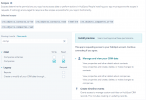
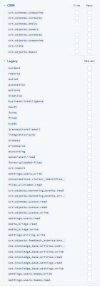
Today is different, within the Hubspot Dev account and the APP the scope is different. It looks like this

scopes CRM.png

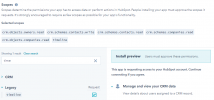
We Save this and go to the 3cx do the normal Client ID and Secret and click Authorize. We select the correct account and get the following

3cx hubspot 2.png

I noticed at the top there was this message
3cx hubspot 3.png

I tried this link and got the following after clicking on the account, and it redirects back to the 3cx server

Error occured: Value cannot be null. (Parameter 'key')


Any help would be great thanks
 
I have found the answer. Hubspot is doing an upgrade to their Dev accounts and the CRM, its was meant to be live in NOV 21, but for some reason, some customers have it now.

Until then we need to use the following Template (this was made by 3cx Support), You can upload this template from the 3CX Console > Settings > CRM > Add button.

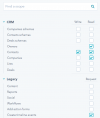
You will need the following set in your DEV account as well

6u8y06j3lKwR_iLeGUgFWLL2MWt5-c_cjQ.png
 

Attachments

Last edited:
In addition, please not that this template works with 3CX v18. If you need the integration for v16, we have another template for that version. I'm attaching here the templates for v18 and v16. Once HubSpot releases this for all users, we will release this template as the official 3CX template through an update.
 

Attachments

  • Like
Reactions: edossantos
It worked !! Thank you a lot !
 
I just wanted to post saying thankyou this has worked for me. I have spent the last couple of hours trying to figure this out as the 3cx documentation doesn't mention this.
 
I just wanted to post saying thankyou this has worked for me. I have spent the last couple of hours trying to figure this out as the 3cx documentation doesn't mention this.
This will be solved in the following 3 weeks. As soon as all HubSpot instances are migrated to the new granular scopes approach, we will update our template and the documentation.
 
In addition, please not that this template works with 3CX v18. If you need the integration for v16, we have another template for that version. I'm attaching here the templates for v18 and v16. Once HubSpot releases this for all users, we will release this template as the official 3CX template through an update.
This fix helped me out as well, the documentation on the 3CX website isn't up-to-date.
 
This fix helped me out as well, the documentation on the 3CX website isn't up-to-date.
Yes, we will update the documentation once we provide the updated template. We need to wait for HubSpot to release the change for every installation. That will happen next month.
 
Hello, I follow your steps and got this error :


Error occured while accessing CRM. Please check log provided.
Started OAuthGetRefreshToken
Request text: https://api.hubapi.com/oauth/v1/token
Request form value code set to 2ce56628-465f-4076-ae93-7188065d5bf6
Request form value grant_type set to authorization_code
Request form value client_id set to 5f8ec5f7-c934-4ec8-94fd-02d167bf23b6
Request form value client_secret set to d9cab93e-ea6e-4607-a599-b0ef20087d91
Request form value redirect_uri set to https://xxxxxxxxxxxx.3cx.ch:5001/api/oauth2crm
Request form value state set to 54753a4b-905a-4422-ad3f-f4c5e75f08d5
Request form value scope set to crm.objects.contacts.read crm.objects.contacts.write crm.objects.companies.read crm.objects.owners.read timeline
System.Net.Http.HttpRequestException: Resource temporarily unavailable (api.hubapi.com:443)
---> System.Net.Sockets.SocketException (11): Resource temporarily unavailable
at System.Net.Sockets.Socket.AwaitableSocketAsyncEventArgs.ThrowException(SocketError error, CancellationToken cancellationToken)
at System.Net.Sockets.Socket.AwaitableSocketAsyncEventArgs.System.Threading.Tasks.Sources.IValueTaskSource.GetResult(Int16 token)
at System.Net.Sockets.Socket.g__WaitForConnectWithCancellation|283_0(AwaitableSocketAsyncEventArgs saea, ValueTask connectTask, CancellationToken cancellationToken)
at System.Net.Http.HttpConnectionPool.DefaultConnectAsync(SocketsHttpConnectionContext context, CancellationToken cancellationToken)
at System.Net.Http.ConnectHelper.ConnectAsync(Func`3 callback, DnsEndPoint endPoint, HttpRequestMessage requestMessage, CancellationToken cancellationToken)
--- End of inner exception stack trace ---
at System.Net.Http.ConnectHelper.ConnectAsync(Func`3 callback, DnsEndPoint endPoint, HttpRequestMessage requestMessage, CancellationToken cancellationToken)
at System.Net.Http.HttpConnectionPool.ConnectAsync(HttpRequestMessage request, Boolean async, CancellationToken cancellationToken)
at System.Net.Http.HttpConnectionPool.CreateHttp11ConnectionAsync(HttpRequestMessage request, Boolean async, CancellationToken cancellationToken)
at System.Net.Http.HttpConnectionPool.GetHttpConnectionAsync(HttpRequestMessage request, Boolean async, CancellationToken cancellationToken)
at System.Net.Http.HttpConnectionPool.SendWithRetryAsync(HttpRequestMessage request, Boolean async, Boolean doRequestAuth, CancellationToken cancellationToken)
at System.Net.Http.RedirectHandler.SendAsync(HttpRequestMessage request, Boolean async, CancellationToken cancellationToken)
at System.Net.Http.DiagnosticsHandler.SendAsyncCore(HttpRequestMessage request, Boolean async, CancellationToken cancellationToken)
at Microsoft.Extensions.Http.Logging.LoggingHttpMessageHandler.SendAsync(HttpRequestMessage request, CancellationToken cancellationToken)
at Microsoft.Extensions.Http.Logging.LoggingScopeHttpMessageHandler.SendAsync(HttpRequestMessage request, CancellationToken cancellationToken)
at System.Net.Http.HttpClient.SendAsyncCore(HttpRequestMessage request, HttpCompletionOption completionOption, Boolean async, Boolean emitTelemetryStartStop, CancellationToken cancellationToken)
at CrmIntegration.ScenarioProcessorBase.ProcessRequest(ScenarioRequest request, IValueManager customManager, HttpClient client, CancellationToken token)
at CrmIntegration.ScenarioProcessorBase.ProcessScenario(ProtocolScenario scenario, IValueManager customManager, CancellationToken token)
at CrmIntegration.ScenarioProcessorBase.Execute(ProtocolScenario scenario, CancellationToken token)
at CrmIntegration.CrmProcessor.ExecuteScenarioByName(String scenarioName, IEnumerable`1 parameters, Boolean useNoAuthProvider, CancellationToken token)
at ManagementConsoleJS.Controllers.OAuth2CrmController.OAuth(String state, CrmProcessorFactoryDelegate crmProcessorFactory, IMemoryCache cache)


I have no issues for the moment ?

Someone can help ?


Best,
Guuillaume
 
Hello, I follow your steps and got this error :


Error occured while accessing CRM. Please check log provided.
Started OAuthGetRefreshToken
Request text: https://api.hubapi.com/oauth/v1/token
Request form value code set to 2ce56628-465f-4076-ae93-7188065d5bf6
Request form value grant_type set to authorization_code
Request form value client_id set to 5f8ec5f7-c934-4ec8-94fd-02d167bf23b6
Request form value client_secret set to d9cab93e-ea6e-4607-a599-b0ef20087d91
Request form value redirect_uri set to https://xxxxxxxxxxxx.3cx.ch:5001/api/oauth2crm
Request form value state set to 54753a4b-905a-4422-ad3f-f4c5e75f08d5
Request form value scope set to crm.objects.contacts.read crm.objects.contacts.write crm.objects.companies.read crm.objects.owners.read timeline
System.Net.Http.HttpRequestException: Resource temporarily unavailable (api.hubapi.com:443)
---> System.Net.Sockets.SocketException (11): Resource temporarily unavailable
at System.Net.Sockets.Socket.AwaitableSocketAsyncEventArgs.ThrowException(SocketError error, CancellationToken cancellationToken)
at System.Net.Sockets.Socket.AwaitableSocketAsyncEventArgs.System.Threading.Tasks.Sources.IValueTaskSource.GetResult(Int16 token)
at System.Net.Sockets.Socket.g__WaitForConnectWithCancellation|283_0(AwaitableSocketAsyncEventArgs saea, ValueTask connectTask, CancellationToken cancellationToken)
at System.Net.Http.HttpConnectionPool.DefaultConnectAsync(SocketsHttpConnectionContext context, CancellationToken cancellationToken)
at System.Net.Http.ConnectHelper.ConnectAsync(Func`3 callback, DnsEndPoint endPoint, HttpRequestMessage requestMessage, CancellationToken cancellationToken)
--- End of inner exception stack trace ---
at System.Net.Http.ConnectHelper.ConnectAsync(Func`3 callback, DnsEndPoint endPoint, HttpRequestMessage requestMessage, CancellationToken cancellationToken)
at System.Net.Http.HttpConnectionPool.ConnectAsync(HttpRequestMessage request, Boolean async, CancellationToken cancellationToken)
at System.Net.Http.HttpConnectionPool.CreateHttp11ConnectionAsync(HttpRequestMessage request, Boolean async, CancellationToken cancellationToken)
at System.Net.Http.HttpConnectionPool.GetHttpConnectionAsync(HttpRequestMessage request, Boolean async, CancellationToken cancellationToken)
at System.Net.Http.HttpConnectionPool.SendWithRetryAsync(HttpRequestMessage request, Boolean async, Boolean doRequestAuth, CancellationToken cancellationToken)
at System.Net.Http.RedirectHandler.SendAsync(HttpRequestMessage request, Boolean async, CancellationToken cancellationToken)
at System.Net.Http.DiagnosticsHandler.SendAsyncCore(HttpRequestMessage request, Boolean async, CancellationToken cancellationToken)
at Microsoft.Extensions.Http.Logging.LoggingHttpMessageHandler.SendAsync(HttpRequestMessage request, CancellationToken cancellationToken)
at Microsoft.Extensions.Http.Logging.LoggingScopeHttpMessageHandler.SendAsync(HttpRequestMessage request, CancellationToken cancellationToken)
at System.Net.Http.HttpClient.SendAsyncCore(HttpRequestMessage request, HttpCompletionOption completionOption, Boolean async, Boolean emitTelemetryStartStop, CancellationToken cancellationToken)
at CrmIntegration.ScenarioProcessorBase.ProcessRequest(ScenarioRequest request, IValueManager customManager, HttpClient client, CancellationToken token)
at CrmIntegration.ScenarioProcessorBase.ProcessScenario(ProtocolScenario scenario, IValueManager customManager, CancellationToken token)
at CrmIntegration.ScenarioProcessorBase.Execute(ProtocolScenario scenario, CancellationToken token)
at CrmIntegration.CrmProcessor.ExecuteScenarioByName(String scenarioName, IEnumerable`1 parameters, Boolean useNoAuthProvider, CancellationToken token)
at ManagementConsoleJS.Controllers.OAuth2CrmController.OAuth(String state, CrmProcessorFactoryDelegate crmProcessorFactory, IMemoryCache cache)


I have no issues for the moment ?

Someone can help ?


Best,
Guuillaume
The error:
Resource temporarily unavailable (api.hubapi.com:443)

Means that the HubSpot API is down. Try again in a few minutes.
 
  • Like
Reactions: Evolute IT
Trying to follow this after getting errors on v16, but get the error below when uploading the XML file;
Template name should contain only alphanumeric characters. I noted a hyphen in the name..

Renamed the file to ;hubcustom

But still, getting the same error? Any dieas?
 
Trying to follow this after getting errors on v16, but get the error below when uploading the XML file;
Template name should contain only alphanumeric characters. I noted a hyphen in the name..

Renamed the file to ;hubcustom

But still, getting the same error? Any dieas?
Open the template file with a text editor, and you will see the Name="HubSpot_Custom_v16" attribute in the second line. Change that removing the underscores, and try again.
 
  • Like
Reactions: Evolute IT
Thanks for the quick reply, done that and managed to get past that hurdle but now im getting;
Couldn’t complete the connection Insufficient scopes were provided. Please contact the app developer.

Im thinking of upgrading to v18 if that will help?

Thanks
Mark
 
Thanks for the quick reply, done that and managed to get past that hurdle but now im getting;
Couldn’t complete the connection Insufficient scopes were provided. Please contact the app developer.

Im thinking of upgrading to v18 if that will help?

Thanks
Mark
Upgrading to v18 is recommended, you should always try to stay on the latest version for security and new features, however the issue is not related to that. When you create the app in HubSpot, ensure that you're setting the scopes defined above in this thread.
 
Yup, totally agree. All the scopes are ticked, in fact I have ticked every scope available to test, but still the same error. I will try v18 this evening and hopefully, that will resolve it.

Thanks for your help.
 
You shouldn't tick all the scopes, that could cause the same issue (3CX requests less scopes than the ones defined by the app). You need to ensure that both endpoints match. These are the only options you should check in the HubSpot app:
6u8y06j3lkwr_ilegugfwll2mwt5-c_cjq-png.24547
 
Thanks for the detail, just following this through incase someone has the same issue, hopefully, our steps here can assist them, I have selected the below but still get the same error
 

Attachments

  • Screenshot_1.png
    Screenshot_1.png
    28.8 KB · Views: 28
Thanks for the detail, just following this through incase someone has the same issue, hopefully, our steps here can assist them, I have selected the below but still get the same error
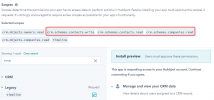
It seems you're selecting the wrong scopes in your HubSpot app:
1637008727528.png

You're selecting "Contacts Schemas" and "Companies Schemas", but those are not required. You need to select just "Contacts" and "Companies". Check this screenshot, selecting exactly this should work:
6u8y06j3lkwr_ilegugfwll2mwt5-c_cjq-png.24547
 
Thanks for sticking at this edossantos, the reason I selected these is that the ones you mentioned are not lsited, so I selected the nearest ones...
 

Attachments

  • Screenshot_2.png
    Screenshot_2.png
    27.3 KB · Views: 42
Status
Not open for further replies.

Latest Posts

Forum statistics

Threads
112,092
Messages
590,711
Members
165,068
Latest member
T-PROTA