HubSpot CRM XML 18.08 final different?

Status
Not open for further replies.

PaulEmous

Bronze Partner
Advanced Certified
Joined
Nov 26, 2018
Messages
111
Reaction score
17
3CX V18.08 Final

Integrating Hubspot and so far was working ok. I wanted to have the option to only have new record created only on outbound calling. I know I saw this option and now its gone. Truely drove me nuts. Anyway I deleted the Hubspot CRM template to start from scratch. The system stated a new template was available so I downloaded it.

I noticed that in the general config something was different:
app.hubspot.com vs something esle (I can't find the url anymore but it certainly changed!)

Also if I look at the XML from earlier version (On different 3cx instance / server) its 587 lines vs 802 lines. Thats a massive difference?

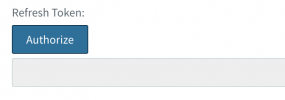
I also fail to get a refresh token?

Lastly the option for contact creation based on inbound / inbound & outboud disapeared?

What's happening here... You can see here that when I upload the "old" XML it indeed shows an update. The update breaks some of functionality?Screenshot 2023-08-24 at 18.56.23.png
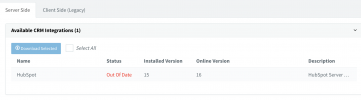
 
Hello @PaulEmous,

Indeed there are changes to all the integrations with 3CX v18 Update 8:
1) Contact creation is not automatic anymore. You need to click "Add contact" in the Web Client / Desktop App in order to add the contact to the CRM. This way you can specify a contact name, instead of creating the contact with a default name like "New 3CX Contact", which you later need to change. Even if you upload the old template, 3CX will not create the contact automatically, you need to do this from the client.

2) We added search functionality, so you can search for CRM contacts from different places in the Web Client / Desktop App.
 
I missed that in the change log. (The only thing I haven’t read yet )

Ok that’s good stuff actually I’m going to test it out tomorrow.
 
  • Like
Reactions: edossantos
Hi @edossantos, I am trying to reconfigure the hubspot integration but not getting a refresh token.

it's empty.

Does this have something to do with the api URL being changed?

Please assist.

Screenshot 2023-08-29 at 12.18.58.png
 
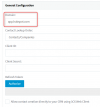
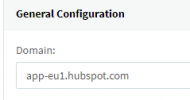
Ok so checked hubspot and indeed the auth url is wrong in the template. It should be app-eu1.hubspot.com not app.hubspot.com
 
You can specify the URL that the integration should use for your account. There's a field for that in the configuration:
1693312153733.png
 
Hi, we have this error trying to refresh token "System.Exception: Server returned a non successful status code - HTTPStatusCode=Forbidden - Reason=Forbidden - Content=error code: 1107"

Everything was fine until yesterday, but starting today, HubSpot no longer tracks the calls. It's strange because when we answer calls from the desktop app, the contact's page opens as usual. However, the call is not being recorded in the system. Why could this be happening?
 
Hi, we have this error trying to refresh token "System.Exception: Server returned a non successful status code - HTTPStatusCode=Forbidden - Reason=Forbidden - Content=error code: 1107"

Everything was fine until yesterday, but starting today, HubSpot no longer tracks the calls. It's strange because when we answer calls from the desktop app, the contact's page opens as usual. However, the call is not being recorded in the system. Why could this be happening?
This could happen if you have enabled contact sync, so the contact name and URL is actually being taken from the 3CX phonebook and not the CRM.....

If you get that error during authorization, the integration will not work, as 3CX will not be able to interact with Hubspot through the API. From that error (forbidden), it seems you're selecting the wrong account when you click Authorize. You must select the normal user account, and NOT the developer account there.
 
This could happen if you have enabled contact sync, so the contact name and URL is actually being taken from the 3CX phonebook and not the CRM.....

If you get that error during authorization, the integration will not work, as 3CX will not be able to interact with Hubspot through the API. From that error (forbidden), it seems you're selecting the wrong account when you click Authorize. You must select the normal user account, and NOT the developer account there.
i am selecting normal user, i've also tried to disinstall and reinstall the app but always getting that error when authorize

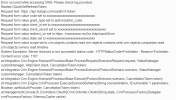
Error occured while accessing CRM. Please check log provided.
Started OAuthGetRefreshToken
Request text: https ://api.hubapi.com/oauth/v1/token
Request form value code set to xxxxxxxxxxxxxxxxxxxxxxxxxxxxxx
Request form value grant_type set to authorization_code
Request form value client_id set to xxxxxxxxxxxxxxxxxxxxxxxxxxxxxx
Request form value client_secret set to xxxxxxxxxxxxxxxxxxxxxxxxxxxxxx
Request form value redirect_uri set to https ://xxxxxxxxx.my3cx.it/api/oauth2crm
Request form value state set to xxxxxxxxxxxxxxxxxxxxxxxxxxxxxx
Request form value scope set to crm.objects.contacts.read crm.objects.contacts.write crm.objects.companies.read crm.objects.owners.read timeline
System.Exception: Server returned a non successful status code - HTTPStatusCode=Forbidden - Reason=Forbidden - Content=error code: 1107
at Integration.Crm.Engine.ScenarioProcessorBase.ProcessRequest(ScenarioRequest request, IValueManager customManager, HttpClient client, CancellationToken token)
at Integration.Crm.Engine.ScenarioProcessorBase.ProcessScenario(ProtocolScenario scenario, IValueManager customManager, CancellationToken token)
at Integration.Crm.Engine.ScenarioProcessorBase.Execute(ProtocolScenario scenario, CancellationToken token)
at Integration.Crm.Engine.CrmProcessor.ExecuteScenarioByName(String scenarioName, IEnumerable`1 parameters, Boolean useNoAuthProvider, CancellationToken token)
at ManagementConsoleJS.Controllers.OAuth2CrmController.OAuth(String state, CrmProcessorFactoryDelegate crmProcessorFactory, IMemoryCache cache)
 

Attachments

  • 3cxerror.png
    3cxerror.png
    4.9 KB · Views: 2
Hi, we have this error trying to refresh token "System.Exception: Server returned a non successful status code - HTTPStatusCode=Forbidden - Reason=Forbidden - Content=error code: 1107"

Everything was fine until yesterday, but starting today, HubSpot no longer tracks the calls. It's strange because when we answer calls from the desktop app, the contact's page opens as usual. However, the call is not being recorded in the system. Why could this be happening?
check your API settings.

When we updated it also broke. It should be app-eu1.hubspot.com.

Then re-authorize
 

Attachments

  • 3cx.png
    3cx.png
    3.4 KB · Views: 7
It should be app-eu1.hubspot.com.
This depends on each installation. You must check the URL you use to access your Hubspot account, it's not the same value for every user, that's why we had to let you configure it.
 
This depends on each installation. You must check the URL you use to access your Hubspot account, it's not the same value for every user, that's why we had to let you configure it.
for me it is app-eu1.hubspot.com , never had a problem before (it's the url i use to access to my hb account)
 
for me it is app-eu1.hubspot.com , never had a problem before (it's the url i use to access to my hb account)
What error do you get now? Can you confirm if you're using the normal user account when authorizing and not the developer account?
 
What error do you get now? Can you confirm if you're using the normal user account when authorizing and not the developer account?
i cant see the calls received in my hubspot account, when my team answer a call the contact page is displayed without any problem, the call is NOT tracked also in the contact activity.

this is the error i'm getting when trying to refresh token :
 

Attachments

  • 3cxerror1.png
    3cxerror1.png
    7.3 KB · Views: 4
  • 3cxerror2.png
    3cxerror2.png
    66 KB · Views: 4
thank you! i refresh the token today and it's ok (nothing changed, just waited), i've also tested a number and 3cx finds the contact in the crm, when a call is answered the contact page is correctly displayed. But CALL JOURNALING still doesn't work
Good that the authorization part is solved. Now you need to check the 3cxSystemService.log file in verbose mode to understand why the call journaling is not working. Any error will be visible there.
 
Good that the authorization part is solved. Now you need to check the 3cxSystemService.log file in verbose mode to understand why the call journaling is not working. Any error will be visible there.
found this line in the log:
2023/08/30 16:40:37.783|16068|0050|Erro|CRM: Exception during call reporting: System.Exception: Server returned a non successful status code - HTTPStatusCode=BadRequest - Reason=Bad Request - Content={"status":"BAD_REFRESH_TOKEN","message":"missing or invalid refresh token","correlationId":"xxxxxxxxxxxx"}
i think this is the problem but dont know why there's this error, the token is correctly refreshed
 
Please do the following:
1) Enable verbose logs in 3CX.
2) Reproduce the issue with a test call.
3) Generate the Support Information bundle, and send it to me in a private message.
 
Status
Not open for further replies.

Forum statistics

Threads
112,147
Messages
590,961
Members
165,167
Latest member
Finatra.us