HubSpot CRM XML 18.08 final different?

Status
Not open for further replies.

PaulEmous

Bronze Partner
Advanced Certified
Joined
Nov 26, 2018
Messages
111
Reaction score
17
3CX V18.08 Final

Integrating Hubspot and so far was working ok. I wanted to have the option to only have new record created only on outbound calling. I know I saw this option and now its gone. Truely drove me nuts. Anyway I deleted the Hubspot CRM template to start from scratch. The system stated a new template was available so I downloaded it.

I noticed that in the general config something was different:
app.hubspot.com vs something esle (I can't find the url anymore but it certainly changed!)

Also if I look at the XML from earlier version (On different 3cx instance / server) its 587 lines vs 802 lines. Thats a massive difference?

I also fail to get a refresh token?

Lastly the option for contact creation based on inbound / inbound & outboud disapeared?

What's happening here... You can see here that when I upload the "old" XML it indeed shows an update. The update breaks some of functionality?Screenshot 2023-08-24 at 18.56.23.png
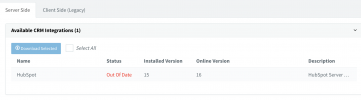
 
Where can i find
Hello @PaulEmous,

Indeed there are changes to all the integrations with 3CX v18 Update 8:
1) Contact creation is not automatic anymore. You need to click "Add contact" in the Web Client / Desktop App in order to add the contact to the CRM. This way you can specify a contact name, instead of creating the contact with a default name like "New 3CX Contact", which you later need to change. Even if you upload the old template, 3CX will not create the contact automatically, you need to do this from the client.

2) We added search functionality, so you can search for CRM contacts from different places in the Web Client / Desktop App.
Hi there, where can I find "search for CRM" in Desktop APP ?

Before the upgrade we had this scenario:
1. call from a new "unknown" customer
2. web browser opens automatically a new customer site on hubspot
3. employee types information in gaps like type of conversation - sale or support etc
4. save

Now:
1. call from a new "unknown" customer
2. clicks "create new contact"
3. empoyee dont know information like name and surrename so fills gaps "n/a" for example.
4. when conversation is finished, employee opens hubspot, search for a customer page using phone number.
5. Fills information about type of conversation.
6. save

Nighmare.
 
Last edited:
Where can i find

Hi there, where can I find "search for CRM" in Desktop APP ?

Before the upgrade we had this scenario:
1. call from a new "unknown" customer
2. web browser opens automatically a new customer site on hubspot
3. employee types information in gaps like type of conversation - sale or support etc
4. save

Now:
1. call from a new "unknown" customer
2. clicks "create new contact"
3. empoyee dont know information like name and surrename so fills gaps "n/a" for example.
4. when conversation is finished, employee opens hubspot, search for a customer page using phone number.
5. Fills information about type of conversation.
6. save

Nighmare.
Once the contact is manually created via the New Contact button, a link "CRM" should appear in the dialer and they can use that to open the newly created contact.

To use the search, go to the Contacts page in the app, select the group/list "CRM" (upper right) and simply search in the field.
 
  • Like
Reactions: edossantos
You're right! it does work! Thanks for help
 
  • Like
Reactions: Evolute IT
Hi!
When we use the 3CX Desktop app and create a new contact, the 'create contact' button disappears. However, we don't have a CRM link, unlike what works on the web client. Is there an issue with the Desktop app?
 
  • Like
Reactions: Evolute IT
Hi!
When we use the 3CX Desktop app and create a new contact, the 'create contact' button disappears. However, we don't have a CRM link, unlike what works on the web client. Is there an issue with the Desktop app?
Are you selecting the "CRM" option when you create the contact? Otherwise you might be creating the contact in the local phonebook.
 
  • Like
Reactions: Evolute IT
Yes, we selecting the CRM option on the create contact window.
 
I'm able to reproduce the issue. Looks like an issue with the Desktop App, however as the Desktop App is going to be removed in v20 in favour of a new Windows app, this will not be fixed. Can you use the Web Client instead?
 
  • Like
Reactions: Evolute IT
Status
Not open for further replies.

Forum statistics

Threads
112,147
Messages
590,960
Members
165,167
Latest member
Finatra.us