Solved I want 3CX to sync with O365 but not automatically create extensions

Status
Not open for further replies.

TPR3CX

Customer
Joined
Dec 13, 2018
Messages
88
Reaction score
6
Greetings,

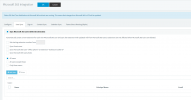
We recently enabled syncing with O365 but one issue is that 3CX is creating extensions automatically for us and we would rather create it manually and have the info auto update O365. Is that possible? Below is the current config of the User Sync tab and was wondering if I changed it to Only these users will it stop creating new extensions yet keep syncing my existing users who are properly mapped?


1644383566875.png
 
Good morning!

That is exactly right, the "Only these users" option allows you to specify the specific users you want to sync. If any of the selected users don't exist in 3CX, then they will be created.

All other Users that exist in MS365 will be disregarded.
 
  • Like
Reactions: Evolute IT
Morning Nick!

I also am hoping for the same thing as the original poster. I have a large amount of user accounts in active directory that do not need extensions, including an entire separate site of employees. I would however like to have our 3CX automatically update the extensions of users that we have manually created extensions for.

My perfect world would be a checkbox to disable automatic user creation on the UserSync page.
 
Morning Nick!

I also am hoping for the same thing as the original poster. I have a large amount of user accounts in active directory that do not need extensions, including an entire separate site of employees. I would however like to have our 3CX automatically update the extensions of users that we have manually created extensions for.

My perfect world would be a checkbox to disable automatic user creation on the UserSync page.
Can't you use the "Only these users" option and only select the users that you have manually created? In the procedure that you have when creating new users, you would just add an extra step right after you create the user in the "Users" node, to also add that extension in the Microsoft 365 settings.

Note here that if you create an new 3CX Extension with email X, then you go to the MS settings and specifically add this new user and has X for his MS UPN/Email, 3CX will not create a extension, it will find that an extension already exists with this email and sync with that one.
 
While technically I could do it that way, the extra steps involved means I doubt my helpdesk team will bother as part of the new hire creation process. It also isn't great because this means I need to have my helpdesk team using the 3CX Admin account instead of their individual accounts.
 
  • Like
Reactions: thomastremmel
While technically I could do it that way, the extra steps involved means I doubt my helpdesk team will bother as part of the new hire creation process. It also isn't great because this means I need to have my helpdesk team using the 3CX Admin account instead of their individual accounts.
For the time being this is not possible, but as explained there is a way you can do this by altering the creation process your helpdesk team does this.

This would be classed as a feature request and those go in "Ideas" section by a 3CX Partner.

As there is an alternative way of doing this, I will be marking this thread as 'Solved'.
 
Status
Not open for further replies.