Solved i31s Door Phone - Ring Groups question

Status
Not open for further replies.

tmeahl

Customer
Joined
Jun 29, 2021
Messages
17
Reaction score
2
Hi,
Currently I have a "Ring Group" set to RingAll that includes 7 Group Members. Our Fanvil i31s has its first BLF set to call that Ring Group via "Custom Speed Dial".
  1. Is there any way to have it dial different extensions (or a different ring group) depending on the Office Hours? We're using the Self Managed Enterprise Edition v18.
  2. Is there any way to have it call only the desk phones? All the Group Members are currently getting the mobile app and the Fanvil X7A desk phones ringing simultaneously. But pressing the unlock key * doesn't work from the app--it only works from the desk phones.
Thanks for any input or guidance!
-Tyler
 
Hi,

Having the apps and desk phones ring simultaneously is not something that can be avoided. Any calls reaching a certain extension will ring on all its endpoints. You can of course set your extensions to not ring the app via our Statuses, but that would affect all calls.

I've tried the i31S in a ring group, answered from the mobile app, and when I press * I can confirm that the doorphone plays the access tone, and the door relay makes the activation sound.

If you press some other digit though, and then press * it will not work. Can you confirm please whether this was perhaps the case?
In case a user presses the wrong digit, they need to wait until the doorphone plays 3 fast beeps to signify the code was rejected, before trying to enter the correct code again.

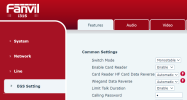
You can also set another code if you prefer, under the "Calling Password", for example I set 7890 and it also works just like the * did
1683791250122.png
 
  • Like
Reactions: IrinaP_3CX
Thanks @JohnS_3CX
You are right, I just tried it again and pressing * from the mobile app unlocks the door (just the video does not work from mobile app, but that's fine).
But is there a way to have the i31s dial different extensions (or a different ring group) depending on the Office Hours?
 
The video on the app is something we are planning to take care of soon ;)

You can make the i31S call a dummy extension, and you can have the dummy extension follow specific office hours.

Depending on whether it is in office or out of office, you can send the call to different destinations (ie. 2 different ring groups)
 
Beautiful! Thank you!
 
Actually I'm having a bit of trouble setting up the dummy extension. I put the doors/dummy extension in their own Group and set this for "where to send calls and messages":
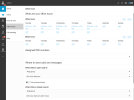
dummy-extension-hours.png

But when the i31s calls this dummy extension (ext 300), it says "voicemail disabled for this extension" and hangs up. I'm sure I'm doing something wrong -- Couldn't find much info in the forums about proper dummy extension config

Thanks for your help!
 
From the screenshot I'm not sure this will work, the above will route DID calls to 804 and 805 but the doorphone will not be calling a DID. Plus, there is no DID assigned to this group anyway so no routing will take place.

Put the dummy extension back in the group with everyone else, then edit the extension itself.

How to make a dummy extension

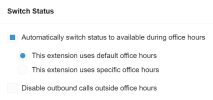
1. Via webclient you can click on Admin>>Edit User (select your dummy extension) >>Schedule>>Switch Status and set auto mode (you can set custom hours if you wish)

1684135975154.png

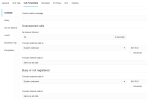
2. Then set your Call Forwards to all point to the ring group you want during "Available" profile (office is open)
1684138920094.png

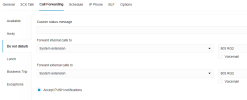
3. Also set your forwards to all point to the ring group you want during "DND" profile (office is closed)
1684139160048.png


So now the calls will switch between ring groups according to your office hours (or specific hours).

The dummy extension does not need to be registered if you set the same destination in all the options per profile.

It will follow the route of "not registered"
 
Thank you @JohnS_3CX that works great. My Ring Groups 804 and 805 aren't listed as available options under "System extension" or "Extension number" but I just typed them in as "External number" and it seems to work just fine
 
  • Like
Reactions: JohnS_3CX
Glad to help!
 
Status
Not open for further replies.

Members Online Now

No members online now.

Forum statistics

Threads
111,834
Messages
589,287
Members
164,663
Latest member
svdDGS