I'm not seeing an update option for v20

Status
Not open for further replies.

survivalbloke

Customer
Joined
Nov 3, 2021
Messages
47
Reaction score
7
My email instructions say "From V18, Update 9 - login to your Admin Console, go to “Updates” and click on “Upgrade”." but I'm seeing Upgrade nowhere in my admin console. Thoughts? I'm on 18 build, update 9, build 20 at the moment.
 
My email instructions say "From V18, Update 9 - login to your Admin Console, go to “Updates” and click on “Upgrade”." but I'm seeing Upgrade nowhere in my admin console. Thoughts? I'm on 18 build, update 9, build 20 at the moment.
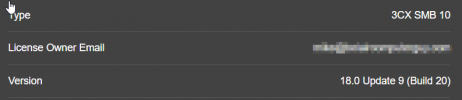
You posting in SMB, this is already v20.
 
I'm super confused then. It doesn't help that I'm only about 2 weeks in with 3CX - so a complete noob.2024-03-12 11_11_28-Admin Console - 3CX.png
 
ohhhhhh. ok, got it. thank you.
 
Hello @survivalbloke,

As @bitn2 mentioned, your license is a 3CX SMB license.
In the 3CX SMB edition, you do not get access to the Management Console and that is why you are not able to see the Update options.
At the moment SMB is still in V18 and not in V20.
 
  • Like
Reactions: accentlogic
1719983707653.png


i have same issue
 
It is expected and the Upgrade is only for Debian installations.
For the Windows installations you need to create a full backup, uninstall and re-install using the V20 Windows Installer.
 
It is expected and the Upgrade is only for Debian installations.
For the Windows installations you need to create a full backup, uninstall and re-install using the V20 Windows Installer.
thank you.1719984435583.png
 
You are welcome
 
Status
Not open for further replies.

Members Online Now

Forum statistics

Threads
111,832
Messages
589,283
Members
164,662
Latest member
DejanMDS