Inbound Call Pickup Delay

Status
Not open for further replies.

HelloPBX

New User
Joined
Jan 25, 2022
Messages
33
Reaction score
4
I have a user who he when picks up a call, has about 5 seconds of silence before he can hear and start talking on the call.

He has tested both the Widows Chrome App and the Windows Desktop App, extension to extension calls, and a call from an external number to a DID.

When I test the extension on my end, I can't reproduce the issue.

This user is overseas from the US while the 3CX server is in the US.

I did some searching on the forums and see this is a common problem but nothing seemed to work for me.

Is it possible the 3CX stun servers are causing this issue with him being overseas?

If not any other ideas?

Thanks!
 
We also tested with one of our "paid" phone providers ... using their soft phone and service ... and there wasn't a delay when answering.
 
Try restarting the PC. I had it once and it seemed better after restarting.

STUN isn't used by the browser/app. They connect directly to the 3CX server.
 
Try restarting the PC. I had it once and it seemed better after restarting.
We just tried that but it did not work. We are going to test the Android app next to see if that works better. The Android app isn't a long term solution but we are just testing it to narrow down the problem.
 
We are going to test the Android app next to see if that works better.
No problem when using the Android app on a Samsung A10.
 
We might need to try and narrow this down even more:

1. When you say that you tested the extension on your end, are you talking about the same exact extension?
2. If yes, it would probably mean that creating a new test extension and using it on the affected user's pc would still result in the same behavior. Can you test and confirm this?
3. You said this does not happen with the Android App. Was it used on the same network as the one the PC is on?
4. Have you tested the same extension on a different PC but on the same network or the same PC on a different network(maybe hotspot from android device)?
5. Does this happen for every single call? Also, is it 5 seconds that only he has no audio or does the other party not hear him either?
6. Try completely uninstalling any security/antivirus software from the PC and restart, do you get the same thing?
7. What 3CX PBX and 3CX Desktop app version are you running?
8. Does this PC happen to be running a VPN client?
 
1 - Yes
2 - I'll have to test this out but these extensions were just created recently.
3 - Yes
4 - No but I can try.
5 - Every call and no audio on either side.
6 - I can try this.
7 - The latest, both the server (18.0 (Build 314)) and client app are new installs
8 - No
 
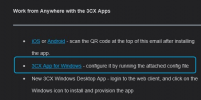
One more thing that might be worth trying is the old 3CX Windows App, formerly known as the 3CX Phone for Windows.

You can download and install it from the 3Cx Welcome Email, use the config file attached to configure it with that extension:
1644246911006.png


The Windows App works differently than the Desktop app so whether it works or not might prove useful information.
 
We tried the Windows app but still had the issue.
 
  • Like
Reactions: ChrisC_3CX
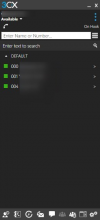
Sorry to insist but I must be absolutely sure, you are talking about this client yes?
1644248198176.png

And you get the exact same behavior, every call has no audio for the first 5 seconds?
 
Sorry to insist but I must be absolutely sure, you are talking about this client yes?
View attachment 27726

And you get the exact same behavior, every call has no audio for the first 5 seconds?
Thanks for checking. I didn't have the 3CX Phone app installed previously. However, I installed it now and it did solve the problem. But does that give you any indication on why the web/desktop web app has that problem?
 
I'll PM you for a bit more information on this.
 
Status
Not open for further replies.

Forum statistics

Threads
111,974
Messages
590,083
Members
164,901
Latest member
Silent_Guru