Solved Inbound Calls to ring groups random 1 way audio after update to 16.0.4.504

Status
Not open for further replies.

ck1

Bronze Partner
Joined
May 5, 2016
Messages
17
Reaction score
1
I have hosted 3cx server in ovh, phones configured to use STUN behind sonicwall. It seams that after the recent update to 16.0.4.504. has caused wierd issues with inbound calls to ring groups. the caller will call one time and there will only be one way audio, call back 10 seconds later and the phone call will be normal. i've never had these issues until recently. there are two customers with similar config that have complained of this as of lately. anybody else having issues?
 
I assume that when you first set up the extensions, you followed information on the 3CX site in remote extensions using STUN. How many sets are you dealing with at that location? Why it has changed after the update, I can't say. (someone else may yet come forward with the same issue, but their set-up may not be exactly the same) All of the ports used should have remained the same. Why there are problems using a ring group behind STUN, I may have some ideas. The fact that you are sending multiple Invites at the same time, to a number of sets, using the same public IP, after one answers, then trying to set up the correct voice ports, may be an issue. I'm actually surprised you hadn't had problems until now. You could go over all of your port forwarding in the remote router, but might be better off installing a Raspberry Pi SBC at that location, if you are unable to correct the issue.
 
Last edited:
thanks for the feedback, these ring groups are around 6 phones. i understand that SBC is the suggested route, but ive never had issues until a couple weeks ago, so im really trying avoid putting in SBC as it adds a point of failure in these remote offices.
 
I wouldn't look at it as a point of failure, but as a solution to an issue.

If you really want to delve into this, consider using Wireshark, at the remote end, behind the router, to see what is happening when a call is sent to the ring group.
 
I have setup unique ports for all extensions, they are being forwarded correctly. In my sonicwall connection monitor I see that randomly the port 5061 gets natted to one or multiple phones. The nat does not stay. 5061 is secure sip, is it possible that it’s conflicting?
 
It seams that after the recent update to 16.0.4.504.

Did you upgrade directly from 15.5??? Or were you already on 16.0 before hand?
 
thanks for the feedback, these ring groups are around 6 phones. i understand that SBC is the suggested route, but ive never had issues until a couple weeks ago, so im really trying avoid putting in SBC as it adds a point of failure in these remote offices.

Hi @ck1

I would consider that an upgrade, going down to a single point of failure from the 6 points of failure you have now.

You have not described how the STUN phones are set up so its a complete unknown at this stage, and you have correlated the upgrade with the error, when it may just be coincidental.

I think you have two ways of dealing with this:

1) The long way: you will have to run packet captures on the PBX and the far end, and once you have a set of captures that contain the error, analyze them one by one and see where the issue appears to be

2) The effective way: you have 6 phones, an SBC is the way to go, it can run on something as small as a raspberry Pi 3B+ and not only encrypts SIP+RTP but also saves you some bandwidth for calls between your local extensions at the remote site, port forwarding and management becomes unnecessary, and phones can be provisioned without needing to type in a login.

So in the long run you can either deal with the random failures or use the tried and tested solution that has already proven itself in the field as more effective than STUN.


PS: And for those who are looking for a high availability SBC solution in case one SBC goes down, we are working on something you might find interesting: https://www.3cx.com/docs/sbc-high-availability-cluster/
 
@JohnS_3CX Ive seen this issue hes having before when people upgraded from 15.5 to 16+ and didnt read the documentation on adding firewall rules for the new expanded RTP ports 10600-10999, or as most people do as a shortcut ive seen increase the 9000-9500 rule to 9000-10999.

But yes the SBC does solve a much wider range of possible issues if that isnt his issue.
 
  • Like
Reactions: JohnS_3CX
no i did not upgraded directly from 15.5.
@JohnS_3CX i get it that sbc is the suggested route. my main questions is why did this start happening all of a sudden, these phones have been in use for two years now, then all of a sudden after update issues start arising. For an MSP like myself, i want to avoid putting extra equipment in,
 
As I already answered above, you can learn the "why", by using captures (which I know is time consuming hence the SBC suggestion to save you time-spent-troubleshooting costs). As to why all of a sudden, I know it's tempting to say it was due to the upgrade, but unless we gather evidence for that then it's just a red herring misdirecting you from your goal. Many others have also upgraded but their STUN phones did not suddenly stop, so use that as a counter argument for the time being.

But I must ask again, you did not tell us how the STUN phones were set up so we are in unknown territory. Here is a checklist and tell me if these things were done from before the upgrade:

- Each STUN phone has a reserved or static IP address at the remote site?
- Each STUN phone has a unique SIP port defined in the extension provisioning settings?
- Each STUN phone has a unique RTP port range defined in the extension provisioning settings?
- Each STUN phone has its unique SIP+RTP ports forwarded at the remote site firewall?
- SIP ALG or NAT Helpers disabled at the remote site firewall?

The above checklist is the only method of deploying STUN that controls the usual things that may go wrong. If the above requirements are not met, it's expected that sooner or later the STUN phones will misbehave. An SBC takes all these variables out of the way saving you costly management and troubleshooting time, but if the checklist above is confirmed, then no SBC is needed. Theoretically if the firewall does a good job, you may run 100s of STUN phones just fine with no major issues.
 
to answer your questions
- Each STUN phone has a reserved or static IP address at the remote site?
NO
- Each STUN phone has a unique SIP port defined in the extension provisioning settings?
YES
- Each STUN phone has a unique RTP port range defined in the extension provisioning settings?
YES
- Each STUN phone has its unique SIP+RTP ports forwarded at the remote site firewall?
NO, Firewall is handling NAT automatically
- SIP ALG or NAT Helpers disabled at the remote site firewall?
YES

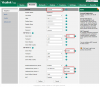
ive attached a picture of the port mappings. all the phones are being natted correctly through the firewall. but occosioanlly i will get another nat showing up in the connection monitor that is natting port 5061 to internernal port 5060. can anyone tell me what this is

port 5070 is the sip port i have configured for this extension in the pbx. this port mapping is consistent and doesnt expire. but the 5061 will show up and expire in 30 seconds. port 5061 is secure sip,
 
Last edited by a moderator:
Everything looks good except one thing. Firewall is handling NAT automatically = this means you are relying solely on the firewall to decide how to NAT the traffic - this is a variable you cannot control unless you port forward manually.

I would suggest to manually add port forwards for each and every phone's SIP+RTP ports (and possibly reserve their IP on the DHCP server if you have the option to do so, they always get the same IP and the portforwards remain consistent).

This a 3CX requirement if you want to use STUN phones in the supported way we recommend. Many firewalls will do a good job, but you are now relying on the firewall vendor implementation, and you cannot know exactly how the machine will behave when it is allowed to do things automatically, so why not eliminate this factor altogether by forwarding your ports as we recommend? Let us know how it goes.

PS: I removed your screenshot to protect your MAC addresses from public view.
 
  • Like
Reactions: leejor
i got it thanks, do you have anything regarding the port 5061 traffic?
 
No problem!

For 5061 perhaps the phone is just probing the network from time to time to discover services like Yealink YMS service which would be 5061 over TLS, but I'm not sure. Might justify that the destination MAC was all zeroes.

Looking at the yealink UI you can check the accounts to see if there is anything configured for 5061
There shouldn't be any, and I think you can ignore it.
1585927392009.png
 
I have hosted 3cx server in ovh, phones configured to use STUN behind sonicwall. It seams that after the recent update to 16.0.4.504. has caused wierd issues with inbound calls to ring groups. the caller will call one time and there will only be one way audio, call back 10 seconds later and the phone call will be normal. i've never had these issues until recently. there are two customers with similar config that have complained of this as of lately. anybody else having issues?

I'm having the same issue after upgrade. Hosted on windows virtual locally with sbc at remote location. When calls comes into remote location receptionist can't hear the other party, but they can hear her. I have all the firewall ports that I'm aware of. I will try and make sure we are using 5060 because we are using Yealink too. The only thing that I can think of is we are running 16 system, but 15 SBC, I will do the upgrade shortly to rule that out.
 
@rgruber yep, upgrade the SBC straight away, dont worry about the ports for now.
 
Can I get some additional help on this topic? Trying to updated SBC from 15 to 16 to test to see if that is the problem with voice issues stated above. 3CX PBX on 16.4.504 and when I uninstall v15 of SBC, reboot server and then try to Install v16 SBC, it says it can not connect to PBX and gives me a general error. I'm sorry I didn't screen shot error, had to reinstall 15 SBC again so extensions would work. I have site to site VPNs that allow all traffic between sites and I can ping from the SBC server to 3CX PBX in main office. VPN has been up since the last firewall reboot with no errors of tunnel going down. Prior to last firewall reboot, the VPN was also up since the previous reboot so no indications of stability of VPN. I also added new v16 SBCs under trunks in 3CX console Thanks.
 
You can setup multiple SBCs, so keep your V15 one for now and setup a new VM for the new SBC.

Use the ISO to setup the new virtual machine, this guide here will help you (it includes Debian instructions) https://www.3cx.com/docs/3cx-tunnel-session-border-controller/
Pay attention to step 4, it links you to how to make a new SBC in your trunks section and get the Authentication Key ID that allows you to register.

If you run into any problems take a note of the error you get and we can help accordingly
 
Thank you John, I spun up a new VM and made sure the certificate was installed at the OS level. Everything worked. I did not have the certificate installed locally on the other SBC.
 
Ah I see that would certainly stop the SBC from registering. Thanks for updating the thread, glad it was resolved
 
Status
Not open for further replies.

Forum statistics

Threads
111,943
Messages
589,860
Members
164,832
Latest member
Boblatino