Inbound Fax & Twilio Trunk

Status
Not open for further replies.

bibbybabs

Customer
Joined
Oct 16, 2022
Messages
27
Reaction score
2
Hi guys,
So I've recently setup 3cx fax to email server on my hosted instance where it forwards to the default fax ext. While the DID line is from my Twilio trunk and despite t.38 being listed as unsupported for twilio, the faxes do seem to work most of the time. But sometimes I get an error message in the logs saying " LegInfo[C:5297.1/Connected@SentOffer->2] does not support Fax codecs. Call is terminated" and fax fails. I tried with and without fallback option enabled to no avail. Is there some special setting I should be configuring on Twilio's end or 3cx end to ensure more reliable function? It's funny Twilio elastic trunk allows you designate a line for "fax" service (useful programmatic purpose I think) but doing so actually makes it incompatible with 3cx fax setup so I have to leave is phone I believe. Thanks for any insight!
 
Regarding your question and the fax capabilities with the specific provider, they are listed with no Fax support per the outcome of our interop testing. With this in mind, we cannot any advice regarding fax with this provider.

We recommend choosing a VoIP provider with fax support set to at least Fax - T38 Bypass.
 
I have Grandstream HT812 sitting between my "fax machine" (an Epson WF-7820 mfp) and my network.
I can SEND faxes from the Epson mfp to 3CX extension (888) and receive the fax in my Outlook inbox.
I can SEND faxed to Twilio SIP Trunk line (DID to Extension 888) from a REAL fax machine (and receive it in my inbox).
I CANNOT send from the Epson mfp to EITHER the Twilio SIP Trunk line, nor the REAL fax machine.

When it FAILS, my 3CX log shows: LegInfo[C:4.1/Connected@SentOffer->2] does not support Fax codecs. Call is terminated

I, therefore, expect that this is something in the HT812 (but I don't understand why it works to 3CX extension).

Any thoughts?
 
Probably the T38 negotiation fails due to incompatible codecs but that is just a guess based on the error. When using T38 the PBX is in passthrough mode so it might an incompatibility between Twilio and your device.
In any case our testing has also resulted that faxing is not working very well with Twilio so we do not support it.
 
Thank you…

it appears I have stumbled on a combination of settings that appear to work (at least so far).

I have taken screen shots of my Grandstream HT812 that seems to work through 3CX and Twilio Elastic SIP Trunk likes (including back through 3CX to the FAX server).

When I get back to the office, I’ll post my screen shots (HT812 and 3CX). I did NOT do anything special to the Twilio side.
 
  • Like
Reactions: YiannisH_3CX
I am trying this same thing.

Please update with your config. Are you using an SBC, sending out with the HT812 and receiving via 3cx fax server to email? @PSBHaven
 
If you have not yet done so, you might check your Fax machine to see if there is a setting for use with VoIP. If not, perhaps a way to only use a slower speed. That might make it more reliable if you are able to overcome the Codec incompatibility issue.
 
Thank you…
it appears I have stumbled on a combination of settings that appear to work (at least so far).

I have taken screen shots of my Grandstream HT812 that seems to work through 3CX and Twilio Elastic SIP Trunk likes (including back through 3CX to the FAX server).

When I get back to the office, I’ll post my screen shots (HT812 and 3CX). I did NOT do anything special to the Twilio side.
Any update on the config? @PSBHaven
 
Sorry... I was distracted setting up multiple SIP Trunks.

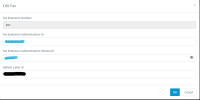
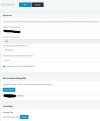
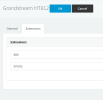
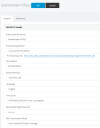
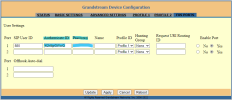
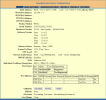
I've stitched together the screen shots (Snagit wouldn't scroll the screen to capture it all).

Feel free to ask if you don't understand what I did.3CX Fax Extension.png3CX Fax Server.png3CX FXS Grandstream Extensions.png3CX FXS Grandstream HT812.pngHT812 - Advanced.pngHT812 - FXS Ports.pngHT812 - Profile.pngHT812 - Status.png
 
Just an FYI...
We only use the HT812 for OUTBOUND fax, using the 3CX Fax Server as the inbound fax (will probably give it its own phone line, when we upgrade our 3CX license [shortly])
For that reason, I have set the SAME DID for the HT812 port AND the Fax Server.
I also configured my "fax machine" (Epson WF-7820) to identify itself as the SAME as the DID for the fax server.
 
Just an FYI...
We only use the HT812 for OUTBOUND fax, using the 3CX Fax Server as the inbound fax (will probably give it its own phone line, when we upgrade our 3CX license [shortly])
For that reason, I have set the SAME DID for the HT812 port AND the Fax Server.
I also configured my "fax machine" (Epson WF-7820) to identify itself as the SAME as the DID for the fax server.
Hmm, ok yes I need to test. It looks like we may be able to send outbound, But inbound is failing every time.

We are receiving unsupported codec erors on twilio.
 
Are you trying to receive to the HT812, or to the 3CX Fax Server?
 
The plan is to send out from the HT812 and receive on the Fax server. I am going to go over all the settings again this weekend and test again.
 
If you get frustrated, upload your screenshots, and we'll compare notes...
I'll be around this weekend...
 
  • Like
Reactions: JoepCEICOM
I was thinking...
Can you fax to your 3CX fax server extension (888) successfully?
 
Status
Not open for further replies.

Forum statistics

Threads
111,974
Messages
590,081
Members
164,899
Latest member
mazet