Solved Incorrect Time on Fanvil X3U Pro

Status
Not open for further replies.

providencetg

Premier Customer
Joined
Oct 4, 2010
Messages
85
Reaction score
27
Good Morning,

Is there anyone else who are getting incorrect time on the Fanvil X3U Pro with firmware 2.4.7 (3CX v18.3)?

The Yealinks and the Fanvil X3U have no issues. Just the Fanvil X3U Pro

Thanks
Alexander
 
Hi Alexander,

1. Do you mean version 2.4.7.5? If not then please install the version we provide.

2. What is the PBX set to under Settings >> Language & Office Hours >> Timezone?

3. What time zone do you see under Extension >> Provisioning >> Options >> Timezone?

4. Did you modify the phone templates or are you using the default ones we provide?
 
Hi JohnS,

Thank you for your reply.

1. Yes, I have 2.4.7.5 installed.

2. Office hours is using "-5:00 Bahamas (Nassau)"

3. I am using "Global Timezone" and have also tried "GMT -5:00 US Eastern.." and others with no such luck.

4. I did not change the template. Using as is fanvil.ph.xml version 125690.

What I am now discovering is that this is only happening at two sites. I have one site with the same 3CX time configure and it has no issues.

The date is also incorrect.

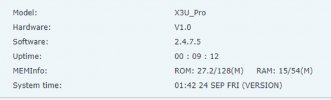
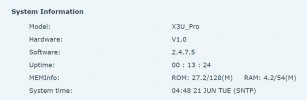
One deference I noticed between the working system and the non working one is that on the phone webpage for the incorrect date/time the "System Time" has (VERSION), and on the correct date/time "System Time" has (SNTP). See attached.
 

Attachments

  • not working.jpg
    not working.jpg
    36.1 KB · Views: 16
  • Working.jpg
    Working.jpg
    24.2 KB · Views: 14
  • Like
Reactions: JohnS_3CX
Are you perhaps blocking the phones from accessing the internet (and hence pool.ntp.org where time is provided)?

They might be picking up NTP from a local NTP server which is not configured correctly.
 
Started to wonder if this is the case because the two networks I am refereeing to are not managed by our team. The only issue though is that there are Yealink phones connected with the correct time.
 
Actually, I replicated this just now:

1655906784074.png

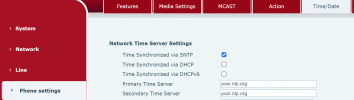
First confirm that the phones have the correct NTP provisioned from Phone Settings >> Time / Date:
1655907018654.png

Then start investigating whether they:

1. have internet access
2. the local DNS resolves pool.ntp.org correctly
3. whether the firewall allows them to contact the resolved IP

This smells, looks and tastes like a network issue so you should not have too much trouble confirming it :)
 
Thank you!

Discovered that the phones were not ale to reach pool.ntp.org. Changed it the the local server IP via the Parameter (NTP) settings.
 
  • Like
Reactions: JohnS_3CX
Good to hear you confirmed it. Just be aware that if your local NTP goes down or has the wrong time, the phones wont have a backup like pool.ntp.org which resolves to multiple IPs. It would be a better solution if you could allow them to reach it by making the necessary adjustments on your network.
 
Status
Not open for further replies.

Members Online Now

Forum statistics

Threads
111,834
Messages
589,287
Members
164,664
Latest member
dominik.pepel