Install problem of Debian version

Status
Not open for further replies.

Inkolore

Free User
Joined
Jul 1, 2019
Messages
8
Reaction score
0
Hi everyone, I have a problem, due to a total crash I am trying to reinstall from scratch 3CX on an appliance based on Intel (R) Celeron (R) CPU J1900 @ 1.99GHz; using the iso of "Linux Debian ISO (PBX & SBC)" debian-amd64-netinst-3cx.iso, for both version 16 and version 18 the installer stops when it arrives to install or just did the "discover" package, i tried to let it run all night me nothing to do. It happens, as I said, for both version 18 and 16, with the graphical or basic installer nothing changes.

On the appliance I had before installed an old version, from 2018 or 2017, maybe v15 I don't remember, which I think was installed disconnected from the operating system. Now this is no longer possible.

Do you have any idea how I can overcome this problem?

Thank you

C

 

Attachments

  • IMG_8850.jpg
    IMG_8850.jpg
    761.9 KB · Views: 20
  • IMG_8891.jpg
    IMG_8891.jpg
    798.6 KB · Views: 20
Hi @Inkolore,

Is this the latest ISO that you're using? Did you download it today before installation?

On your network can you configure your DNS to use Google? (8.8.8.8)
 
Last edited:
If the link above is correct I've tried it and it stops always in the position (installation of "discover" package, there is no way to make them proceed.

Any other idea?

Thank you

C
 
Hi! Could you say what kind of appliance this is?
It could be some compatibility between our Debian ISO and the specific hardware of this appliance.

Also out of curiosity, does the vanilla Debian 10 netinst ISO proceed past this point?
 
Hi NickD, is a simple appliance based on Intel Celeron CPU J1900 @ 1.99 GHz (64 bit capable), do you need others info?

As for the vanilla version, I've tried to install "Debian 10.11" (buster) "debian-10.11.0-amd64-netinst.iso" and the process stops at the same position, same also with "Debian 11.2" (debian-11.2.0-amd64-netinst.iso), so I guess is something tied with my appliance.
I wonder if it is possible to skip just the install of the discover package?

C
 
Hi NickD, is a simple appliance based on Intel Celeron CPU J1900 @ 1.99 GHz (64 bit capable), do you need others info?

As for the vanilla version, I've tried to install "Debian 10.11" (buster) "debian-10.11.0-amd64-netinst.iso" and the process stops at the same position, same also with "Debian 11.2" (debian-11.2.0-amd64-netinst.iso), so I guess is something tied with my appliance.
I wonder if it is possible to skip just the install of the discover package?

C
I wouldn't go there to be honest with you, because even if you do overcome this now by using something like the DVD version of Debian (instead of the netinst version), there might be an issue later on when downloading packages.

Plus, you would not have used the 3CX ISO, so you would be in unsupported area.

The problem with these appliances is usually the network card they have, and that Debian doesn't have drivers for them.
In my opinion, I think you should try and return this device if you still can, do some research and find another appliance to get that your research has found that Debian can be installed on it.
 
Thanks NickD, the fact is that this appliance is old (2018) and was already running 3CX, I've installed it in May 2018 running Debian 8 with 3CX version 15.5.15502.6

Since 3 days ago everything was fine until a crash stopped definitively the system, therefore I've tried to reinstall everything from scratch and with my surprise the only chance was the ready made ISO from 3CX (Debian 10 and 3CX 18), no way to install an older version of Debian and the 3CX software.I have tried to install older version on Debian (7.11.0 - 8.11.1) and they install correctly without any freeze and stop, Debian 9, 10 and 11 seams to have the freeze problem.

I wonder if there is the possibility to have a 3CX ISO with Debian 8

Thanks

C
 
I wonder if there is the possibility to have a 3CX ISO with Debian 8
Even if I did have that, it wouldn't help you much. On Debian 8 you can only install V15.5 and that is practically end of support, plus you won't be able to activate it anymore.

The fact is you need to get to V18, which means installing Debian 10.

It's sad for me to say, but I think you need to start looking for some other compatible hardware. :/
 
Ok Thank you NickD for your support.

In the case of a new appliance do you have any hardware suggestions? I was thinking something like the Protectli FW4B – 4 Port Intel® J3160 based on Intel Celeron® J3160 Quad Core at 1.6 GHz (Burst to 2.24 GHz), what do you think?

Thanks again

C
 
hello @Inkolore I have the same issue here. IF you ever find a solution please share.
thank you,
Daniel
 
Hi dandumit, if I ever find a solution I will post-it here ;-)
 
I see that you are trying a lot of netinst versions. have you attempted to install only 3cx standard image without net ?
 
No actually! I have no idea where to find it.
 
Or a much more advanced and complete setting found here :
https://www.golem.de/news/intel-ein...-socs-durch-patch-abgefedert-1609-123546.html

it supposes to run script attached
Code:
#!/bin/sh

#title:       c6off+c7on.sh
#description: Disables all C6 and enables all C7 core states for Baytrail CPUs
#author:      Wolfgang Reimer <linuxball (at) gmail.com>
#date:        2016014
#version:     1.0   
#usage:       sudo <path>/c6off+c7on.sh
#notes:       Intended as test script to verify whether erratum VLP52 (see
#             [1]) is the root cause for kernel bug 109051 (see [2]). In order
#             for this to work you must _NOT_ use boot parameter
#             intel_idle.max_cstate=<number>.
#
# [1] http://www.intel.com/content/dam/www/public/us/en/documents/specification-updates/pentium-n3520-j2850-celeron-n2920-n2820-n2815-n2806-j1850-j1750-spec-update.pdf
# [2] https://bugzilla.kernel.org/show_bug.cgi?id=109051

# Disable ($1 == 1) or enable ($1 == 0) core state, if not yet done.
disable() {
    local action
    read disabled <disable
    test "$disabled" = $1 && return
    echo $1 >disable || return
    action=ENABLED; test "$1" = 0 || action=DISABLED
    printf "%-8s state %7s for %s.\n" $action "$name" $cpu 
}

# Iterate through each core state and for Baytrail (BYT) disable all C6
# and enable all C7 states.
cd /sys/devices/system/cpu
for cpu in cpu[0-9]*; do
    for dir in $cpu/cpuidle/state*; do
        cd "$dir"
        read name <name
        case $name in
            C6*-BYT) disable 1;;
            C7*-BYT) disable 0;;
        esac
        cd ../../..
    done
done
 

Attachments

Hi @dandumit ,

What you found is an interesting read, but from the things I know, this looks like changing some of the fundamental inner workings of the Debian OS.

I can't recommend going down this path as touching these kind of things can have a cascading effect on other parts of the OS with unpredictable outcome.

If you want to try it, do so at your own risk, the suggestion from 3CX would still be to find hardware that is compatible out-of-the-box with Debian 10/11.
 
HEllo @NickD_3CX I am on a long run here. I need first to prove that 3CX fit my purposes and it will integrate well with Hubspot and especially with my SIP trunk provider. IF is possible please advice at least how to set in GRUB intel_idle.max_cstate=1

Thank you
Daniel
 
HEllo @NickD_3CX I am on a long run here. I need first to prove that 3CX fit my purposes and it will integrate well with Hubspot and especially with my SIP trunk provider. IF is possible please advice at least how to set in GRUB intel_idle.max_cstate=1

Thank you
Daniel
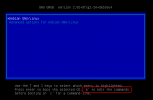
I have not gone into such depth myself, but you might be able to do this from the boot screen:
1647507927485.png


For anyone else reading this, I will say this in the simplest way, 3CX does not recommend doing this.
 
  • Like
Reactions: VasilisV_3CX
Status
Not open for further replies.

Forum statistics

Threads
111,974
Messages
590,083
Members
164,900
Latest member
Silent_Guru