- Joined
- Jul 11, 2022
- Messages
- 4
- Reaction score
- 2
Starting on Monday, we have a client who is having inbound audio issues. This system has been in place for months without issues.
The client calls back the number that has been trying to call them, and that call works fine.
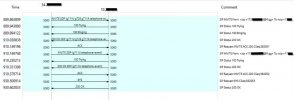
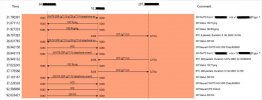
I was basically running a new wireshark from the 3CX server every 30 minutes until I got one. I'm attaching a working and non-working capture. As you can see, the RTP packets are missing from the non-working capture.
I have a ticket open with Flowroute, but I am wondering if there is something obvious I am missing here.
And not to put on my tin foil hat, I had another client today, who uses Flowroute, report one similar issue of someone calling in and not hearing the digital receptionist.
- We are on Version 18.0 Update 9 (Build 31)
- Self hosted on an Azure VM Server 2022 (this server is for 3CX only, no other applications)
- Firewall checker passes
- Rebooted the Azure VM
- Windows firewall is off
- No reports of issues with outbound calls
- Clients are using soft phones
- Multiple extensions reporting the issue
- Intermittent, every time I call them from my cell or work phone, I have no issue
- Flowroute SIP Provider
- PBX Delivers Audio, Support-Re-Invites, and Support 'Replaces' header are checked on the extension I am doing the most troubleshooting with
- Happens if they call an extension directly or the digital receptionist
- Recordings of the problematic calls only have audio of the person answering, not the person calling
I was basically running a new wireshark from the 3CX server every 30 minutes until I got one. I'm attaching a working and non-working capture. As you can see, the RTP packets are missing from the non-working capture.
I have a ticket open with Flowroute, but I am wondering if there is something obvious I am missing here.
And not to put on my tin foil hat, I had another client today, who uses Flowroute, report one similar issue of someone calling in and not hearing the digital receptionist.