Solved Invalid Conference PIN IP phone

Status
Not open for further replies.

Aboling

Gold Partner
Advanced Certified
Joined
Feb 23, 2021
Messages
5
Reaction score
2
Hello,

I started a web meeting. I created a DID to connect to the 700 bridge, I can call from the outside into a meeting. I can use my Cell app to connect to a meeting. However my IP phone on my desk keeps saying invalid ID this has me stumped. What am I missing? Is there a setting I need to make sure is done? Using a T58a with webcam and mic. Thanks for your assistance!
 
  • 3CX Version, Enterprise 16.0.9
  • Server OS, Debian 9
  • Is the 3CX Server Hosted and where? We host it locally in VMware
  • IP Phone Make/Model/FirmwareT58, 16.3.0.220
  • Provisioning Method: Local
  • Trunk Provider or Gateway Make/Model: Voxtelesys
  • Has the Firewall Checker passed: YES
  • Are custom Phone Templates being used: no
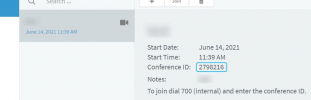
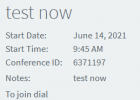
Correct. I am dialing 700, then it asks for the conference ID, I enter the Conference PIN provided in the email and what is on the WebClient. It rejects with an invalid PIN.
As a workaround, I have DID to connect to the 700 Extention. so I can call out to get back in and connect just fine. I have narrowed it down to locally internal joining the Conference is not accepting the PIN.
On my cell phone 3cx App, I can dial 700 then the Conference ID, and get in just fine.

1623683390235.png
1623683429402.png
1623683451747.png
 
@Aboling

Please try the following and let me know what happens:

1. In the Management Console, navigate to "Extensions".
2. Edit the extension which is provisioned to the T58a.
3. Go to the "Phone Provisioning" tab and select the Yealink T58a from the "Your Phones" list.
4. Scroll down to where the codecs are and remove OPUS from the list by clicking the X button on the right hand side.
5. Save the changes by clicking on OK.
6. Go to the "Phones" section on the left and select the Yealink T58a.
7. Click on "Reprovision" on the top and wait for the device to reprovision.

Test it again by calling 700 and entering the Conference ID.

Let me know if anything changes.
 
Genius. That worked. I have tested this on multiple phones by removing the OPUS codec. The phones all connected as expected. Thank you so much!!! This is perfect.
My issue is resolved!
 
  • Like
Reactions: ChrisC_3CX
Great, glad to hear you got this resolved!

Do bear in mind that this issue has actually been addressed in v18 so it should stop being a problem once v18 is released.
 
Status
Not open for further replies.

Forum statistics

Threads
111,974
Messages
590,081
Members
164,899
Latest member
mazet