invalid password application error

Status
Not open for further replies.

GiannisA

Forum User
Advanced Certified
Joined
Dec 18, 2020
Messages
27
Reaction score
2
Hello,

I have noticed that from time to time on different android devices we get the below error, "invalid password"
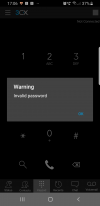
1611061573913.png

The extension has as a status of not connected but i can call inside the company and outside without any issue.
If i close the app and reopen it most of the times will get the correct status "Connected"

I have not noticed such issues in windows or iOS apps.

Have you ever seen this? Is it needed a different configuration for android devices ?

Thank you
 
Hello Vasili,

3CX Version: Professional Perpetual 16.0.641
Server OS: Microsoft Windows Server 2016
Is the 3CX Server Hosted and where: It is hosted locally on our site
IP Phone Make/Model/Firmware : Different IP phones, softphones and smartphones
Provisioning Method: Local
Trunk Provider or Gateway Make/Model : Gamma
Has the Firewall Checker passed: YES
Are custom Phone Templates being used: YES

The app version is the latest from Play store:16.6.2.89
 
Hi Giannis,

I see that the PBX is out of date, can you update to the latest version? A few interesting features regarding presence have been updated. Keep us posted after updating.
 
Hello Vasili,

So the "invalid password" error is indicating an issue with the presence ?
When you say the latest, do you mean 16.0.1078 ?
 
Hello Giannis,

It may, and this is why I've asked you to update to check. Yes, when you update it via the Management Console, it will update to the latest version.
 
Last edited by a moderator:
Hello Vasili,

We upgraded to 16.0.7.1078 and still have the same random errors.

The opened ports are the below

UDP: 9000-9127 , 5060, 3478, 5090
TCP: 5060, 5001, 5090

Is there anything else that i should check ?
 
Hello Gianni,

Can you check to make sure that client can access port 5001 without restriction (by disabling rules that may block access, temporarily to test)?
 
I just took captures on the FW and i can verify that my public IP , could establish communication with 3CX over port 5001 and 5090.
 
Thank you for updating. As this is an unusual case, may I suggest contacting 3CX Support to follow up?
 
Status
Not open for further replies.

Members Online Now

No members online now.

Forum statistics

Threads
111,832
Messages
589,284
Members
164,662
Latest member
DejanMDS