Invalid reply (licensephone) Error during restore v.18 backup to v.20 system

Status
Not open for further replies.

bytesolutions

Bronze Partner
Advanced Certified
Joined
May 30, 2016
Messages
80
Reaction score
10
Good morning.
I have a self hosted VM v18 update 9 build 31.
I set up an extension as a system administrator, assigned it a unique email address and followed all the other steps required to backup before v.20 update.
I generated a backup including information about the license key, fqdn etc....
I turned off the first Vm
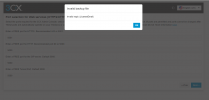
I created a second self hosted v20 VM, I imported the previously created backup and after about 5 minutes of processing it crashes and this screen appears:
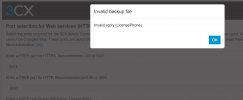
Invalid Reply.jpg
What is it about? How can I solve it?
Thank you all
 
Check if the registration details of the license key are correctly configured in the customer portal.
 
Check if the registration details of the license key are correctly configured in the customer portal.
I checked the license information and everything was correct. The only missing information was the customer's address and number, but I don't think it's essential for correct restoring a backup.
The license is a PRO 8sc. valid until July 2025
 
Some information is required to be configured in the registration details.
If this information is not included in the backup this will also fail as it need to match.
 
I checked the license information and everything was correct. The only missing information was the customer's address and number, but I don't think it's essential for correct restoring a backup.
The license is a PRO 8sc. valid until July 2025
Later I will try again to make a new backup and a a restore on V.20 considering the changes made.
I will give you updates shortly
 
Let us know the outcome.
 
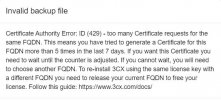
@TheodorosG_3CX I tried too many times yesterday and now it stuck. Is there a way to reset this counter or will I really have to wait a week?
 

Attachments

  • certificate error.JPG
    certificate error.JPG
    40.8 KB · Views: 27
This is a LetsEncrypt limitation, you'll need to wait.
 
  • Like
Reactions: bytesolutions
It is blocked from the SSL Authority and you need to wait for 7 days or create a new FQDN.
 
I set up an extension as a system administrator, assigned it a unique email address and followed all the other steps required to backup before v.20 update.
Just to be sure, it is system owner, right?
because System administrator and System owner are 2 different roles.
 
Did you have both servers running at the same time? I had this issue on my first upgrade. I now kill the old server before uploading the backup to the new.
 
Did you have both servers running at the same time? I had this issue on my first upgrade. I now kill the old server before uploading the backup to the new.
In the first message I extensively described the steps to shut down the first Vm, before starting the second.
 
I would turn the old VM back on and try the backup again. I wonder if it didn't complete or the download was slightly corrupted.

I'd also make sure all phone firmware is up to date prior. Also are all the phones you are using still supported by V20?
 
Hi All,

I have same problem about upgrade v18 to v20, return error LicenseEmail.

1724237429694.png

This simulation test with me.
- I think this problem in this server has someting not support or old config cash fot 3CX v20.(V18 can install normal & complete)
- This error incoming from all step install > upload cf file, copy link and restore file.


- Gen new OS and resource server (change devices setup 3cx) to restored.(*can installed complete but not solve root case problem)
 
You'll have to check theres a valid email address under license information and that it matches whats in customer.3cx.com when you login.
 
  • Like
Reactions: Evolute IT
You'll have to check theres a valid email address under license information and that it matches whats in customer.3cx.com when you login.
This is valid email under license. Because
- This server can not restore complete and has error. I test change key 3cx to install 3cx v20 in this server and has error again.
- But I can restore on Other server V20 complete... not error return.(with the same 3cxbackup file)
 
Hi all,

I update for testing problem.

- Test change profile login windows on problem server can install 3cx V20 Complete. not error return.
*This profile login windows create new.
 
Let us know the outcome.
Good morning. Sorry for the delay in getting you feedback.
I fixed all the missing information in the customer's area, I generated a new backup and I waited seven days for let's encrypt to make the timeout expire for too many certificates requested and I attempted a new restore.
This time everything went perfectly.
Thank you very much
 
Good morning. Sorry for the delay in getting you feedback.
I fixed all the missing information in the customer's area, I generated a new backup and I waited seven days for let's encrypt to make the timeout expire for too many certificates requested and I attempted a new restore.
This time everything went perfectly.
Thank you very much
I'm glad this is resolved.
 
  • Like
Reactions: bytesolutions
Status
Not open for further replies.

Latest Posts

Forum statistics

Threads
111,953
Messages
589,915
Members
164,850
Latest member
masvty