invitations sent via "3CX (direct email)" look and behave diffrently

Status
Not open for further replies.

VSC

Forum User
Joined
Mar 16, 2020
Messages
110
Reaction score
14
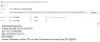
Since we updated to 3CX Version 16, Update 7 FINAL, Build 16.0.7.1078 December 2020 we experience that invitations emails sent via “3CX (direct email)” look and behave diffrently. Before the sender was [email protected] and after receiving it with Outlook it appeared in my calendar. Now it looks like a new invitation even hasn't a sender and does not appear in my calendar anymore (see screenshot). Has something changed in this area?
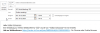
1607628952263.png
 
  • Like
Reactions: Andreas Conrad
Btw. we face similar problems when initiating a conference call using the Desktop client. The generated email from the 3CX server is useless and does not work at all. Are we the only ones having this issue?

1607697611421.png
 
RSVP has been removed as you cannot answer to the noreply address by getting a ugly no delivery email. The rest is the same.
 
  • Like
Reactions: sst_ekell
We are seeing this issue across multiple customers.

Previously, we would receive the email AS A CALENDAR INVITE. That appointment that could be accepted and added to our own calendars.

Now there is an .ics attachment with no ability to accept the appointment, forward it, or reply. All the options are greyed out. And it just says "No Resposne Required" for response options.

As an end user in Google it works, but not in Outlook.

I will reply to the other threads about the schedulding changes. But in most corporate environments, even at many of our non-profits, we standardize on Outlook as the email client. Even when their email services are backed by 365, users are NOT logging into their 365 portal directly.

And in many cases we ask users not to use Google and in some cases we flat out block it. The scheduling changes are causing massive complexity and confusion for our clients.
 
We are not able to react to invitations for audio conferences via 3CX direct Mail. The three typical buttons for "accept", "with reservation" and "decline" are not available here. When deleting this, the button for removing out of the calendar is available, but the appointment has never been in the calendar. For video invitations everything is normal.
 
While I understand that this may not be ideal for Outlook user, there was a choice we had to make, make it work on outlook and break in most other places, or adjust it for most places and leave outlook aside which seems to be doing something differently (as the "fix" imples).

For Outloo users, I think the best I could suggest is generate the iCal file, load it into Outlook and then send the invites via Outlook, then all is happy. Granted, there are a 1-2 extra clicks in the process but this the best we could do under the circumstances explained above.
 
While I understand that this may not be ideal for Outlook user, there was a choice we had to make, make it work on outlook and break in most other places, or adjust it for most places and leave outlook aside which seems to be doing something differently (as the "fix" imples).

For Outloo users, I think the best I could suggest is generate the iCal file, load it into Outlook and then send the invites via Outlook, then all is happy. Granted, there are a 1-2 extra clicks in the process but this the best we could do under the circumstances explained above.

Outlook is the defacto standard email client AT WORK.

We never received a complaint about the way it worked before. Never. And we support over 900+ end users. That number includes many Mac users as well.

Since the change - complaints. You can see that in the forum posts. No complaints about this feature before... now multiple forum threads.

And it doesn't work like you suggested.

The ability to click the .ics and Accept it or add it to the calendar doesn't work. All the buttons are greyed out. There is no ability to add it into the calendar. I've done a walkthrough with our partner team to show them and they said they have raised it to the product team. Still waiting to hear back on this.

But this feature is striaght up broken. This is not okay to roll out this major breaking change that negatively impacts the majority of work email users.

It was better before. I am suggesting you change it back to the way it worked before. There were no complaints before and it just worked the way it should.
 
Agreed. If it doesn't work in Outlook with the 3CX SMTP:

- It makes the 3CX SMTP unusable.
- Makes scheduling via the webclient useless if I have to send my invites myself anyway.

iCal is not an option, for real. It was working before, why change it?

Right now, I have 4 PBX to reconfigure the SMTP using my own licenses of O365 just to bypass the 3CX SMTP, and allow RSVPs.

This change is bad. Specially since there's no Outlook plugin (yet.)
 
It's not just the 3CX email by the way. We configure all our 3CX instances to use the client's email servers. Office 365 for most.

This is straight up broken even when you are using your company specific email servers.
 
RSVP has been removed as you cannot answer to the noreply address by getting a ugly no delivery email. The rest is the same.

Stefan,

No one cared about the "ugly" no delivery email. This literally wasn't an issue.

We have our 3CX configured to use our company specific email servers and have a unmanned email account sending invites and receiving the replies.

We have a rule configured to delete any reply emails that end up in the Inbox. It's not hard to setup and it works flawlessly.

The "feature" you introduced actually caused changes that BREAK functionality that was previously working.

Please roll this back to the working version.
 
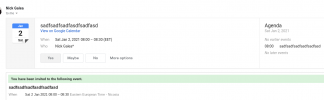
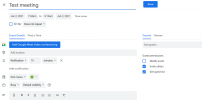
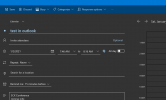
I just double checked on Google Mail and Microsoft Outlook online and the behaviour works as intended if you select your e-mail client as the one to send the invite. After organizing the meeting in 3CX, your email client will pop up with a meeting. See screenshots. Invites will be stored in your calendar and emails sent to the invitees.

And if you still insist on using 3CX SMTP, then all works you just dont have the reply buttons. Again, you are supposed to use your email client.

I think the problem is if you are using the locally installed Outlook full fat client (isnt it time to move online in this day and age??) We will look into a better solution for this old style clients.
 

Attachments

  • Screenshot 2021-01-02 at 07.41.42.png
    Screenshot 2021-01-02 at 07.41.42.png
    45 KB · Views: 14
  • Screenshot 2021-01-02 at 07.44.37.png
    Screenshot 2021-01-02 at 07.44.37.png
    56.2 KB · Views: 13
  • Screenshot 2021-01-02 at 07.46.40.png
    Screenshot 2021-01-02 at 07.46.40.png
    43.3 KB · Views: 13
Last edited:
We adapting the iOS and Android apps to work the same way and bring up the default email client configured on the phone. So the problem here is that the users are using 3CX SMTP and they should be using their email client to send meeting invites
 
  • Like
Reactions: Evolute IT
Status
Not open for further replies.

Forum statistics

Threads
111,973
Messages
590,078
Members
164,896
Latest member
sameage