iOS App Beta 18.6.4.651 & 2N door intercom

Status
Not open for further replies.

3cxTester2018

Forum User
Joined
Apr 30, 2018
Messages
15
Reaction score
16
Hello all,

we are just testing the iOS App beta version 18.6.4.651 with H.264 support.
Wiith door intercom from 2N like IP Verso, IP Verso 2 or IP Style the video call function is still not working.
We tried activate/deactivate the sendrecv attribute, different resolutions but still get no video.
Does anybody got it up and running?

Regards
Ralf Schweiger from getcom
 
We addressed this in the upcoming beta.
 
Hi Vali,

thank you for your answer.
It would be nice if 2N would be completely supported in 3CX. This brand is the Ferrari for door intercom systems and every of our customers have at least one of them.

Regards
Ralf Schweiger from getcom
 
@3cxTester2018 Hi Ralf
We just released on TestFlight 18.6.4.686 - please check it and let us know if it solves the issue you described.
Thanks!
 
Sadly a Videocall from 2N IP Verso 2.0 to an iPhone 15 Pro on iOS 17.3 with the latest 3cx TestFlight app (20.0.1.11) through an 3CX SBC on 18.0 Update 9 (Build 20) with a SMB Free 10 license isn't possible so far. I can't get it to work.
Voice calls work fine but I can't activate the video feed. Neither if I press the button on the 2N IP Verso 2.0 ring button or call the IP Verso 2.0 from the App and try to activate video here. The Display in the App stays blank.
Is there anything I can do to get this running with my constellation?
 
What's the H264 settings in the 2N? Profile, resolution, bitrate, etc.
 
thank you for your fast response. Here are my Settings in video on my 2N IP Verso 2.0.

Profiles active:
H.264 Baseline Profile, Packetization Mode 1SDP Payload Type123
H.264 Baseline Profile, Packetization Mode 0SDP Payload Type124
H.264 Main Profile, Packetization Mode 1
H.264 Main Profile, Packetization Mode 0
Priority: highest
Resolution: VGA 640x480
Bitrate: 1024 kbps
Framerate: 15 FPS
Maximum Packetsize: 1400
Use sendrecv Attribute for Video: off
 
Last edited:
Hello all,

we discussed this problem already with 2N and there is already an issue opened.
If there is any news I will inform you.

Regards
Ralf
 
Last edited:
Oh well. Thank you all.
Going back to the official release of 3CX on iOS won’t work.

happy to hear, that the issue is discussed with 2N. Thank you for letting me know.
 
Here is an update from today.
We tested the current 2N firmware version 2.42.1.55.3 with same result.
Additionally we sent two pcap traces to 2N again.
RnD division of 2N is involved into this issue now.
 
Hello all,
here is the update from 2N from today:
...thank you for the traces and feedback, I was indeed able to replicate it easily with our test 3CX cloud PBX we set up. Unless I'm missing something, this should be on our side, so we'll get that fixed.
 
Here is the current update to this issue:
Today there is a meeting @2N where they want to discuss and analyze the data from our latest tests from today with debugging enabled on the door intercom.
 
Any news on this?
 
Yes, indeed.
We tested a lot together with 2N and as result they fixed a SRTP issue in the firmware.
End of March 2N will release their firmware 2.43 which will include this fix.
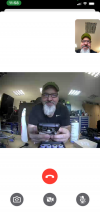
This is the first preview and the evidence it is working:

1710868898543.png
 
The Firmware is available to download.
What setting do I have to alter, so that the video is shown after a call and pressing the video button?
On my device it is not working by leaving as is.
My video settings are still the same as in post #7.
 
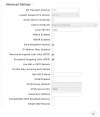
Do you have SRTP for both incoming and outgoing calls activated in the advanced settings of the configuration?

1711611245280.png

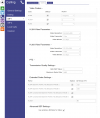
Here is my Video setup:

1711611148262.png
 
  • Like
Reactions: Vali_3CX
i have set all checkmarks and settings like on your screenshots and activated SRTP on all users in my 3CX SBC, but can’t get it to run.
Edit: I can’t activate H.263. It’s not present on my Verso 2.0.

If i activate „Receive Encrypted Calls Only (SRTP)“ the call is initiated and my camera feed is enabled but no picture of the Verso 2.0.
If i activate „Encrypted Outgoing Calls (SRTP)“ the call can be initiated but no image is active. Not even mine.
 
Last edited:
Status
Not open for further replies.

Forum statistics

Threads
111,973
Messages
590,079
Members
164,898
Latest member
grahamaskew