iOS App - ZeroTier

Status
Not open for further replies.

SigmaVal

Free User
Joined
Oct 11, 2020
Messages
6
Reaction score
0
Hello to all,

since the mod. closed my thread Quote: "This is a PBX configuration (request), has nothing to do with the client, here's the appropriate forum:"

Ill post my story here -> https://www.3cx.com/community/threads/ios-3cx-client-and-zerotier.76690/

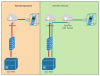
Network map:
1603388244207.png

So to point out my issue - The iOS App IP Field can NOT be edited! I just need to input the IP from the ZeroTier Network everything else is in split-tunnel mode. Like this the normal SIP Traffic is not affected.

Port 5001 and 5090 need to go thru ZeroTier and it does! - The issue is the App just to be clear! The Phone itself is already part of the ZeroTier Network.

The PBX has a ZeroTier Client and the Phone has the ZeroTier Client and both can communicate. :) But since the Config. is hardlocked on the PHONE it is not able to change the IP there.

I know I am repeating myself like crazy. But since port 5001 and port 5090 are open I got allot of attacks to the PBX! (Since there is no ReCaptcha or 2FA as a second factor BotNet hacking is still a thing!)

Best regards
SigmaVal.
 
This is not a 3CX issue, this is a networking issue. If you want traffic to go over the ZeroTier VPN tunnel, then send it. How you do it is up to you. You are better off asking on the Zerotier forums as this is not 3CX specific.

You shouldn't have an IP in the iOS app. It should be using the FQDN. And in your diagram, you don't have Zerotier on the PBX, so you don't need to put the Zerotier IP address in the app. You need to tell Zerotier how to route traffic to the subnet that 3CX is on. It's been a while since I played with Zerotier but you should be able to add route to the client(s) via the management console
 
Hello @cobaltit

ZeroTier is not a Full-Tunnel VPN - it is a P2P connector ;)

So if ZeroTier is active on my Phone and active on my Server they have other IPs to work with.

Example:

PBX Eth0 (normal) 192.168.100.100 to GW 192.168.100.110
PBX ZeroTier (Virtual Eth0) 10.10.10.100 to GW 10.10.10.110

Phone LTE (normal) 49.49.49.49 to GW
Phone ZeroTier (Virtual VPN Interface) 10.10.10.101 to GW 10.10.10.110

In the iOS App i just need to input the IP from the PBX as it would be in a "Local Network" the 10.10.10.100 but since it is hardlocked I would love to edit that. :D - There is no need for the my3cx address. Since the Device or App thinks it operates in Local LAN mode.


Thank you for reading
SigmaVal
 
Last edited:
Never heard of Zerotier until now but if that puts your phone as if its local, are you not able to make a DNS entry to point your FQDN to local IP? Changing the app isnt going to happen anytime soon so you need an alternative.
 
Hello @cobaltit

ZeroTier is not a Full-Tunnel VPN - it is a P2P connector ;)

So if ZeroTier is active on my Phone and active on my Server they have other IPs to work with.

Example:

PBX Eth0 (normal) 192.168.100.100 to GW 192.168.100.110
PBX ZeroTier (Virtual Eth0) 10.10.10.100 to GW 10.10.10.110

Phone LTE (normal) 49.49.49.49 to GW
Phone ZeroTier (Virtual VPN Interface) 10.10.10.101 to GW 10.10.10.110

In the iOS App i just need to input the IP from the PBX as it would be in a "Local Network" the 10.10.10.100 but since it is hardlocked I would love to edit that. :D - There is no need for the my3cx address. Since the Device or App thinks it operates in Local LAN mode.

Thank you for reading
SigmaVal
Zerotier can be any type. They have Zerotier appliances (and you can roll your own) and that's how I interpreted your diagram. But if you have Zerotier installed on 3CX that's not a supported scenario. But I already gave you the solution. The app should be using DNS, not IP address to reach 3CX. Configure your DNS to use the ZT IP address. Or I suppose you could just try changing the network interface on the phone provisioning tab for that extension.

But I really don't understand why you are going through this effort. I'm not sure why you think your 3CX is getting attacked any more than anyone elses. That's what the global blacklist is for. The web interface and the tunnel interface are very secure.
 
YeY got it to work finally :D

What I did is to re-check the ZeroTier Documentation on how to route IP Traffic on the ZeroTier Network.

Like that I created a forward and backward route from the PBX ZeroTier Peer to the ZeroTier Network.

Closed all the Port at the NAT Rules for 5001 and 5090 and the result is great.

NAT Rules currently are dedicated to SIP Provider
Port 5060
Port 5061
Port 9000-10999

Deleted Rules on NAT
Port 5001
Port 5090

Firewall Rules for the PBX Interface
1603479075419.png1603479031625.png
Calls work from my mobile thru the PBX and Calls coming in work too. Thanks allot @cobaltit for the advice to check routing.

Settings on the Phone are simple on the ZeroTier app -> No DNS - No Default Route

Tested over LTE and 3G on my mobile.

Sincerely
SigmaVal

P.S. On what type of 3CX PBX I use -> RaspberryPi current Alpha Build 16.x.x with ZeroTier Client installed. Followed that guide to install ZeorTier -> https://peyanski.com/raspberry-pi-into-vpn-video-how-to/
 
Last edited:
Nice. It's been a while since I used ZT but it's definitely a nice program. Good job on the setup. Hopefully it behaves for you but do note that 3CX doesn't support having VPN on the 3CX box so if something comes up (usually audio issues) the first thing they will ask you to do is remove/disable that VPN interface. And thanks for posting the details.
 
Status
Not open for further replies.

Forum statistics

Threads
111,993
Messages
590,178
Members
164,933
Latest member
bunthoeun.may