IP Blacklist

Status
Not open for further replies.

Eder Pardeiro

Forum User
Joined
Jul 8, 2017
Messages
40
Reaction score
2
Good morning people!

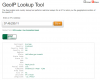
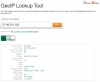
Looking at two customers alert emails on this morning, I realized that an IP was blacklisted. But the strange thing is that in at least two of the customers, these IP's are from the same region. Detail: The customers are in Brazil, in different cities, using different internet providers.

Do you also think this is strange? Does anyone have any idea why 3cx is blocking this?

See below:

Customer 1
Customer 2
9607
9608
 
You need to look at the activity logs, to see why these IP where blocked.

At a guess, bots on the web found out you have open ports to 3CX and 3CX blocked them due to incorrect credentials
 
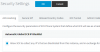
If you are already on version 16 then I would advice to enable "Global 3CX IP Blacklist " in the security settings. Both IPs are known to us as scanners and the IP owner does not answer to our security reports.

9609
 
Hi Saqqara!!!

Thank you for response.

I had already analyzed the logs but found nothing. In this consumer the IP was blocked at 00:05 am, but in the logs nothing appears at that time.

9610
 
If you are already on version 16 then I would advice to enable "Global 3CX IP Blacklist " in the security settings. Both IPs are known to us as scanners and the IP owner does not answer to our security reports.

View attachment 9609

Hi Stefan,

Thank you for your response! I'm using the V15.5 version.
 
So you know how the internet works right? :) Script kiddies run scans against entire IP blocks or provider ranges and then log the results. Those devices found with open ports are then targeted with more specific attacks. It's quite common to see the same IP or attempts from the same range on MANY servers.
 
After you have collected a lot of Blacklisted IPs, you see patterns (repeats), and can "widen the net" by changing the subnet mask. With the new Global 3CX IP Blacklist you won't have to worry about this. If you don't normally have users roaming in certain counties there would be a lot less concern about blocking an IP if yo know the location. While, originally, (IPV4) IPs were allocated on a fairly easy to track, per country basis. As the supply has run increasingly low , the have been divided up, and assigned on a seemingly random basis. Much harder to block entire "troublesome" countries.
 
Maybe think about hardening the firewall.
 
you can also prevent this at the firewall level by using a firewall that has geo ip blocking capabilities. then you can block countries based on the business tolerance. in my case, there are many countries where bots operate out of, that i have no reason to allow traffic to and from.
 
So v16 is including the ability to subscribe to a 3CX managed blocklist. That being said I've never bothered adding ranges to block. Set the ban time to something really long and let it do it's thing.
 
Set the ban time to something really long and let it do it's thing.

I have it set to expire after a week. I get the email notification and can then see who keeps trying and any IPs from the same provider. They then get permanently Blacklisted.
 
i find most of my ip blacklist come from my own android phone getting disconnected from wifi and reconnected.
 
I have it set to expire after a week. I get the email notification and can then see who keeps trying and any IPs from the same provider. They then get permanently Blacklisted.


I'm entirely too lazy for that. I have it set to 10 years and I never look at it unless something legitimate can't connect.
 
So v16 is including the ability to subscribe to a 3CX managed blocklist. That being said I've never bothered adding ranges to block. Set the ban time to something really long and let it do it's thing.

Yes it does, the best is that all 3CX work collectively to populate this list.
 
Status
Not open for further replies.

Forum statistics

Threads
111,914
Messages
589,710
Members
164,783
Latest member
GothamUser