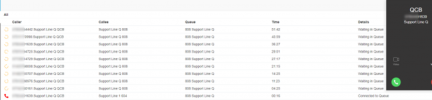
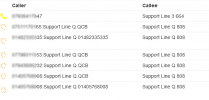
Is there a design to the queue view?

Status
Not open for further replies.

Alphabetic

3CX MVP
Silver Partner
Advanced Certified
Joined
Jul 1, 2016
Messages
6,688
Reaction score
2,671
Can you tell me how this queue view is supposed to be interpreted?

Obviously the first batch of calls are waiting and the 2nd batch are phones calling.

However, the order of the phones are sorted by wait time (by the looks of it).

So how come this call, that has been waiting the longest and has now been answered, is placed randomly in the order?
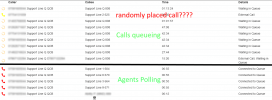
1642592349865.png
 
Hi,


When someone is waiting in the Queue, once they get prompted to leave a QCB and they accept, the timer on the Wallboard switches to 00:00 again, so it is re-ordered.

When this call gets picked up, there is a chance that instead of going to the top place, it replaces the the actual position in the list (QCB calls though don't lose their position despite timer going back to 00:00).

To try and put it simply, when QCB calls are in play, the actual Queue Position does not necessarily match the order by time you see, because someone might request a callback before someone else, even though the other person actually is ahead of them in the Queue (initially called in earlier).
 
  • Like
Reactions: Evolute IT
Hi @NickD_3CX

Customer tells me that the call they get on their phone isnt always the one that has the longest wait time.

When they look at the wallboard they're expecting the next caller on their phone to be the one with the highest wait time - this is what i'd also expect.

This is a really poor screenshot but hopefully you can make out the numbers. You can see that the call with the highest wait time isnt the one polling phones.

1642665840827.png


It should look like this

1642666183613.png


Edit:

Just a further update.

I had a look in the Qmanager log and I can see that the call ending 1639 joined the queue at 15:58 and 4442 joined at 16:05. So it's correct that 1639 will call before 4442 but why is it not showing in the queue and only ringing the phones? This is what is confusing the staff as they think these callers are jumping the queue.

On a side note, i cannot see an entry in the Qmanager log that states the call was picked up - does this not report that?
 
Last edited:
Hi,


When someone is waiting in the Queue, once they get prompted to leave a QCB and they accept, the timer on the Wallboard switches to 00:00 again, so it is re-ordered.

When this call gets picked up, there is a chance that instead of going to the top place, it replaces the the actual position in the list (QCB calls though don't lose their position despite timer going back to 00:00).

To try and put it simply, when QCB calls are in play, the actual Queue Position does not necessarily match the order by time you see, because someone might request a callback before someone else, even though the other person actually is ahead of them in the Queue (initially called in earlier).
Nick, trying to get my head around this.

Someone might have requested a call back before someone else thats fine. But if they request a call back before someone else, their queue position should be the same. Meaning, when it comes to them being serviced, they will have been the longest waiting caller and I would expect to see them at the top of the queue. Just like this:

1642669931725.png
 
Nick, trying to get my head around this.

Someone might have requested a call back before someone else thats fine. But if they request a call back before someone else, their queue position should be the same. Meaning, when it comes to them being serviced, they will have been the longest waiting caller and I would expect to see them at the top of the queue. Just like this:

View attachment 27279
It is a bit hard to explain, but I'll give it another shot.

In the WebClient Panel, when you are seeing QCB calls, the order can get 'confusing' because the moment the Caller confirms the callback, the Timer that appears in the WebClient resets to 0. Despite this though, the position of the callers remains where it was.

The technical reason this is happening is because this turns from a regular incoming call to a call that is queued to make an outbound call to the CB number, like it was transferred internally to a placeholder.

To find our common points, indeed from a user perspective it may seem that the order is not being followed due to what they are seeing on the Wallboard, but it is.

I'm not sure if this can be somehow changed, but for the time being I would suggest you inform your customer that the presentation is correct, positions are being honored, just the grouping of the calls is like this when QCB calls are in play.
 
Nick, am I being thick or what?

I understand what you're saying regarding the wait times resetting when they request a QCB but what I dont know is why the call that has been answered is 2nd place.

Nevertheless, this particular thing isnt that urgent.

Did you see the screenshot I sent this morning?
 
Nick, am I being thick or what?

I understand what you're saying regarding the wait times resetting when they request a QCB but what I dont know is why the call that has been answered is 2nd place.

Nevertheless, this particular thing isnt that urgent.

Did you see the screenshot I sent this morning?
Not thick, it's a bit complicated to explain with words alone.

Yes, I saw the screenshot you sent this morning, the call shows both as ringing the extension (red icon) and still waiting, most likely because this is at the point where the QCB call is polling this extension and the agent hasn't answered yet. Once the agent answers and the system calls the QCB external number, there will be only one entry.
 
Not thick, it's a bit complicated to explain with words alone.

Yes, I saw the screenshot you sent this morning, the call shows both as ringing the extension (red icon) and still waiting, most likely because this is at the point where the QCB call is polling this extension and the agent hasn't answered yet. Once the agent answers and the system calls the QCB external number, there will be only one entry.
Think you looked at the wrong screenshot.

The number thats calling agents (red icon) isnt being displayed as a QCB waiting
 
Think you looked at the wrong screenshot.

The number thats calling agents (red icon) isnt being displayed as a QCB waiting
Then please explain exactly what you mean, because the case by itself is complicated to explain, so better not for me to also have to guess the exact screenshot and question. :)
 
Then please explain exactly what you mean, because the case by itself is complicated to explain, so better not for me to also have to guess the exact screenshot and question. :)
post number 4
 
post number 4
You need to check the logs why the longest waiting call isn't polling at that exact moment the screenshot was snapped.
It could be example that the agent that was being polled didn't answer, in the meantime the next call polled the other call that you are seeing, and then the first agent logged out, meaning the longest waiting call was "stuck" in the Queue again.
 
You need to check the logs why the longest waiting call isn't polling at that exact moment the screenshot was snapped.
It could be example that the agent that was being polled didn't answer, in the meantime the next call polled the other call that you are seeing, and then the first agent logged out, meaning the longest waiting call was "stuck" in the Queue again.
The queue is ring all and the agents dont log out.

The problem is, the call that is polling (red icon) isnt shown as waiting in the queue (circle dots).
 
The queue is ring all and the agents dont log out.

The problem is, the call that is polling (red icon) isnt shown as waiting in the queue (circle dots).
This requires someone to have a look through the logs. To further investigate this aspect, I'd suggest you open a ticket with our support team as this can take many hours, as I am sure you know after going through the logs yourself.

In general though, this doesn't happen and I am pretty sure there is a logical and reasonable explanation for why it is happening.
 
Yeah i was being thick...

the number being served was waiting, i just couldnt see it!
 
  • Like
Reactions: NickD_3CX
Status
Not open for further replies.

Forum statistics

Threads
112,349
Messages
592,027
Members
165,514
Latest member
megalmazan