


- Joined
- Sep 14, 2020
- Messages
- 47
- Reaction score
- 2
I need help with stopping 3CX from changing the "Default Dial Mode" on the Fanvil X210 from "Video" to "Audio."
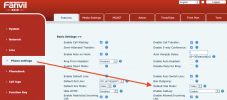
This happens every time after some settings of the extension provisioned to X210 are changed on 3CX, despite that I have manually set "Default Dial Mode" to "Video" on X210's webpage.
For example, if I go into the the extension's settings on 3CX, make an update on one of the BLF keys, reboots the phone, then the Default Dial Mode that was previously set on the device webpage to "Video" will be switched back to "Audio" by 3CX, which breaks the capability of X210 to make video calls.
This happens every time after some settings of the extension provisioned to X210 are changed on 3CX, despite that I have manually set "Default Dial Mode" to "Video" on X210's webpage.
For example, if I go into the the extension's settings on 3CX, make an update on one of the BLF keys, reboots the phone, then the Default Dial Mode that was previously set on the device webpage to "Video" will be switched back to "Audio" by 3CX, which breaks the capability of X210 to make video calls.
- 3CX Version: Standard Annual 16.0.9
- Server OS: Windows 10
- Is the 3CX Server Hosted and where? Not Hosted
- IP Phones: Fanvil X210 v2.4.7
- Provisioning Method: Local
- Has the Firewall Checker passed: YES
- Are custom Phone Templates being used: NO


