Solved Issue certificate for SBC (3CX with MS Teams integration)

Status
Not open for further replies.

Artem Khvostenko

New User
Joined
Apr 26, 2022
Messages
34
Reaction score
5
Hello
Please help with understanding
How to issue certificate for domain-name for FQDN name of SBC (Virtual machine) if on it isn't exist nginx or apach web-server to accept certificate request?
"Your chosen FQDN will be used by Microsoft to route traffic to your 3CX to place outbound calls. Therefore it must point to the static public IPv4 address of your 3CX installation."

In fact I have VM with SBC with private ip address and have public ip on virtualization system and made port forwarding for ports 5060 and 5062.
I know that cert must be true - like this https://www.ssl.com/certificates/basicssl/
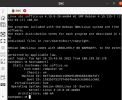
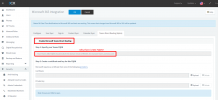
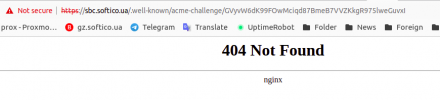
But for test trying to make self-signed from Lets Encrypt and see:cert.png
sbc1.png
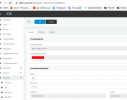
sbc2.png


sbc3.png
 
Last edited:
Hi!

I think there is some confusion, in the screenshot you posted, you show the settings a 3CX SBC.

If you are looking to integrate 3CX with Teams, you need to follow these instructions:
https://www.3cx.com/docs/microsoft-teams-business-voice/

Here it even explains how to generate a SSL Certificate using SSL.com that you mentioned.
 
  • Like
Reactions: Artem Khvostenko
Hi!

I think there is some confusion, in the screenshot you posted, you show the settings a 3CX SBC.

If you are looking to integrate 3CX with Teams, you need to follow these instructions:
https://www.3cx.com/docs/microsoft-teams-business-voice/

Here it even explains how to generate a SSL Certificate using SSL.com that you mentioned.
Hello
Thank you for reply.
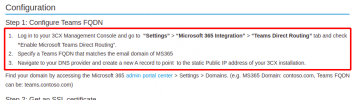
Could I ask about "Navigate to your DNS provider and create a new A record to point to the static Public IP address of your 3CX installation." which installation means control panel of 3CX or Virual machine with SBC that I have deployed?

Virtual machine with SBC need public ip or it can be port forwarding, like on my screens 116.202.231.99(public) to 192.168.7.200(private)?
 
On the sbc setup within the 3cx management console, you can use the wan ip address of the 3BC it does not have to be an fqdn. The local ip is the sbc server ip address.

On the firewall protecting the sbc server, you do not have to configure any port forwarding just allow udp port 5090 (3cx tunnel) and 3cx https port (443 or 5000) out.

On the firewall protecting the 3CX server have you configured the required ports - https://www.3cx.com/docs/manual/firewall-router-configuration/
 
On the sbc setup within the 3cx management console, you can use the wan ip address of the 3BC it does not have to be an fqdn. The local ip is the sbc server ip address.

On the firewall protecting the sbc server, you do not have to configure any port forwarding just allow udp port 5090 (3cx tunnel) and 3cx https port (443 or 5000) out.

On the firewall protecting the 3CX server have you configured the required ports - https://www.3cx.com/docs/manual/firewall-router-configuration/
Thank you
A record creates for 3CX control panel or for SBC (VM on my side)?
 
Here is our SBC setup

Public IP is the sbc wan ip address

Local IP is the sbc internal IP address

1651152191552.png
 
@Artem Khvostenko: what exactly are you trying to achieve please, to set up a 3cx SBC to connect your IP phones to 3cx? or set up teams' integration? as this is not to be confused with a 3cx SBC, as these are two completely different things.
 
@Artem Khvostenko: what exactly are you trying to achieve please, to set up a 3cx SBC to connect your IP phones to 3cx? or set up teams' integration? as this is not to be confused with a 3cx SBC, as these are two completely different things.
I want to integrate 3CX with MS Teams. Finally I want to call via MS Teams by SIP Trunks.
 
@Artem Khvostenko: what exactly are you trying to achieve please, to set up a 3cx SBC to connect your IP phones to 3cx? or set up teams' integration? as this is not to be confused with a 3cx SBC, as these are two completely different things.
So if you mean that I don't need SBC, how I can integrate MS to 3CX?
Because to finalize integration I need to add dns-name of SBC and issued true ssl cert.
 
In this case 3CX server is acting like a SBC for Teams.

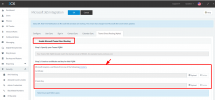
Make an A record called (example) sbc.example.com where example.com is the same domain you have in 365 already. The IP of that A record should point to the IP of your 3CX server. That name (sbc.example.com) is what you use in the field pictured above.
 
In this case 3CX server is acting like a SBC for Teams.

Make an A record called (example) sbc.example.com where example.com is the same domain you have in 365 already. The IP of that A record should point to the IP of your 3CX server. That name (sbc.example.com) is what you use in the field pictured above.
It helped, thanks. I made integration with 3CX.
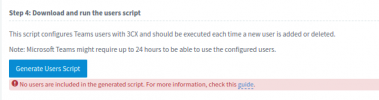
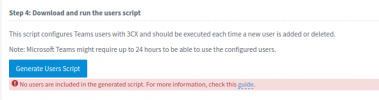
But maybe must go some time, because I can't generate script
1651164979802.png
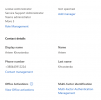
meanwhile in my user added phone number and license
1651165073224.png
1651165120071.png
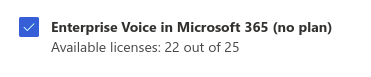
and have notice that not have licence in MS Teams
1651165197275.png
 

Attachments

  • 1651165023571.png
    1651165023571.png
    19 KB · Views: 2
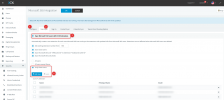
First you need to configure Office 365, then in the Users tab, sync the users you want to also have Teams:
1651172519538.png


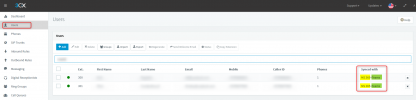
After you do this, assuming the Teams License is correctly added, in the Users of the Management Console you should see "MS365 + Teams" for the users you synced:
1651172646486.png


After this the script should generate.
 
First you need to configure Office 365, then in the Users tab, sync the users you want to also have Teams:
View attachment 29850


After you do this, assuming the Teams License is correctly added, in the Users of the Management Console you should see "MS365 + Teams" for the users you synced:
View attachment 29851


After this the script should generate.
Thank you for reply.
I turn on check-boxes in User sync, but can't use adding of user
This tab was configured by first stage
1651230479721.png
 
Why can't you add users like that?
Thank you. I have already sync. Cause of this was in that I need to regenerate key-pair after Teams Direct routing integration.
And add this new key-pair to MS 3CX APP.
 
Thank you. I have already sync. Cause of this was in that I need to regenerate key-pair after Teams Direct routing integration.
And add this new key-pair to MS 3CX APP.
I am afraid I don't understand what you mean. What does syncing users have to do with the key-pair?

I have gone though the thread here and I think the best thing you can do as find a 3CX Partner to help you set this up for you:
https://www.3cx.com/ordering/find-reseller/
 
Status
Not open for further replies.

Forum statistics

Threads
112,148
Messages
590,963
Members
165,168
Latest member
Stephan Eusebe