Issue with 3CX Bin Log Viewer

Status
Not open for further replies.

c.holloway

Gold Partner
Joined
Oct 24, 2014
Messages
102
Reaction score
6
Good morning! I need some help with an issue I've had for a long time; I can never properly view archived log files in the Bin Viewer, they just won't load and I have no idea what i'm doing wrong.

My most recent example comes from today. The server in question is set to retain the log files for 5 day and I have folders in the location C:\ProgramData\3CX\Instance1\Data\Logs\Backup. The problem i have is that these folders ONLY have BLREC files. This means I can't open them with the Bin Log Viewer as attempting to open any of these throws the error "Log file cannot be opened. 3CX Binary log view requires one bldef and at least one blrec file." I have tried copying in a BLDEF file from other locations into the folder with the logs I want to access but I still get this error. It is my understanding that this Bin Viewer is the only way to view archived logs so surely there has to be something I'm doing wrong or those archives are useless.

Any advice you can lend would be appreciated!
 
Hi @c.holloway,

Did you ensure the date and number were correctly corresponding when copying out of the folders in Logs?
 
VasilisV,

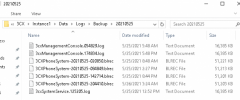
I am unsure what you mean by this. I have the following files in the log folder for yesterday and have tried a few different things.

logs.png

I copied them into the directory C:\ProgramData\3CX\Instance1\Data\Logs where the only BLDEF file lives but when i do this, only todays logs are shown despite changing the date on the filter

I have copied the BLDEF file from the current log folder into the backup folder for yesterday and I get the aforementioned error.

I have copied both the BLDEF and the BLREC files into a 3rd folder and get the aforementioned error.
 
Hi @c.holloway,

Try this: Copy the 3CXPhoneSystem.bldef file from the Logs folder into one of the backup folders you wish to view, add the .blrec files you wish to view into that backup folder. Does it open without the error message?
 
VasilisV,

Yes when I copy the .bldef folder into a folder with the backup .blrec files and then attempt to open either the .bldef or the .blrec files it gives me this error. I have never successfully used this tool on archived logs as I run into this error all the time so I'm hoping to figure out what i'm doing wrong.
 
Hi again @c.holloway,

If no services have restarted, the .blrec files should be in the \Logs folder, until they are archived in the backup folders. If they reach a size of 55MB, they'll roll over to a new file. If you copy these files into the same location (.blrec(s) and .bldef), you should have access to all of the days logs you've copied.

If services have restarted, there is often another .bldef file created. Unfortunately sometimes the services can, be stopped (server restart, manually stopping services etc). You'll see these extra files in the backup folders, remove any suffixed dates so that it appears like the .bldef file in the \Logs folder.
 
@VasilisV_3CX

The services have not been restarted. I am trying to view the files from 25 May that are in a backup folder. I have tried removing the time and date stamp from the .blrec file after i copied in the .bldef file and I get the error mentioned above when i try to open either the .blrec or .bldef
 
Hi @c.holloway,

If the .bldef file had a date added on, that would need the date remove. Not the .blrec files. If this does not work - I'm not entirely sure what is causing this in your case.
 
@VasilisV_3CX

Well thanks for looking with me I guess I'm back to the drawing board.

I will say that I don't think I've ever seen a .bldef with a time date stamp any time I've tried to view archived logs.
 
If you go on the following path, C:\ProgramData\3CX\Instance1\Data\Backups and on the date you want you find only .blrec files without .bldef do the following :

Copy these files into the folder of the Bin Log Viewer. Go on the following path, C:\ProgramData\3CX\Instance1\Data\Logs copy your " 3CXPhoneSystem.bldef " file and paste it on the same Folder of the Bin Log Viewer.
Now open the " 3CXPhoneSystem.bldef " with Notepad ++ and on the top of the screen you will see a date like " 3CXPhoneSystem-20150423-065605 " . Replace this one with the same line from the 1st .blrec file and save it.

Open Bin Log Viewer >> File >> Open and select the " 3CXPhoneSystem.bldef " . If you do not see any entries on the logs then check the filtering on the BLV in the date From section and make the appropriate adjustments.
 
@charles

Thanks for your response. As suggested I opened the .bldef file and replaced the current time stamp on the line $3CXPhoneSystem-20210526-043831.blrec with the time and date stamp of the first archived .blrec and got the same error

2021-05-28 09_44_06-3CX -  [v. 7.00.25][#10100026244727] [0_01_09].png
 
I found the issue was being caused by something that happened while SFTPing the files down from the Debian instance to my Windows machine. I don't know what it was that was going wrong but the workaround was to install Samba on the instance.

I shared out the logs folder and set up a Samba password for the user phonesystem (as its the owner of all of the pertinent files and you need to copy the bldef file into the archive folder. I was then able to use the bin viewer to access the files across the share and they opened without an error.
 
Status
Not open for further replies.

Forum statistics

Threads
111,982
Messages
590,121
Members
164,909
Latest member
Jacob.Ive