Issue with SNOM 735 / D785 Firmware Update on 3CX V20

Status
Not open for further replies.

StBil

Customer
Joined
Jun 22, 2021
Messages
8
Reaction score
1
Hey everyone,

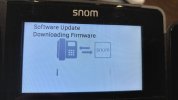
We have SNOM 735 and D785 phones, and it's indicating that there's a firmware update available. However, whenever we attempt to apply the update, the phone screen gets stuck on "Software Update, Downloading Firmware." Interestingly, we have Yealink phones as well, and the update went through smoothly on those.

Here are the steps we've taken so far to troubleshoot:

  • Turned off firewall rules and filters
  • Restarted the phones
Unfortunately, we're still facing the same issue. Has anyone else encountered this problem, specifically with SNOM phones on 3CX V20? Any insights or suggestions would be greatly appreciated!

Thanks in advance for your help!
 

Attachments

  • Schermafbeelding 2024-02-28 151018.png
    Schermafbeelding 2024-02-28 151018.png
    8.5 KB · Views: 27
  • IMG20240228150946.jpg
    IMG20240228150946.jpg
    4.2 MB · Views: 32
Hello,

Have you set up split DNS on your network?

This is a requirement for V20, and the firmware update will rely on it (especially snom).
 
  • Like
Reactions: pyr4m1d
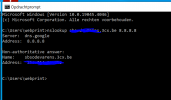
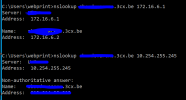
Thank you for your response. All the settings are correct. Unfortunately, this did not solve the problem. I have attached screenshots to demonstrate that our setup works. We are using 3CX 20.0 Update 0 (Build:1620)
 

Attachments

  • 1709137557145.png
    1709137557145.png
    47.8 KB · Views: 53
  • 1709137779335.png
    1709137779335.png
    37.8 KB · Views: 50
Last edited:
Hey everyone,

I believe I've pinpointed and resolved an issue within my VOIP VLAN that was quite perplexing. Initially, I had configured the phones within this VLAN to use Google's DNS (8.8.8.8). While I had no trouble pinging my FQDN, I encountered a peculiar problem: updates weren't pushing through to my SNOM phones, though my Yealink phones updated without any hitch.

To troubleshoot, I switched the DNS settings to point towards my PfSense firewall instead of Google's DNS. After rebooting the phones, voila, they all updated successfully. However, this has left me scratching my head. Why would this DNS change solve the update issue for SNOM phones but not affect Yealink phones in the same way?

I'm curious to hear if anyone else has encountered similar issues or if there's a technical explanation for this discrepancy between phone brands. Any insights or explanations would be greatly appreciated!

Thanks in advance for your input!
 
  • Like
Reactions: pyr4m1d
My Guess, may be Yealink phones FW update is not exclusively using FQDN at this point and Snom strictly does. (I may be wrong)
 
Yes, but the FQDN resolves on the public DNS from Google and it didn't work. For now the issue is bypassed.
 
Just ran into the same issue here after updating to v20 build 1620. Found this thread and I was able to resolve the issue here by adding a local DNS record to our pi-hole DNS servers with our 3cx FQDN pointing to the internal IP of our on-prem 3cx server. Our Snom phones are updating properly now. Thank you!
 
  • Like
Reactions: JohnS_3CX and StBil
hello, I updated the firmware but to the latest 10.1.175.10, 3CX only supports 10.1.175.0 so keeps reporting unsupported firmware and the phones keep trying to update (I've set the phones to never update for now) but I can't manually update, should I say downgrade really to the supported version because this firmware is not available in the snom library. When will the latest FW be supported by 3CX? or how can I manually downgrade for the time being?
 
Status
Not open for further replies.

Members Online Now

Forum statistics

Threads
111,832
Messages
589,280
Members
164,662
Latest member
DejanMDS