


- Joined
- Mar 11, 2024
- Messages
- 1
- Reaction score
- 0
Hi,
I'm working with a client of mine to connect their 3CX environment to their HubSpot portal (we're the HubSpot partner in this scenario). Creating the Public App and connecting it to 3CX went swimmingly. When testing using the integration's interface in 3CX, we find the test contact in HubSpot. But the live situation is not working:
Can anyone confirm if 2 is also because of the number format? Or am I missing something? And does anyone know why the rate limit is hit like this? There was only 1 call at the time (there's only 1 3CX user with a matching HS account and she's a team lead so doesn't typically pick up support calls.
EDIT: Phone numbers on their PBX are formatted like so:
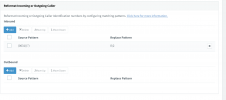
I'm pretty sure this is not e164, but I'm not sure how to reformat it. I tried the guide that 3CX provides for formatting, but I'm not sure I understand. Anyone have any tips on this?
I'm working with a client of mine to connect their 3CX environment to their HubSpot portal (we're the HubSpot partner in this scenario). Creating the Public App and connecting it to 3CX went swimmingly. When testing using the integration's interface in 3CX, we find the test contact in HubSpot. But the live situation is not working:
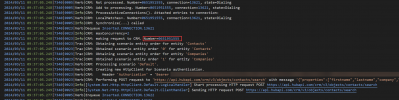
- No match is found for incoming calls. I think this is because their 3CX portal is set to transform incoming numbers to a format different to e164. I asked for their 3CX logs verbose and got the following:
When the caller is dialing:
 When the call is over and it's trying to log it:
See the phone number is formatted as 06XXXXXX rather than +316XXXXXX as it should be in this case. So I think I know how to solve this.
- But no option is given to create a contact either, after hanging up. This strikes me as weird. Is that because the number isn't e164, so it won't let you create one at all? Like, I'd expect it to prompt contact creation after that last log entry, but it just carries on with 3CX native events and the next call after that.
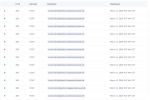
- Last peculiarity I found is the sheer amount of API calls for what should be just 2 searches (one for contacts and one for companies):
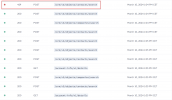
When we tested this a few days ago, we even hit rate limits (HubSpot Search API is limited to 4 requests per second):
Can anyone confirm if 2 is also because of the number format? Or am I missing something? And does anyone know why the rate limit is hit like this? There was only 1 call at the time (there's only 1 3CX user with a matching HS account and she's a team lead so doesn't typically pick up support calls.
EDIT: Phone numbers on their PBX are formatted like so:
I'm pretty sure this is not e164, but I'm not sure how to reformat it. I tried the guide that 3CX provides for formatting, but I'm not sure I understand. Anyone have any tips on this?
Last edited:


