Listen In to Calls

Status
Not open for further replies.

robeac

Bronze Partner
Basic Certified
Joined
Mar 31, 2022
Messages
10
Reaction score
1
Hi

I have a need for new employees to be able to listen in to calls that their trainer is having with customers.

I can see that there is a Listen In function but I'm unclear on how to set this up and use it and struggling to find detailed info or an example of how to set this up.

Could someone help with:
  1. Provide instructions as to what must be configured and where as I would like to configure a user to be able to listen in on a single extension rather than being able to listen in on any extension i.e. their trainers extension. What permissions need to be set for which users?
  2. Can this be done using a normal handset or would the have to use the desktop app?
  3. How would the trainee actually go about listening in to the calls?
  4. During the "listen in" is the listener (trainee) muted or can they interact with the call?
  5. Anything else I might need to know that I haven't covered above.
Thanks for the help.
 
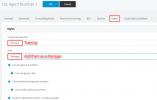
I would create a group under extensions call it Training.

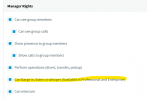
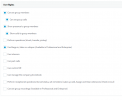
Under Manager rights select "Can Barge in, listen or whisper"

1648805326418.png

Add your extensions in this group.

Set your "manager" as a manager under their extension rights.

They would need to use the client to initial the call to listen in from a headset/handset.

You could also then give your trainee access to their own call recordings.

Go to their extension > Phone prov > 3CX app

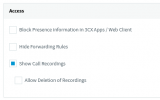
under access you can select "show call recordings"

1648805306382.png
 
Hi @robeac,

@kieferschild has summarised it very well. Just to add a couple of things:

During the "listen in" is the listener (trainee) muted or can they interact with the call?
If the trainee "listens in" they'll be muted, if they barge in, they'll be heard.

How would the trainee actually go about listening in to the calls?
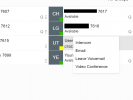
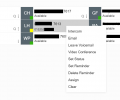
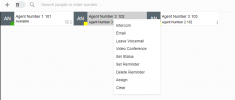
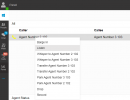
From the Panel view I find it easiest in the Web Client, go ahead and right click an active call and select Listen In, if they've got an IP phone provisioned then it's a possibility to listen to it there as well.
 
Hi

Thanks for the info.

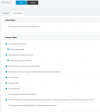
I have created the Training group and added the relevant permission to the group (Training) under User Rights.

Pic1.JPG

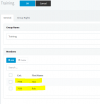
I have added two users to the group to test

1649318862234.png

I'm a bit lost in regards to the below:

Set your "manager" as a manager under their extension rights.

Could you clarify exactly where I need to add this?

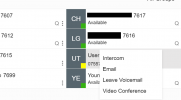
I have tried making a call from the "Test User" and then right clicking the user in the Webclient but I don't get an option to "Listen In".

1649319365011.png

Thanks for the help.

Rob.
 

Attachments

  • 1649319346680.png
    1649319346680.png
    28.7 KB · Views: 19
Hi @robeac,

What @kieferschild meant is to go into the extension itself, click the Rights section, select the Group Training and allocate ensure that the extension is a "manager" for that - or just tick the checkboxes that apply to your situation.

1649319675117.png
 
Thanks for the update.

I tried this but still unable to get it to work.

I have undone all the changes so far and I have simply set the test user that I want to "Listen In" on calls as a Manager on the default group to test.

This is only a small company with 20 users and having a new employee being able to listen in on all users calls would be helpful, hence why I have set the Test User as a manager so that they can listen in on anyone's call.

1649320895082.png

I still do not get an option to listen in when right clicking on an active call in the webclient.

1649321029827.png

Thanks.
 
Hi @robeac,

In the Web Client where you are, click the Panel, this will give you a view on the calls that are taking place. Right clicking a call there will give you the option. Notice the difference:

People:
1649321391943.png


Panel:
1649321346965.png
 
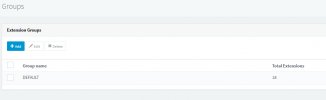
Under Users , click on Groups Icon - select Default - have you added extensions as members

You do have a Pro or Ent license
 
Last edited:
Thank you all for the help.

I have this working now and can refine it using groups as needed.
 
Hi @robeac,

Great to hear you got this working, if you need anything else feel free to open a new thread!
 
Hi

We don't seem to be able to listen in on calls that come inbound through a call group, do we need to enable something on the call queue to allow this?

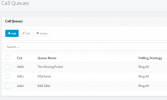
I have added the users as Mangers on the Call Queue.

Thanks
 
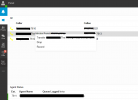
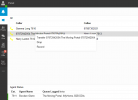
This is the only options we see when the call is Inbound via a Call Queue called The Moving Portal.

1649328515193.png


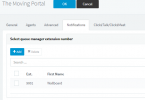
I have added the users as Managers on The Moving Portal queue

1649328625939.png
 

Attachments

  • 1649328400067.png
    1649328400067.png
    27.5 KB · Views: 13
Hi @robeac,

A couple of things.
  1. Go back to the test scenario. Add another test extension. Have them both in a queue, from 1 test extension, call the queue and answer with the other. From your Rob extension, can you Listen In / Barge In there?
  2. If yes, what groups do these users belong to? Are you a Manager within their group (not within their Queue)?
  3. Why is everyone a queue manager?
 
Hi

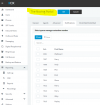
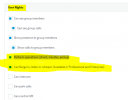
After working through writing a long reply covering the testing I've done, I discovered that where I had enabled the " Can Barge in, listen or whisper (Available in Professional and Enterprise)" permission for Users in the Training Group, this allowed them to Listen In on some calls (External to DDI only) but not for any calls that originated Externally and were inbound to a call queue.

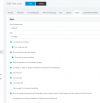
Enabling the option "Perform operations (divert, transfer, pickup)" as well has resolved the issue and users can now "Listen In" on calls the originate externally to the Call queues.

I am assuming that it is the Pickup permission that is required. Maybe an area that may need to be looked at by 3CX Development Team.

1649335421512.png


On a final note to the Development Team.

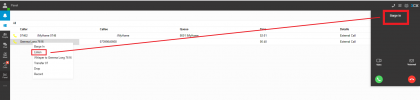
At the moment when you select "Listen In" in the Webclient, the box that appears actually shows "Barge In" which our customer has said is a bit confusing as they are second guessing themselves as to if they pressed the correct option. Can this be fixed to show "Listen In" when you select Listen In and Barge In when you select Barge In?

1649336026385.png

Thanks for the help again.
 

Attachments

  • 1649331185431.png
    1649331185431.png
    33.9 KB · Views: 39
  • 1649331233669.png
    1649331233669.png
    25.5 KB · Views: 27
  • 1649331298707.png
    1649331298707.png
    8.1 KB · Views: 24
  • 1649331409719.png
    1649331409719.png
    13.6 KB · Views: 23
  • 1649331536880.png
    1649331536880.png
    14.6 KB · Views: 24
  • 1649333268909.png
    1649333268909.png
    17.2 KB · Views: 24
Hi @robeac,

For the time being, you'll need to have the perform operations option selected to barge in / listen in to external calls directed to a queue. Thanks for your input, it will be considered!
 
Status
Not open for further replies.

Forum statistics

Threads
111,974
Messages
590,083
Members
164,900
Latest member
Silent_Guru