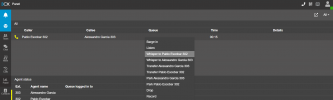
Listen/Whisper/Barge in option not showing

Status
Not open for further replies.

3CTEL

Bronze Partner
Joined
Nov 30, 2022
Messages
89
Reaction score
6
1-extension 29001 is part of all groups
2-he has manager rights
3-Perform operations (divert, transfer, pickup) is selected
4-Can Barge in, listen or whisper (Available in Professional and Enterprise) is selected (using professional account)

These are the settings but still for this extension Listen/whisper/barge in options have suddenly disappeared.
 
Hey, can I get some help please?
 
I assume you are using the DesktopApp or Webclient... if so, what device is set as the "Call using?"
If set to older IP phones these options won't appear and you will need to set it to the app instead.
If set to Smartphone apps these options won't appear and you will need to set it to the app instead.
 
I assume you are using the DesktopApp or Webclient... if so, what device is set as the "Call using?"
If set to older IP phones these options won't appear and you will need to set it to the app instead.
If set to Smartphone apps these options won't appear and you will need to set it to the app instead.
"call using" option is in "phone provisioning" of user?
 
"call using" option is in "phone provisioning" of user?
In the Dialer, when using the dialer there is a drop-down menu “call using”.

If you have the webclient select “Browser” or if it is the desktop app then select the Desktop App option.
 
In the Dialer, when using the dialer there is a drop-down menu “call using”.

If you have the webclient select “Browser” or if it is the desktop app then select the Desktop App option.
I did what you have said above. still can not see "listen" or "whisper" or "barge in" options. Before updating my system all of them were available. Update ruined this and also other problems we have after update.
 
Last edited:
I did what you have said above. still can not see "listen" or "whisper" or "barge in" options. Before updating my system all of them were available. Update ruined this and also other problems we have after update.
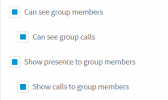
Please check that users are in the same group of users, they also must have these rights enabled

1695218652678.png


Then using an extension with the whisper, barge in feature you will be able to perform these actions from the web client, pwa, desktop app using the panel.
 
thank you very much. this solution worked for me
 
i also have another problem. can i write here about my another problem with 3cx system?
The problem is about 3cx user and manager rights in groups.
 
i also have another problem. can i write here about my another problem with 3cx system?
The problem is about 3cx user and manager rights in groups.
please create a different post for that one.
 
once i have created post, but nobody reacted from 3cx. that is why i want to write it here. by the way i saw staff member in this post that is why i started to write here to get some help.
 
Hello @bakhtiyar123 it is better not to confuse this topic if your inquiry is not related. You can create a new forum topic with your issue.
 
Hi again. Please somebody from 3CX staff help me in this Problem. I created thread but nobody from 3CX staff writes to help me. link is below.
(3cx.com/community/threads/3cx-rights-give-unintended-privileges.122718/#post-575260)
 
Hi again. Please somebody from 3CX staff help me in this Problem. I created thread but nobody from 3CX staff writes to help me. link is below.
(3cx.com/community/threads/3cx-rights-give-unintended-privileges.122718/#post-575260)
Hi @bakhtiyar123 please stop doing this in the forum. You can try to also contact your 3CX partner to get assistance, If you dont have a partner assigned you can find one here

Have a great day!
 
In the Dialer, when using the dialer there is a drop-down menu “call using”.

If you have the webclient select “Browser” or if it is the desktop app then select the Desktop App option.
I have selected "desktop app" but the issue is still there. Also the user is part of all the groups so technically he should have listen/barge/whisper option available for all the users.
 
I have selected "desktop app" but the issue is still there. Also the user is part of all the groups so technically he should have listen/barge/whisper option available for all the users.
Could you please check that the extension is using the manager role or group owner / system owner who are the one that can perform these actions in the group.

The rest of the user must share the presence and calls in order to perform a call action.
 
Could you please check that the extension is using the manager role or group owner / system owner who are the one that can perform these actions in the group.

The rest of the user must share the presence and calls in order to perform a call action.
yes user is assigned manger role with these actions enabled. user can see the call in progress but these options are not available.
 
This works as expected

1696089128089.png

Try to do the following test:

  • Create three new extensions and add them to a new group
  • These three new extensions should not be added in other groups, so remove them from the default group.
  • Assign one of these new users the Manager Role, the rest assign them the user role.
  • Call from A to B, then user C that is the manager, from the switchboard right click on the call, you should see the barge in, listen, whisper functions.
 
Status
Not open for further replies.

Forum statistics

Threads
111,974
Messages
590,081
Members
164,899
Latest member
mazet