Solved Location of recordings - New V18 Windows app

Status
Not open for further replies.

Peter Tomlins

Bronze Partner
Advanced Certified
Joined
Dec 1, 2020
Messages
33
Reaction score
20
Hi - as per subject, am I being totally blind or is there no way for a user to access their own recordings via the new V18 Windows app? Additionally, I cannot see this in the Webclient either?
If this is a missing feature, is it on the roadmap at all?

Thanks in advance!
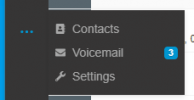
 
In V18 desktop application, click on the three blue dots .

1631111080986.png
 
  • Like
Reactions: ChrisC_3CX
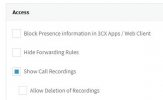
You'll first have to make sure that the extension has the necessary permissions to see recordings when using the 3CX App. To do this, access the Management Console and go to "Users >> Edit >> Phone Provisioning" select the 3CX App from the drop-down list and then scroll down to where it says "Access". Make sure that "Show Call Recordings":
1631110983634.png


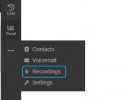
Then it should be under the three dots in the Webclient/Desktop App:
1631111103335.png
 
  • Like
Reactions: Evolute IT
It doesn't make sense to me ether. I'm still not getting emails for recorded web meetings and the only way I've found to give a user access to their own recordings is to give them management console access and strip out all but the recordings permission, however, that gives them access to all user recordings and company wide access to all chat logs between all employees and clients. I'm dumbfounded by this still. I know they are "working" on more granular permissions but they need to go back to the drawing board on this.

Update: @ChrisC_3CX offered a way I hadn't seen before, however, it still gives the user access to all recordings system wide... :oops:
 
Last edited:
  • Like
Reactions: red45
@Peter Tomlins
That's voicemail, I'm not seeing Recordings here?
@SyncWave
the only way I've found to give a user access to their own recordings is to give them management console access and strip out all but the recordings permission, however, that gives them access to all user recordings and company wide access to all chat logs between all employees and clients. I'm dumbfounded by this still. I know they are "working" on more granular permissions but they need to go back to the drawing board on this.

You'll need to first allow the extension to access the recordings when using the 3CX App as per my previous reply.
 
You'll first have to make sure that the extension has the necessary permissions to see recordings when using the 3CX App. To do this, access the Management Console and go to "Users >> Edit >> Phone Provisioning" select the 3CX App from the drop-down list and then scroll down to where it says "Access". Make sure that "Show Call Recordings":
View attachment 24302


Then it should be under the three dots in the Webclient/Desktop App:
View attachment 24304

Duh, I didn't even think about checking there, thanks! I'm sure this was set by default on V16 as I don't recall ever ticking it but then it's a fairly niche thing amongst our customers. Thanks again!
 
  • Like
Reactions: ChrisC_3CX
You're very welcome!

...I'm sure this was set by default on V16 as I don't recall ever ticking it...

It's not selected by default in 3CX v16 either but I can definitely understand not remembering about it especially if it was enabled a while back!:)


@Peter Tomlins
Can you please confirm if this resolved it for your case also?
 
You're very welcome!


It's not selected by default in 3CX v16 either but I can definitely understand not remembering about it especially if it was enabled a while back!:)


@Peter Tomlins
Can you please confirm if this resolved it for your case also?
Yep, it's there, bold as brass now! Thanks again Chris!
 
  • Like
Reactions: ChrisC_3CX
Excellent!

Glad to see this is now sorted!
 
Status
Not open for further replies.

Forum statistics

Threads
112,025
Messages
590,368
Members
164,978
Latest member
FringeIT-Eric