Solved Lots of IPs getting blacklisted > how to respond to the threat?

Status
Not open for further replies.

Charli

Customer
Joined
Apr 6, 2020
Messages
35
Reaction score
14
We've started using 3CX in May 2020 and in July we started getting IP blacklisting notification mails. The amount of IPs being blacklisted has increased since then and over 200 IPs were blacklisted during the last three weeks.

I already increased the blacklisting time from the inital 1 day to 30 days in July.

The blacklisting notifications all look the same except for the user agent:

The IP 45.141.156.19 on PBX [REDACTED] has been blacklisted and will expire on: 2021/01/16 09:19:17.
Affected Module: SIP Server
User agent: PolycomVVX-VVX_300-UA/4.1.6.4835

Reason: Too many failed authentications!

This IP Address 45.141.156.19 has made numerous attempts to authenticate with 3CX using invalid credentials. In response, 3CX has blacklisted this IP and denied any further requests.

No action is required on your behalf.

I'm starting to get worried and would like to block these brute force login attempts. Do these blocked login attempts only occur on port 5060?
I guess I should be able to restrict access to this port to our SIP providers IP address. Though I'd need to check that all of our remote clients use the 3CX Tunnel Protocol (Smartphone Apps and Windows Clients).

Any thoughts or pointers on this? Is this a common problem? How do others tackle this?

Some additional information about our System:
  • 3CX Version: Professional Annual 16.0.1078
  • Server OS: Debian Hyper-V image provided by 3CX
  • Is the 3CX Server Hosted and where?: Hosted on premises
  • Has the Firewall Checker passed: YES

Kind regards and stay safe everyone!
Karl
 
As you know, anything public on the internet will be subject to attacks. Therefore, it's up to you to protect your internet facing services. 3CX is doing it's job by blocking attacks (as youre being notified). Sometimes they come it waves and sometimes hardly ever.

I would first say 3CX shouldnt be your first line of defence in protecting the PBX - Check to see if your router firewall has any IPS services or look to get one that does.

Then consider whether or not you need 3CX to be accessible externally outside of your network (depending on your set up) you could lock your ports down, set up VPNs, restrict by IP.

This is an issue for your network administrator.

I would turn off your blacklist IP email notification as youre likely to get spammed.
 
  • Like
Reactions: YiannisH_3CX
Karl i too have noticed and increase over the last couple of weeks so will watch this thread.
Blocking all 5060 apart from Gamma is the logical and supported thing to do (for me) which is fine apart from most IP phones are on the outside of the LAN - so not a working option.

Putting in a SBC is an idea but the poor fragmented documentation makes little sense and contradicts, loads of "experts" all spouting the contradictory information on the web and no one gives solid factual answers.

It would be great for someone to do some diagrams with working real life examples for new comers to 3CX that go a bit further than the official and confusing documentation which seems to often go around in circles.

If i get a working SBC in place i will map it out graphically for all to see my own working example and what actual ports need to be open and pointed to either SBC or the actual 3CX to get it secure and still actually working.
 
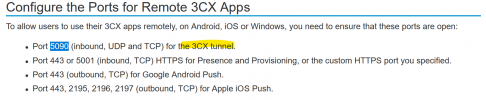
The only port needed IN to 3CX PBX for the SBC to use the tunnel is (default 5090). The SBC needs no ports forwarding but it needs a static IP.

Firewall ports are explained here

https://www.3cx.com/docs/manual/firewall-router-configuration/

1610118933167.png

SBC FAQ

https://www.3cx.com/docs/3cx-tunnel-session-border-controller/

As a newcomer I would have a read in the academy section, watch the webinar and review the slides.

https://www.3cx.com/3cxacademy/videos/basic/nat-port-forwarding/

I would recommend getting your phones off STUN and use SBCs where you can as it will make administration a lot easier. Alternatively, get them using the 3CX apps / web client.

Also, the SBC creates an encrypted tunnel to the PBX to the traffic is secure.

If you want a hand with an SBC set up there are plenty of people here who will help if you ask. But, we ask you read the documentation first.
 
Last edited:
  • Like
Reactions: CRM250 and Charli
@kieferschild i really appreciate your reply.

So assuming i had the SBC and 3CX on the same LAN (will expand on this again) then it needs mapping out as follows

SBC - UDP 5060 only

3CX - TCP 5001, TCP/UDP 5090, UDP 6000-10999

Anything on the LAN (supported or unsupported works and provisions fine if pointed to 3CX
Anything on the WAN (supported only) works and provisions if pointed to the SBC WAN IP using a FQDN

Is this right ? sorry for the thread hijacking @Charli
 
You do not need an SBC on the same LAN as your 3CX as phones will provision using LAN method.

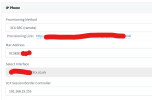
The SBC needs to be at the remote site, your phones will provision via the SBC when you configure them this way.

1610119995331.png

they will show like this under phones tab

1610120052240.png
 
Hi @CRM250

I would recommend creating a new thread for this as this thread is for a different topic.
 
  • Like
Reactions: Charli and CRM250
As you know, anything public on the internet will be subject to attacks. Therefore, it's up to you to protect your internet facing services. 3CX is doing it's job by blocking attacks (as youre being notified).
yes, I know, I'm just curious on how others are protecting their PBX.

Then consider whether or not you need 3CX to be accessible externally outside of your network (depending on your set up) you could lock your ports down, set up VPNs, restrict by IP.
For our PC users it would be okay to dial in through VPN but I don't want to force VPN usage on our Smartphone users. But I will recheck if any of our currently exposed ports are actually unnecessary for our setup. E.g. We don't use any desk phones, only the Windows and Smartphone Apps + Webinterface.

Thanks for you suggestions so far, kieferschild.

I'd still like to know what kind of login attempts 3CX actually blocks and blacklists here. In the notification mails it says "Affected Module: SIP Server". I guess this refers to port 5060?
 
PC Users / Mobile App dont need VPN as they use the tunnel to the pbx
 
I feel that the initial topic of this thread has been addressed, so I will mark it as solved.
If you have setup 3CX without manually changing passwords manually, configuring phones manually, etc, you will be just fine.
To better understand the security measures 3CX takes, you can check out this:
https://www.3cx.com/3cxacademy/videos/advanced/security-with-3cx-phone-system/

For the discussion on the SBC I see it has continued here:
https://www.3cx.com/community/threads/sbc-ports-real-world.78623
 
Status
Not open for further replies.

Forum statistics

Threads
111,974
Messages
590,081
Members
164,899
Latest member
mazet