M365 Sync not working?

Status
Not open for further replies.

flevel

New User
Joined
May 3, 2022
Messages
5
Reaction score
0
Hi, in the post you have referenced, the button to add users is not available, as when you have all users enabled for the sync option, the button to add users is not available. All users that are in 365 will then be synced to create 3cx extensions, but what exactly is your issue, please?
 
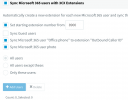
Well the main issue is that users don't sync, but with regard to the buttons, I cannot even change the radio button selection:

1651605049426.png
 
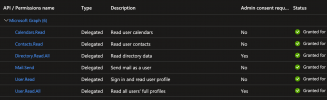
I see, in this case, check and make sure that the app registration for the 365 integration has been completed, as in, that you have also set the permissions in azure and switched back to the management console clicked sign in, and accepted the permissions. As per the guide https://www.3cx.com/docs/microsoft-365-integration/#h.v13e02uyuc4j.
 
Yes, I have done all that and gone through the guide again to make sure.
1651605919499.png
Is there debug info anywhere?
 
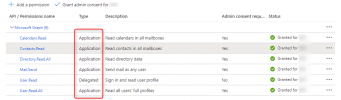
first, check the options you have set, these should be set to Application not Delegated (except for User.Read), then grant permissions again and switched back to the management console click sign in, and accepted the permissions again. Make sure you are following the guide carefully. If still an issue you can switch on verbose logging from the management console > activity log > settings and restart the 3cx system server service, then from the Activity log > Log files > Instance > download the 3cxSystemService.log. Check in this log for any errors with the 365 sync.

1651607718461.png
 
Last edited:
  • Like
Reactions: flevel
Well that's embarrassing, thank you! That fixed it.
 
You are welcome, no problem at all. I am glad I could help.
 
Well it looks like I might have spoke too soon. The sync kind of works, with one problem: my user (the same user authorizing the app) does not appear in the "only these users" list. If I synchronize all users, my user comes across but it wipes my first and last name.
 
Well it looks like I might have spoke too soon. The sync kind of works, with one problem: my user (the same user authorizing the app) does not appear in the "only these users" list. If I synchronize all users, my user comes across but it wipes my first and last name.
Does this user have a First and Last and Display Name set?
 
Status
Not open for further replies.