MakeCall source is not reachable" when linking a call to a Snom desk phone (3CX v20 Update 10, SBC)

danfw

Silver Partner
Joined
Oct 7, 2020
Messages
63
Reaction score
7
Hi all,

We're seeing an issue on a 3CX v20 Update 10 (Build 1801) system and would appreciate any guidance. It was first reported by a customer using a Snom D120, and we can reproduce it on our own test phone (Snom D785, firmware 10.1.226.13) on a separate 3CX system running the same version.

WHAT USED TO WORK
In the 3CX Desktop App on macOS, the user could choose which device to place a call from (desk phone, browser, or smartphone), and the call would link to that device.

WHAT HAPPENS NOW
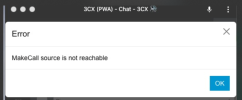
The desk phone is still offered as an option, but when the call is linked to it we get the error "MakeCall source is not reachable" (screenshot attached). Using the smartphone as the source works.

SETUP DETAILS
- The phones register through an SBC, with SRTP enabled.
- CSTA control is enabled in the phone settings.
- The phones were provisioned through the SBC with manual provisioning.

WHAT WE'VE TRIED
- Reproducing the error on several desk phones and extensions, with the same result every time.
- Updating the desk phone firmware, with no change.
- Factory-resetting a phone and re-entering the credentials, with no change.
- Testing from the Web Client and as a PWA, with the same result. The customer's user is on iOS, so the native app isn't available to her.

QUESTIONS
1. Is choosing a desk phone as the call source from the Desktop App or Web Client still supported in v20, or was it removed or changed?
2. If it is supported, what does the desk phone need to be "reachable" (provisioning method, SBC, firmware, extension settings)?
3. Which logs or events should we check to see why the source is unreachable?
 

Attachments

  • image (6).png
    image (6).png
    73.6 KB · Views: 1
Hi,

A few things I'd suggest checking:

1. Firmware: Your D785 is running 10.1.226.13. Could you try the firmware version officially listed by 3CX for that model? I'd recommend testing this on your lab phone first. https://www.3cx.com/docs/phone-firmwares/

2. Provisioning: When you mention "manual provisioning", do you mean you manually entered the provisioning URL generated by 3CX, or configured the SIP credentials directly on the phone? There's an important difference, especially for CSTA functionality.

3. Phone assignment: In the 3CX Admin Console, make sure the phone is properly assigned to the extension, with the correct MAC address, model, and SBC.

4. CSTA: Even though CSTA is enabled, could you confirm that the phone actually receives the configuration generated by 3CX? I'd also suggest checking the Snom logs when reproducing the error.

5. Isolation test: If possible, try a different supported phone brand (Yealink or Fanvil) on the same PBX and SBC. This could help determine whether the issue is specific to Snom or affects phone control more generally.

If nothing helps, enable Verbose logging in 3CX, reproduce the error, and generate the 3CX Support Info package for further investigation. Don't share your 3CX Support Info package publicly on the forum.
I'd be particularly interested in knowing whether you're using the 3CX provisioning URL or configuring the SIP credentials manually.
 
Hi Guillaume, thanks for the detailed suggestions.

To answer your question about provisioning: the D785 was configured manually, with the SIP credentials entered directly on the phone. It is not using the provisioning URL generated by 3CX.

We'll run the tests tomorrow, starting with adding the phone in the Admin Console with its MAC, model, extension and SBC, and provisioning it with the 3CX-generated URL. If the error persists, we'll try the firmware version officially listed by 3CX for the D785 (10.1.215.13) and check the Snom logs.

I'll report back with the results
 
  • Like
Reactions: Guillaume Bourgeois