- Joined
- May 31, 2022
- Messages
- 2
- Reaction score
- 1
Hi All,
Cross posting here as the partner/permier forum may not be the best place to get a response.
I'm hoping someone can help me shed some light around the setup for departments/users rolls to achieve a new objective of both providing and restrcing call recording/report access depending on department membership and I'm not sure it's possible to do this nicely in V20?
For example, I have multiple deparments, Exec, Team1, Team2
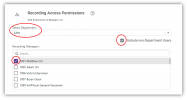
I need members of exec to be able to report on and and listen to call recordings for everyone in Exec/Team1/Team2 but I also need only the managers role in Team1/Team2 to able to report on and listen to the calls of their respective departments only. An issue I run into is when I add Exec members to Team1/2 all the managers in Team1/2 gain access to the exec members recordings. The only solution I've come up with so far is to set Exec members as System Owners and not be members of Team1/2 to give them access to all recordings without letting the Team1/2 managers listen in on their calls.
Has anyone solved this requirment or is aware of where I'm going wrong?
Any help would be greatly appreciated.
Kind Regards
Cross posting here as the partner/permier forum may not be the best place to get a response.
I'm hoping someone can help me shed some light around the setup for departments/users rolls to achieve a new objective of both providing and restrcing call recording/report access depending on department membership and I'm not sure it's possible to do this nicely in V20?
For example, I have multiple deparments, Exec, Team1, Team2
I need members of exec to be able to report on and and listen to call recordings for everyone in Exec/Team1/Team2 but I also need only the managers role in Team1/Team2 to able to report on and listen to the calls of their respective departments only. An issue I run into is when I add Exec members to Team1/2 all the managers in Team1/2 gain access to the exec members recordings. The only solution I've come up with so far is to set Exec members as System Owners and not be members of Team1/2 to give them access to all recordings without letting the Team1/2 managers listen in on their calls.
Has anyone solved this requirment or is aware of where I'm going wrong?
Any help would be greatly appreciated.
Kind Regards