Solved Manually hit download on the debian security update and latest U10 A2 and now system wont boot -.-"

Status
Not open for further replies.

Alphabetic

3CX MVP
Silver Partner
Advanced Certified
Joined
Jul 1, 2016
Messages
6,588
Reaction score
2,602
got eager and now our system wont boot...

whats best way to troubleshoot this?

"service 3CX* status" returns nothing :(
 
Solution
I pasted the previously quoted snippet from the update.log into the 3CX Support AI chat and followed instructions to fix the GRUB problem and then was able to install the Debian security update successfully.

Problem: GRUB boot loader was installed to disk vda which doesnt exist (caused by how I installed 3CX).

Solution: Install GRUB bootloader to correct disk following 3CX AI Support instructions.

For reference only, this was for MY CASE

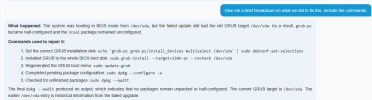
1789032452531.png


Never thought id use it but here we are :p

Code:
What happened: The system was booting in BIOS mode from /dev/sda, but the failed update still had the old GRUB target /dev/vda. As a result, grub-pc became half-configured and the 3cxai package remained unconfigured.


Commands used...
@Alphabetic can you elaborate what you mean with " hit download on the debian security update " ?
Did you try to install U10 A2 and this happened ?
 
@Alphabetic can you elaborate what you mean with " hit download on the debian security update " ?
Did you try to install U10 A2 and this happened ?
Hi Nikos

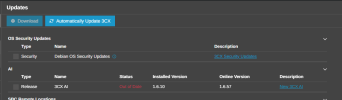
I selected the top 2

1789024416544.png

Hit download.

I managed to get it back to life with the help of ChatGPT.

Code:
sudo dpkg --configure 3cxpbx

Brought PBX back up and got a failed update email, but looks like im on latest 20 U10 B1621

**Update**

Ignore screenshot, as I had the security update and U10 Alpha to install - this has since been installed.
 
@Alphabetic I will drop you a DM now so we can check this further with more details.
 
@Alphabetic I will drop you a DM now so we can check this further with more details.
No worries.

I can send you the update log too.

There seems to be floods of entries that say:

Code:
GRUB install devices: 
Use of uninitialized value $_[1] in join or string at /usr/share/perl5/Debconf/DbDriver/Stack.pm line 111.
grub-pc: Running grub-install ...
You chose not to install GRUB to any devices. If you continue, the boot loader 
may not be properly configured, and when this computer next starts up it will 
use whatever was previously in the boot sector. If there is an earlier version 
of GRUB 2 in the boot sector, it may be unable to load modules or handle the 
current configuration file.

If you are already using a different boot loader and want to carry on doing so, 
or if this is a special environment where you do not need a boot loader, then 
you should continue anyway. Otherwise, you should install GRUB somewhere.

Continue without installing GRUB? [yes/no] 
Use of uninitialized value $_[1] in join or string at /usr/share/perl5/Debconf/DbDriver/Stack.pm line 111.
The GRUB boot loader was previously installed to a disk that is no longer 
present, or whose unique identifier has changed for some reason. It is important
to make sure that the installed GRUB core image stays in sync with GRUB modules 
and grub.cfg. Please check again to make sure that GRUB is written to the 
appropriate boot devices.

If you're unsure which drive is designated as boot drive by your BIOS, it is 
often a good idea to install GRUB to all of them.

Note: it is possible to install GRUB to partition boot records as well, and some
appropriate partitions are offered here. However, this forces GRUB to use the 
blocklist mechanism, which makes it less reliable, and therefore is not 
recommended.
 
I pasted the previously quoted snippet from the update.log into the 3CX Support AI chat and followed instructions to fix the GRUB problem and then was able to install the Debian security update successfully.

Problem: GRUB boot loader was installed to disk vda which doesnt exist (caused by how I installed 3CX).

Solution: Install GRUB bootloader to correct disk following 3CX AI Support instructions.

For reference only, this was for MY CASE

1789032452531.png


Never thought id use it but here we are :p

Code:
What happened: The system was booting in BIOS mode from /dev/sda, but the failed update still had the old GRUB target /dev/vda. As a result, grub-pc became half-configured and the 3cxai package remained unconfigured.


Commands used to repair it:


[LIST=1]
[*]Set the correct GRUB installation disk:echo 'grub-pc grub-pc/install_devices multiselect /dev/sda' | sudo debconf-set-selections
[*]Installed GRUB to the whole BIOS boot disk:sudo grub-install --target=i386-pc --recheck /dev/sda
[*]Regenerated the GRUB boot menu:sudo update-grub
[*]Completed pending package configuration:sudo dpkg --configure -a
[*]Checked for unfinished packages:sudo dpkg --audit
[/LIST]

The final dpkg --audit produced no output, which indicates that no packages remain unpacked or half-configured. The current GRUB target is /dev/sda. The earlier /dev/vda entry is historical information from the failed upgrade.
 
Solution
Status
Not open for further replies.