Manually setting Out of Office hours with dial code

Status
Not open for further replies.

garrick.cobcroft@gsconsul

Silver Partner
Joined
Sep 1, 2022
Messages
75
Reaction score
16
Hi, in V18 you could set a dial code (in our case *99) to override the default office hours manually. I notice that this has been removed from the dial codes section in V20. However, I have setup this dial code in parameters under DIALCODEOUTOFFICE. When dialling *992, the system correctly reports that it is now Out of Office hours. and dialing *991 returns to in office hours.
However, we dialing *992 and placing the system out of office hours, it's still following the call handling sequence for in office hours?
 
The Force In/Out of Office hours dial code in V20 is no longer available and adding this as a parameter might affect functionality or not work properly.
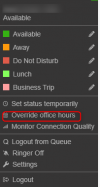
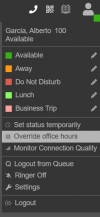
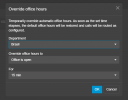
However in V20 you can do this from the Web Client and select to Override Office hours, then select Department, timeframe and status:
1712627695990.png
 
  • Like
Reactions: Evolute IT
Hi Garrick, in v20 this must be done using the web client or pwa as shown in the pic below:

1712627580735.png

1712627598937.png

In v20 there is not dial code to force the system in/out anymore, also do not edit the parameters in the system if these have not been authorized by the 3CX Support otherwise the setting will be unsupported.

Have a great week ahead!
 
  • Like
Reactions: Evolute IT
Thanks guys, I have been able to do this from the web client as the System Administrator, but the other users don't seem to have the option. What role does a user need to have to see this option?

It is disappointing that the dial code option has been removed, as this is far more convenient for my users. I have a number of customers that only have desk phones and/or the mobile app, so they rely on using the dial codes for features such as this.
 
The new 3CX Roles and each capabilities are also listed here.
Currently the V20 is based on the departments as you can now easily override the hours globally or specific for a department.
 
  • Like
Reactions: Evolute IT
Thanks Theodores, yes - I do get that. But in our case, our client base is small business (less than 100) and in most cases, less than 20 empoyees. So deparments are unnesessary. The ability to change the office hours globally via a dial code is very much a key feature for organisations of this size in our region.

I appreciate your help though.
 
  • Like
Reactions: CPMM and AzzWiz
Note that this is a feature that is added in the 3CX Call API scripts and can be developed from your side in the next updates.
This can be implemented with the Call Processing Scripts. For more information refer to this guideline.
However note that this is a feature for the Self Hosted or On premise installations only.
 
  • Like
Reactions: Evolute IT
Thanks Theodores, yes - I do get that. But in our case, our client base is small business (less than 100) and in most cases, less than 20 empoyees. So deparments are unnesessary. The ability to change the office hours globally via a dial code is very much a key feature for organisations of this size in our region.

I appreciate your help though.
Just use 1 department. Receptionist and above should be able to override hours.
 
  • Like
Reactions: TheodorosG_3CX
Status
Not open for further replies.

Latest Posts

Forum statistics

Threads
111,953
Messages
589,915
Members
164,850
Latest member
masvty