Solved Mcu servers list

Status
Not open for further replies.

Oriol_F

Silver Partner
Advanced Certified
Joined
Dec 1, 2017
Messages
5
Reaction score
3
Hi,
could it be possible to find the full list of european/global mcu servers?

In status.3cx.net there are a few servers only, and I suppose they are v16 servers.

When we query the domains:
mcu-zone-a.3cx.net
mcu-zone-b.3cx.net
mcu-zone-c.3cx.net
mcu-zone-d.3cx.net
mcu-zone-e.3cx.net
mcu-zone-f.3cx.net
mcu-zone-i.3cx.net
webmeeting-director.3cx.net

we get ips like
"Name: mcu-zone-c.3cx.net
Addresses: 165.227.135.25
51.89.234.28
51.83.239.112
51.178.92.131
51.89.234.26
51.178.92.178
51.178.133.95"

but when we start a webmeeting the mcu may be:
- mcu-wmr-eu-02227.3cx.net - 35.198.101.173
- mcu-wmr-eu-02226.3cx.net - 35.198.65.216
- mcu-wmr-eu-02225.3cx.net - 34.107.112.102
- .....

Could we get the complete list of mcu to help our customers configure their firewalls? some of them can not use wildcards in domain names.

Thanks
 
You can use "qos.3cx.net" which has all IPs.
 
  • Like
Reactions: Oriol_F
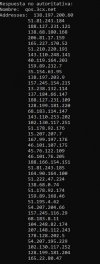
Thanks for the reply, we tried this domain, but isn't also showing the real IPs. In attached img you can see the ip's of qos.3cx.eu,

qos3cx.jpg

but as you can see, neither of these is shown:

- mcu-wmr-eu-02227.3cx.net - 35.198.101.173
- mcu-wmr-eu-02226.3cx.net - 35.198.65.216
- mcu-wmr-eu-02225.3cx.net - 34.107.112.102
 
  • Like
Reactions: oolivella
but as you can see, neither of these is shown:

- mcu-wmr-eu-02227.3cx.net - 35.198.101.173
- mcu-wmr-eu-02226.3cx.net - 35.198.65.216
- mcu-wmr-eu-02225.3cx.net - 34.107.112.102
MCU Servers with this naming convention are dynamically created servers that are span up automatically depending on the load of the webmeeting platform.
These Dynamic MCUs change constantly both names and IPs.
 
Hello,
Same thing with us, we generated objects in our Firewall to anticipate the news fqdn (ex mcu-wmr-eu-02225.3cx.net mcu-wmr-eu-02226.3cx.net mcu-wmr-eu-02227.3cx.net...).
Why you don't create a FQDN grouping these FQDNs before ? This is really impacting for us, we use special routing for videoconferencing streaming an Qos too.

Nicolas
 
hi,
don't having the complete list (or the subnet used) is a big problem for our customers too. In a zero trust policy environment that's a really big problem and it's enough reason to stop using the tool.

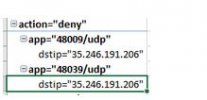
We cannot tell our costumer's security team "you should allow all the UDP >48000 connections to xxxxxxxxxxx.googleusercontent.com"
(like the ones in the image)

We need a public list or IPs and ports, or an option at server level to force the connection over TCP443. I think this would be a good solution.

Thanks,
Oleguer
 

Attachments

  • mcu servers.JPG
    mcu servers.JPG
    31.1 KB · Views: 16
  • Like
Reactions: Oriol_F
hi,
don't having the complete list (or the subnet used) is a big problem for our customers too. In a zero trust policy environment that's a really big problem and it's enough reason to stop using the tool.

We cannot tell our costumer's security team "you should allow all the UDP >48000 connections to xxxxxxxxxxx.googleusercontent.com"
(like the ones in the image)

We need a public list or IPs and ports, or an option at server level to force the connection over TCP443. I think this would be a good solution.

Thanks,
Oleguer
+1

Totallly agree, i think a public list or the connection over TCP443 is needed.

Thanks
 
We are working one something to allow you to be able to resolve the IPs of the Dynamically created MCUs, but bear in mind that as those change intra-day, 24h caching might not be often enough.

Regardless, it should be ready in the near future, when it is we will let you know.

In the meantime though, do make sure that you always allow Outbound Access to: wmr.3cx.net
 
Hello,
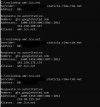
this domain shows only one ip, which changes every few seconds.
why don't you change the connection behavior, and force connections over tcp 443? that could be a definitive and secure solution
 

Attachments

  • mcu servers 2.JPG
    mcu servers 2.JPG
    48.4 KB · Views: 18
Hello,
this domain shows only one ip, which changes every few seconds.
why don't you change the connection behavior, and force connections over tcp 443? that could be a definitive and secure solution
With the way WebMeeting works, this isn't possible for all services.

this domain shows only one ip, which changes every few seconds.
The system that you load this FQDN into needs to respect and recheck every TTL interval, which is 5 minutes in this case at the time of writing, so yes, the IP this resolves to can change quite frequently.
 
Hello,
WebMeeting already works fine on port TCP 443 if no UDP connectivity is available and there is no need to configure anything. The client will try UDP and TCP connectivity and use what's available from the client's network.
Consider that UDP performance is usually better and it's the preferred choice when available.

WebMeeting servers are part of a dynamic architecture, with new servers being created during the day when needed, so be sure that your firewalls are updating their rules according to the TTL of the DNS record we will provide soon, otherwise you could experience connectivity issues.

3CX PBX will connect to MCUs only when a meeting starts and only on port TCP 443: if this connection fails, the meeting won't start (error 0x0020). There is no UDP between 3CX PBX and MCUs.
 
  • Like
Reactions: NickD_3CX
Hi, thanks for the replies!
some of our customers have reported that they cannot connect with us because of the locked by default udp ports. (and they cannot open them without a list of ip)
If they enable them in a test environment, the streaming works! but if the firewall denies the outbound connection over udp>48000, the webmeeting doesn't works (they don't receive video nor audio) It doesn't redirects to tcp as it should, don't?.
I think that's the issue. Why is not redirecting? Any idea?
 

Attachments

  • ncu servers3.jpg
    ncu servers3.jpg
    13.1 KB · Views: 4

Zero Trust Networks​

Some 3CX System installations are placed in zero-trust networks. In order for 3CX Video Conference to operate correctly, the 3CX System and its users need connectivity to the 3CX Video Conferencing platform in the Cloud and users need to be able to connect to your system in order to start a video session.

Inbound
Customers (and your users) will connect to the selected 3CX FQDN and the HTTPS port (recommended 443). Once they are connected they will be assigned to a processing unit in the 3CX cloud.

Outbound
The most convenient network outbound rule would consist of:
  • To: *.3cx.net
  • Ports: 443:TCP and 48000-65535:UDP.

The underlying IPs may change multiple times per day and must be updated frequently. Therefore do not resolve the FQDNs and write down the IPs! In detail are our records wmr.3cx.net (443:TCP, ephemeral), files-eu.3cx.com (443:TCP, static), files-us.3cx.com (443:TCP, static), files-as.3cx.com (443:TCP, static), files-uk.3cx.com (443:TCP, static), files-au.3cx.com (443:TCP, static), files-sa.3cx.com (443:TCP, static), files-af.3cx.com (443:TCP, static), wmr-cdn.3cx.com (443:TCP, static). v18-vc-qos.3cx.net returns a list of IPs of currently used media processing units (MCU) under various FQDNs within the 3CX.net domain namespace. 443:TCP and 48000-65535:UDP need to be allowed to those endpoints.
 
How does that list relate to qos.3cx.net?
Thanks,
 
How does that list relate to qos.3cx.net?
Thanks,
The logic is the same as with qos.3cx.net, but with more breakdown. Also qos.3cx.net had static values, where the mechanism we are preparing will cater for the dynamic nature of the new infrastructure.
 
  • Like
Reactions: Evolute IT
I see thanks. I had noticed there was overlap with qos.3cx.net so was confused. So, use Stefan's list and not qos.3cx.net? In my case it's not for outbound rules but for QoS of the streams.

And presumably by its name v18-vc-qos.3cx.net will update to v19-vc-qos.3cx.net and so on, at some future point?
 
So, use Stefan's list and not qos.3cx.net?
Yes

And presumably by its name v18-vc-qos.3cx.net will update to v19-vc-qos.3cx.net and so on, at some future point?
I can't talk for what will happen in the future, but for now, this is the entry that will hold the active MCU IPs.
Just to add, it does not yet hold ALL the IPs of all MCUs, but the mechanism that will update it and be responsible for keeping it up-to-date should be ready in the coming days.
 
When ready, maybe qos.3cx.net can be made a CNAME for v18-vc-qos.3cx.net? (or whichever is appropriate)

Edit: hmm, that might be misleading if that's only some IPs, as opposed to having qos.3cx.net not resolve at all anymore.
 
The underlying IPs may change multiple times per day and must be updated frequently. Therefore do not resolve the FQDNs and write down the IPs! In detail are our records wmr.3cx.net (443:TCP, ephemeral), files-eu.3cx.com (443:TCP, static), files-us.3cx.com (443:TCP, static), files-as.3cx.com (443:TCP, static), files-uk.3cx.com (443:TCP, static), files-au.3cx.com (443:TCP, static), files-sa.3cx.com (443:TCP, static), files-af.3cx.com (443:TCP, static), wmr-cdn.3cx.com (443:TCP, static). v18-vc-qos.3cx.net returns a list of IPs of currently used media processing units (MCU) under various FQDNs within the 3CX.net domain namespace. 443:TCP and 48000-65535:UDP need to be allowed to those endpoints.

Just to add, it does not yet hold ALL the IPs of all MCUs, but the mechanism that will update it and be responsible for keeping it up-to-date should be ready in the coming days.
thanks for the info Stefan and Nick! that looks good.
we will send that info to our customers
 
For anyone watching this thread, we'd like to inform you that changes have been made and the FQDN (v18-vc-qos.3cx.net) should now hold all MCU IPs and will keep being updated dynamically.
 
Status
Not open for further replies.

Latest Posts

Forum statistics

Threads
111,973
Messages
590,075
Members
164,895
Latest member
jasonkkrause