Microsoft 365 Integration calendar sync

Status
Not open for further replies.

Thomas Six

Platinum Partner
Advanced Certified
Joined
May 31, 2017
Messages
133
Reaction score
44
We have an issue with removing the calendar item in office 365.

When we add a new office 365 calendar item and set it to busy, the 3cx client status changes to DND when the calendar item starts. And goes back to available when the item ends.
But when we remove the item after starting time and before end time, the status stays DND until whe change it manually or when a new item starts. Is this normal behavior?
 
But when we remove the item after starting time and before end time, the status stays DND until whe change it manually or when a new item starts. Is this normal behavior?
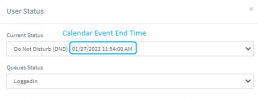
This should actually not happen as the 3CX PBX will set the extension's status only for the time duration the calendar event was set to. I just tested and confirmed that, even if you delete the calendar event while it was running, the extension will indeed stay in the Away/Busy status but will then automatically switch back to Available when the original event end time is reached.

You can actually check this by going into the Management Console and checking the extension status(check the extension and click on "Status" above). It will show as follows even after you've ended the event:
1643275533243.png
 
  • Like
Reactions: Evolute IT
We experience the same behaviour:

So if an event begins the status changes do dnd.

But if we delete the calendar item or change the "Show As" option form dnd to available, when the event is ongoing then there is no sync of the new settings of the calendar item.


Also if an calendar item is set as "Show As" available and change it to dnd while the event is already started, then the status in 3cx is changed.


Can we force syncs when an event is ongoing or is this something you are aware of and are fixing ?
 
We experience the same behaviour:

So if an event begins the status changes do dnd.

But if we delete the calendar item or change the "Show As" option form dnd to available, when the event is ongoing then there is no sync of the new settings of the calendar item.


Also if an calendar item is set as "Show As" available and change it to dnd while the event is already started, then the status in 3cx is changed.


Can we force syncs when an event is ongoing or is this something you are aware of and are fixing ?
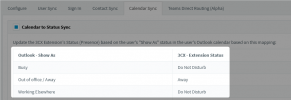
The 3CX understand only:
  • The creation date/time of an event
  • These statuses:
    1646730950333.png
This means that if you do one of the actions that 3CX does not understand, 3CX will remain in the previous state.

Examples:
  • Calendar Event is "Away" and you change the status to "Busy" --> 3CX will switch to DND because it is a known status
  • Calendar Event is "Busy" and you change the status to "Free" --> 3CX does not know "Free" so will do nothing.
  • Calendar Event is set to end at 11:45 and at 11:40 you change the time to 11:50 --> 3CX Understand the end time, so it will update.
  • Calendar Event is set to end at 11:45 and at 11:40 you delete the calendar event --> 3CX does not know this state, so remains as it was.
 
The 3CX understand only:
This means that if you do one of the actions that 3CX does not understand, 3CX will remain in the previous state.

Examples:
  • Calendar Event is "Away" and you change the status to "Busy" --> 3CX will switch to DND because it is a known status
  • Calendar Event is "Busy" and you change the status to "Free" --> 3CX does not know "Free" so will do nothing.
  • Calendar Event is set to end at 11:45 and at 11:40 you change the time to 11:50 --> 3CX Understand the end time, so it will update.
  • Calendar Event is set to end at 11:45 and at 11:40 you delete the calendar event --> 3CX does not know this state, so remains as it was.

Oké I understand the above explanation (programming of 3cx), but what I’m wondering is what stops you (3cx) to add the "outlook - shows as" option "available " and link it to available in 3cx.

is this an limitation of the Microsoft graph API ?
 
Oké I understand the above explanation (programming of 3cx), but what I’m wondering is what stops you (3cx) to add the "outlook - shows as" option "available " and link it to available in 3cx.

is this an limitation of the Microsoft graph API ?
This I cannot answer unfortunately, but I would suggest asking your 3CX Partner to open it as an "Idea".

In regards to the deletion of an event, in this case I think it is an MS Graph thing, because *I think* it doesn't send a notification.
 
Status
Not open for further replies.