Microsoft 365 integration set extension in AD

Status
Not open for further replies.

FirstPoint

Titanium Partner
Joined
Oct 3, 2022
Messages
71
Reaction score
4
Microsoft 365 integration set extension in AD.
Is it possible to set the extension to be assigned to 3cx on AD?

Thanks
Simone Rota
 
  • Like
Reactions: ghalan
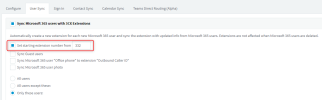
Hi @FirstPoint You can sync the M365 "Office phone" to be the users "Outbound caller ID" but unfortuntaly not the extension number.
There is, however, an option to set the starting extension number to your desired range.

1664955925829.png
 
  • Like
Reactions: ghalan
we are struggling with exactly the same.

We are planning a large migration from broadsoft to 3cx with over 100 users.
It would be very handy if 3CX made an option to use e.g. contact information field "Business phone" in AAD to use as extension. This way you can keep the existing user/extension number combination without importing user by user.
 
we are struggling with exactly the same.

We are planning a large migration from broadsoft to 3cx with over 100 users.
It would be very handy if 3CX made an option to use e.g. contact information field "Business phone" in AAD to use as extension. This way you can keep the existing user/extension number combination without importing user by user.
Hello @jener
As per my colleagues reply, you can choose to start importing of users to 3CX Extensions to a specific range. Due to the limitation of AAD there is no extension number field and other fields such as Office Phone Number are required for other features such as Team Integration for example.
In any case, currently this is not possible.

That said, if you have an on-premise Active Directory which is synching to your AAD, you can sync your local AD Users as 3CX Extensions using the AD import feature but only on Windows based 3CX System.
 
Status
Not open for further replies.