Microsoft 365 Integration

KaterinaK_3CX

Joined
Feb 24, 2016
Messages
246
Reaction score
36
This guide will walk you through setting up Microsoft integration to sync users, enable SSO and contact/calendar sync depending on the Microsoft subscription and 3CX Edition

Read the guide.
 
Good afternoon,
I've tried to integrate Microsoft 365 into 3 CX.
I've followed your guid.e
Until Step 3 point 2 Adding the permissions, everything goes fine.
Point 3 Click on “Grant admin consent for 3CX” to set the app permissions.I cann't execute the procedure. I cann't change the grant to 3 CX.
When I'm signing into Microsoft 365, I recieve the following message in the login window of office 365.

Request Id: 45d87c88-686b-46ad-9dd4-ffe5b4814500
Correlation Id: 419b9e7e-1fe3-4012-8154-8c7111fa80cd
Timestamp: 2021-03-03T16:40:56Z
Message: AADSTS50011: The reply URL specified in the request does not match the reply URLs configured for the application: '645a6b0d-0b3e-4ac4-9860-681c15392b45'.

The application ID in 3 CX was

1614791016374.png
Can you help me what I've done wrong?
 
  • Like
Reactions: NickD_3CX
Is there a way to set up the Office 365 Exchange mailbox to directly sync with 3CX voicemails such that voicemails are placed in Exchange? This would mean that regardless of whether the user logged into Exchange or directly into 3CX voicemail and deleted a particular voicemail, that voicemail would be deleted from the other view (i.e., deleting from 3CX would delete from Exchange, and deleting from Exchange would delete form 3CX. Thus a synchronization.)
 
@kfjelsted there is no way to have such a synchronisation. 3CX Can send voicemails to the mailbox of the user, but the deletion of the voicemail from any one of those destinations will not affect the other.
 
Hi Team,

When initally spinning up a PBX, if we run the M365 sync, will that pull all existing users from our tenancy and create them as extensions?
 
@Lachlan Britt
When initally spinning up a PBX, if we run the M365 sync, will that pull all existing users from our tenancy and create them as extensions?
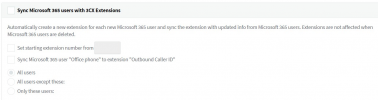
In essence yes, provided of course that you enable "Sync Microsoft 365 users with 3CX Extensions" under "Settings >> Microsoft 365 Integration >> User Sync". You do have some additional options if you do not want to sync all users. For instance you can sync only specific users or even have users excluded from syncing:
1620898454907.png
 
  • Like
Reactions: Lachlan Britt
Thanks Chris,
Second question, do we have to specifiy sync users individually, or can we do via 365 groups?
 
Second question, do we have to specifiy sync users individually, or can we do via 365 groups?
The only available options are as seen in the screenshot, you can either sync all users, exclude specific users or include specific users. There is a search function available when including/excluding users which might help make it easier, but there is no option to search by group.
 
That's a shame, we'll have to do the creation etc. manually rather than just selecting a 365 Group.
 
  • Like
Reactions: alanjmcfL
Microsoft 365 group sync options?.... Wish we could select groups to sync from AAD not just users :(

Do you think this will come at all ... if not bye bye 3CX :(
 
Microsoft 365 group sync options?.... Wish we could select groups to sync from AAD not just users :(

Do you think this will come at all ... if not bye bye 3CX :(
I'm afraid that's not planned for the immediate future and is not currently on our roadmap.
 
The only available options are as seen in the screenshot, you can either sync all users, exclude specific users or include specific users. There is a search function available when including/excluding users which might help make it easier, but there is no option to search by group.
Would it be possible to request this feature?

If you handle a bunch of customers, with every changing employee you have to do change the settings in 3 to 4 menus. Remove old User from "User Sync", "Sign In", eventually "Contact Sync" and "Calendar Sync". Now you have to add the new employee in "User Sync", "Sign In", "Contact Sync" and "Calendar Sync".

So it would be really nice to request a feature to handle this within AzureAD Groups in the future.
 
  • Like
Reactions: JohnGrenfell
I'm having an issue where the test email goes through but the voicemails are no longer sending to email, I Followed the directions in the article and updated the email settings to 365 and added the username but it didn't correct the issue.Any ideas how to resolve this?
 
enable "Sync Microsoft 365 users with 3CX Extensions" under "Settings >> Microsoft 365 Integration >> User Sync". You do have some additional options if you do not want to sync all users. For instance you can sync only specific users or even have users excluded from syncing:
1620898454907.png
Hello 3CX,

I find that when I select 'All users except these' or 'Only these users', not all users necessarily appear in the popup box to select users from. I wonder if they are hidden users or shared mailboxes? The issue then if 'All users except these' is selected, is that new users are still created for these 'hidden' Office 365 users, such as [email protected] or [email protected] etc. Can you help me with this, please?

Thanks, William.
 
I'm afraid that's not planned for the immediate future and is not currently on our roadmap.
Given this reply is quite a few years old, is group sync now on your road map as it seems to be a request for a lot of people. it's not truly 365 sync, it's just scraping users from the directory, sync would be to synchronise users as and when their status changes (add to a group, disabled or deleted from AD)
 
I'm afraid that's not planned for the immediate future and is not currently on our roadmap.
Its 2 years later now, is it already on the roadmap. this option we can sync groups is a must in big organisations.
That way we can make dynamic groups, so it will add users automaticly.

Please add this function.
 
The manual doc specifies that you need to use your Azure Admin to setup sync what is the least level of Azure permissions required to not receive access denied for the automated setup i.e. something like Application Administrator?
  1. Login to the 3CX Management Console and navigate to “Settings > Microsoft 365”.
  2. Click on “Click here to provision Microsoft 365 access.” You will be redirected to the integrations.3cx.com.
  3. Login with your Azure admin account to authenticate the app creation on Microsoft 365.
https://www.3cx.com/docs/manual/microsoft-365/

FYI "Read the Guide" link on this thread broken:
https://www.3cx.com/docs/microsoft-365-integration/
 
When synchronising users from Microsoft 365 to 3CX, the extensions are created from the start number.
I would like to sync the current numbers.
How can that be done?