


- Joined
- Sep 4, 2019
- Messages
- 26
- Reaction score
- 8
I'm having trouble with Microsoft 365 sync creating a duplicate extension for new users whose extensions we create manually. I really only use the Microsoft 365 integration for single sign on, so I create the extensions manually, and then select the user in the Office 365 sync settings to match them up. The email listed in the extension and UPN/email in Microsoft 365 all match. But when the sync process happens, it creates a new extension instead of finding the existing one. The weird thing is both the new and existing show that they're synced with Microsoft 365.
Here are screenshots of what I'm seeing. How can I stop it from creating new extensions for users in already in the system with the same email address? This was all working before, but seems to have changed in the last couple of months.
Edit: One more piece of info I just remembered. This extension used to belong to someone else. I changed the email address on it when they left rather than deleting it and creating it new. Is that the issue, and could it be cleared somehow without deleting the extension and wiping out the user's newly recorded greetings?
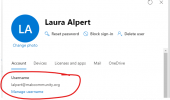
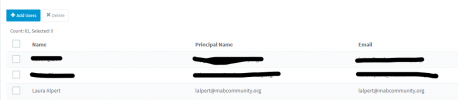

Here are screenshots of what I'm seeing. How can I stop it from creating new extensions for users in already in the system with the same email address? This was all working before, but seems to have changed in the last couple of months.
Edit: One more piece of info I just remembered. This extension used to belong to someone else. I changed the email address on it when they left rather than deleting it and creating it new. Is that the issue, and could it be cleared somehow without deleting the extension and wiping out the user's newly recorded greetings?
Last edited:


