- Joined
- Feb 9, 2023
- Messages
- 16
- Reaction score
- 3
I was doing my weekly systems review and saw that my M365 integration wanted a reconfiguration. I attempted to complete the process but the website (integration.3cx) showed "waiting for settings to take effect" then nothing. I have tried the following:
Any help would be amazing, could this be an update issue and we are waiting for a new update to resolve?
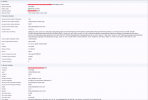
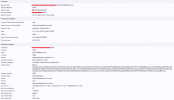
Google Chrome showed this information as it was waiting for the settings to take effect.

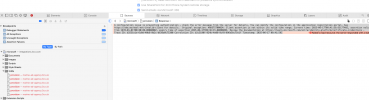
Safari shows the following error as well

After posting this as a reply to another issue, I have decided to open a new thread as the other one was an old one and may not have been active or the same issue. I did leave the waiting for settings screen for over an hour, there would be a stack of attempts for my 3CX instance to accept the new settings but 400 errors where being posted over an over again. I have a feeling the latest version of v20 may have a bug that is causing it and could be resolved at the next update.
I have changed our email settings to use 3CX to keep our emails running. Our settings are so that when a voicemail comes through, it is emailed and transcribed then deleted from user accounts. This was done to keep the storage size as small as possible.
We do have Google logins connected as well as users can still SSO to their accounts just not with Microsoft atm. I did see in the previous update that logging in with m365 was not working. You would attempt to login and just be returned to the login page without any error message. Possible that I have a bug in my instance so any guidance would be helpful.
Any help would be appreciated.
Regards
Darren
- I have attempted the configuration process on Safari and Chrome thinking it could be an issue with the browser.
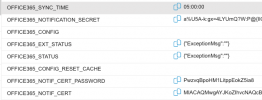
- I have removed the parameters for Office365_config, restarted my system and deleted the application on Microsoft entra. attempted again and then the process gets to the same place and then doesn't create anything on Microsoft entra.
- I have rolled back my changes and attempted the reset again with also updating the parameter office365_config_reset_cache with a 1 (now removed) but same issue.
Any help would be amazing, could this be an update issue and we are waiting for a new update to resolve?
Google Chrome showed this information as it was waiting for the settings to take effect.
Safari shows the following error as well
After posting this as a reply to another issue, I have decided to open a new thread as the other one was an old one and may not have been active or the same issue. I did leave the waiting for settings screen for over an hour, there would be a stack of attempts for my 3CX instance to accept the new settings but 400 errors where being posted over an over again. I have a feeling the latest version of v20 may have a bug that is causing it and could be resolved at the next update.
I have changed our email settings to use 3CX to keep our emails running. Our settings are so that when a voicemail comes through, it is emailed and transcribed then deleted from user accounts. This was done to keep the storage size as small as possible.
We do have Google logins connected as well as users can still SSO to their accounts just not with Microsoft atm. I did see in the previous update that logging in with m365 was not working. You would attempt to login and just be returned to the login page without any error message. Possible that I have a bug in my instance so any guidance would be helpful.
Any help would be appreciated.
Regards
Darren